How to see who unfollowed you on TikTok (without risky apps)
Photo by greenwish _ on Pexels
TikTok doesn't send a notification when someone unfollows you, and there is no list of people who have left. New followers can also hide the loss, so your total might not drop at all. But you can check whether a particular person still follows you, spot who in your Following list no longer follows you back and keep your own record so you can see who has gone.
This guide covers all three, why your count can drop when nobody has unfollowed you and why unfollower apps are worth avoiding. It is based on TikTok's own Help Centre pages, linked as we go. TikTok changes its app often, so a button or label may look slightly different on your phone.
The short answer
- To check one person: go to Profile, tap Followers and search for their name. If they aren't there, they don't follow you any more.
- To check people you follow: open your Following list. Accounts marked Friends follow you back. Accounts marked Following don't.
- To track who left over time: if your TikTok data download includes a follower list, save it and compare it with a later download.
- Analytics shows how your follower count has changed, not who unfollowed you.

Does TikTok tell you when someone unfollows you?
No. TikTok tells you about new followers in your inbox, but there is no notification when someone stops following you. Unfollowing is a single tap on the Following button on someone's profile, as TikTok's help page on following and unfollowing shows, and nothing in those steps alerts the other person.
A falling total only tells you that you lost more followers than you gained. Finding out who left takes a little detective work.
How to check if a particular person unfollowed you
- In the TikTok app, tap Profile at the bottom.
- Tap Followers under your name. This is the same list TikTok's help page uses for removing followers.
- Search for the person's name or username. If they appear, they still follow you. If they don't, they have unfollowed you, you removed them or their account is no longer there.
You can also check from their side. Open their profile and look at the main button. These are the labels you are likely to see, although they can vary slightly between versions of the app:
- Friends means you follow each other.
- Following means you follow them, but they don't follow you.
- Follow back means they follow you, but you don't follow them.
- Follow means neither of you follows the other.
If you know an account used to show Friends and it now shows Following, they have most likely stopped following you. If you don't know what it showed before, Following only tells you they don't follow you back now.
How to see which people you follow don't follow you back
Most people who search for this want to know about accounts they follow themselves. Your Following list answers that in one go.
- Tap Profile, then tap Following.
- Scroll the list. Each account has a button on the right.
- Accounts marked Friends follow you back. Accounts marked Following don't, either because they never did or because they unfollowed you.
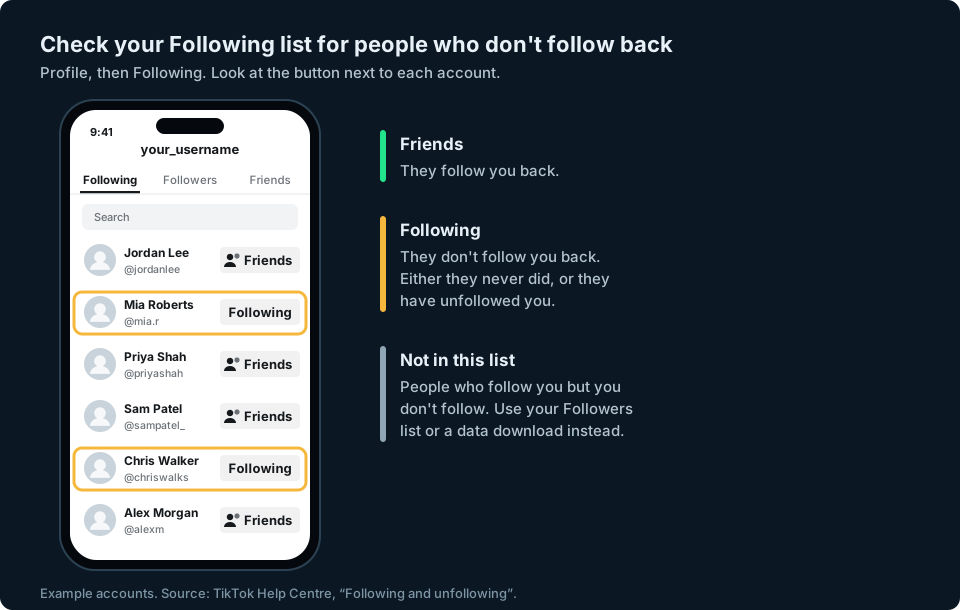
This only covers people you follow. If someone who followed you was never followed back, they won't be in this list, and you'll need the next method to notice them leaving.
How to keep a record and see who left
TikTok doesn't keep a history of your followers for you, but it does let you download a copy of your data. TikTok's Requesting your data page gives the steps:
- In the TikTok app, tap Profile, then the Menu button at the top, then Settings and privacy.
- Tap Account, then Download your data.
- Choose what to include and pick a file format (TXT is easiest to read, JSON is better for a spreadsheet).
- Tap Request data.
TikTok says the file can take a few days to prepare. It will notify you in the app, and the file is then available for up to 4 days in the Download data tab, so download it promptly. TikTok also says the last 24 to 48 hours of some data may not be included, so allow for that when comparing lists, especially if someone followed or unfollowed you very recently.
If your download includes a follower list, keep it. Request another one in a month and compare the two lists. Anyone on the first list but not the second has unfollowed you, been removed by you or deleted their account.
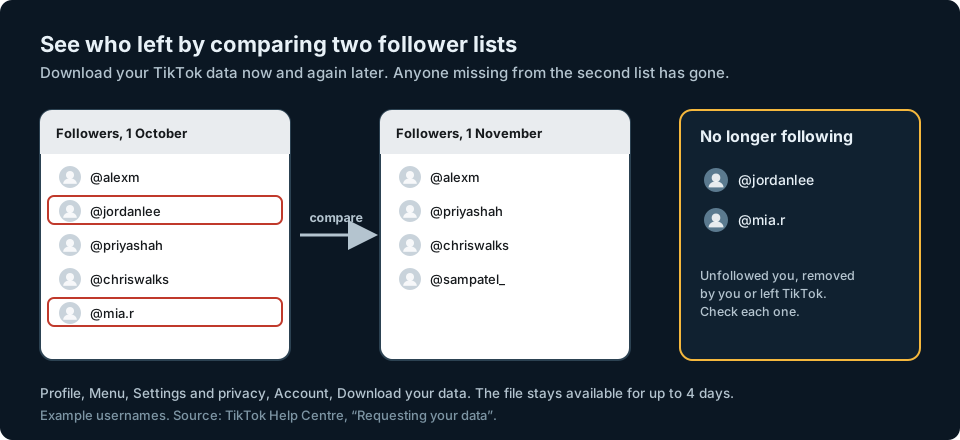
For a long list, a spreadsheet does the work. Paste the older usernames into column A and the newer ones into column B, then put this in C2 and copy it down:
=IF(COUNTIF(B:B,A2)=0,"Gone","Still following")
Every row marked Gone is someone who was following you on the first date but not on the second. Compare usernames rather than display names, because display names don't have to be unique.
Why your follower count dropped when nobody unfollowed you
A lower number doesn't always mean people chose to leave. Common reasons include:
- TikTok removed fake followers. TikTok says it removes fake followers and fake likes to cut down on spam-like behaviour (see the FAQ on its Removing followers page). If spam accounts followed you, a clear-out can take several at once.
- Accounts were deleted or banned. When a follower's account goes, it stops counting towards your total.
- You removed someone. Removing a follower takes them off your list, the same as if they had unfollowed.
- Normal churn. Every account loses some followers while gaining others. What matters is the overall direction.
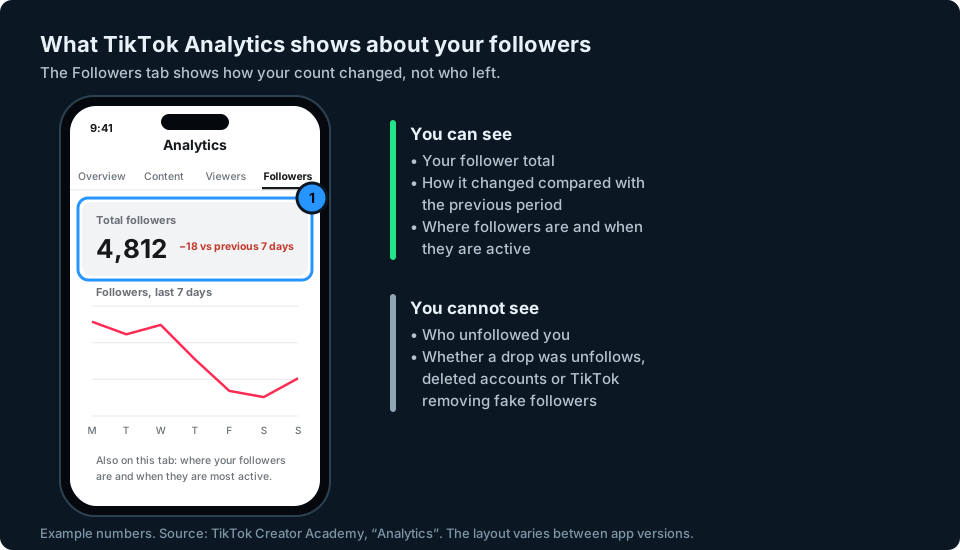
TikTok's Analytics, which you'll find in TikTok Studio on recent versions of the app, has a Followers tab. TikTok's Creator Academy says it shows follower growth compared with the previous period, along with where your followers are and when they are most active. It doesn't name anyone who left.
Are TikTok unfollower apps safe?
Be wary. Some apps and websites that promise to show who unfollowed you on TikTok ask for your TikTok login details, access to your account or an uploaded copy of your data. Be careful what you share and which permissions you grant. TikTok doesn't publish a list of who unfollowed you, so at best these tools compare lists the same way you can yourself, and at worst they put your account at risk. Never type your TikTok password into a third-party app or website.
If you'd rather not do it by hand, the safest option is the method above: your own data download and a spreadsheet.
Keeping an eye on your audience
If you post on TikTok and other platforms, checking each app's follower count separately is slow, and small drops are easy to miss until they add up.
That is the problem we are building GridStats to solve: your social audience numbers together on one screen on your iPhone, with how they have changed over 24 hours, 7 days and 30 days. TikTok is among the platforms we want to support. If TikTok makes the necessary data available, GridStats could help you spot when your follower count drops, so you know when to look. It won't tell you who left, because TikTok doesn't share that. If you want to hear when GridStats launches, sign up at the top of this page.
Frequently asked questions
Does TikTok notify you when someone unfollows you?
No. TikTok tells you about new followers but sends nothing when someone unfollows you. Your follower total may fall, although new followers can hide the loss.
Can I see who unfollowed me on TikTok?
Not directly. You can search your Followers list for a particular person, check your Following list for accounts that no longer show Friends or compare two data downloads to see who has gone.
What does Friends mean on TikTok?
Friends means you and the other account follow each other. If you know a button used to show Friends and it now shows Following, that person has most likely stopped following you.
Why did I lose followers on TikTok overnight?
Often it is TikTok removing inauthentic accounts, or followers deleting their accounts. It can also be people unfollowing you. A sudden drop of several at once is often worth a day's wait before you read too much into it.
Can I see who unfollowed me if my account is private?
Yes, the same checks work. A private account only changes who can see your lists. TikTok says that on a private account you approve who can follow you and see your followers and following lists (TikTok Help Centre). You can always see your own.
Can someone see if I unfollow them on TikTok?
They won't get a notification. They could notice if they check their Followers list or see that your profile shows Follow back instead of Friends.