How to see who unfollowed or unfriended you on Facebook

Photo by Michael Burrows on Pexels
Facebook doesn't send you a notification when someone unfriends or unfollows you, and there is no dedicated list of people who have left. But unfriending and unfollowing leave different clues, and there are a few ways to investigate.
This guide explains the difference between unfriending and unfollowing, how to check whether someone unfriended you, what Facebook's Insights can tell you about unfollows on a Page or pro mode profile and how to keep your own record so you can see who left. It is based on Meta's Facebook Help Centre pages, which are linked as we go.
The short answer
- To see if someone unfriended you: search your friends list for their name. If they don't appear, check their profile to confirm whether you're still connected. Facebook won't tell you whether they removed you or you removed them.
- To see if a friend unfollowed you: you can't. Friends can stop following you without unfriending you, and Facebook does not show it.
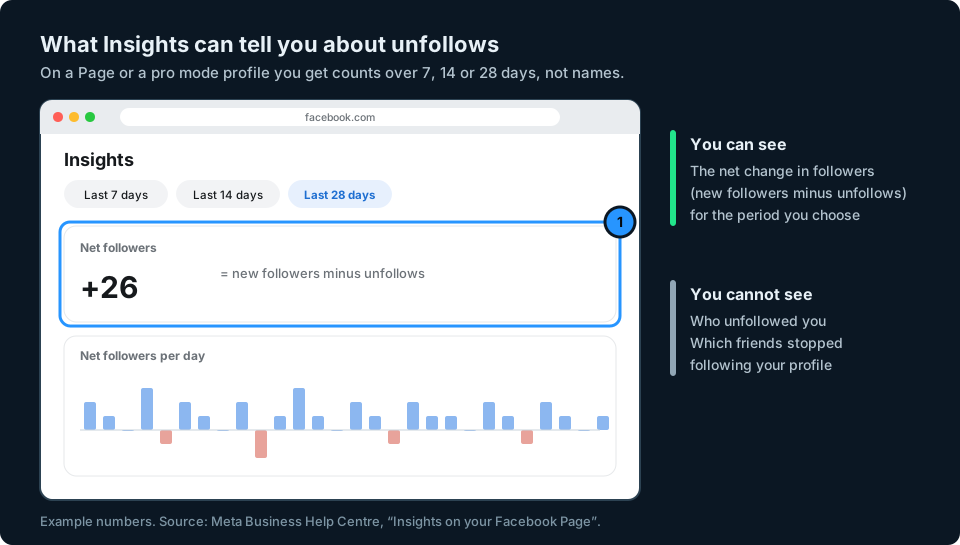
- On a Page or pro mode profile: Insights shows your Net followers, which is new followers minus unfollows. It tells you how many, not who.
- To track changes over time: compare your friends list from two dates, using the information Meta lets you download. It shows who is no longer a friend, not which friends merely unfollowed you.
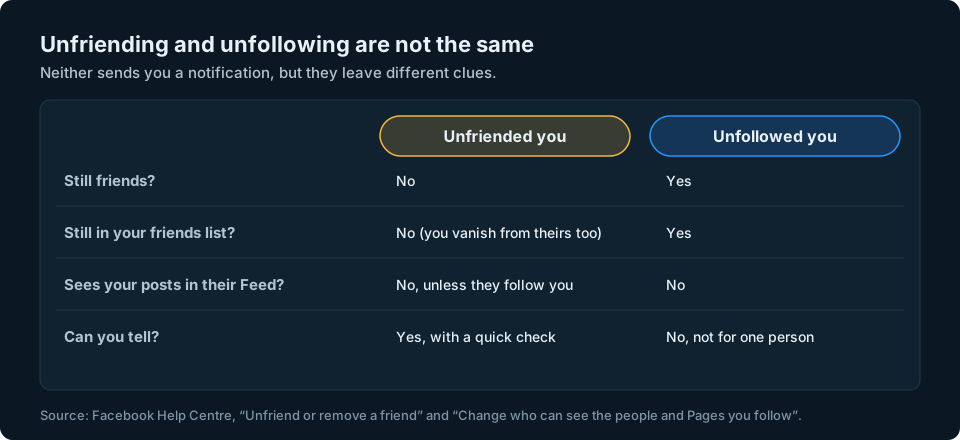
Unfriending and unfollowing are different
Unfriending ends the friendship. When someone unfriends you, you are removed from their friends list and they are removed from yours. Meta says the person who was unfriended won't be notified (Unfriend or remove a friend on Facebook).
Unfollowing means someone stops seeing your posts in their Feed. When a friend unfollows you, the friendship carries on and you stay in each other's friends lists. People can also unfollow Pages and public profiles without any friendship being involved. Meta says that when you unfollow a friend, they don't get a notification (Facebook Help Centre).
So the question "who unfollowed me on Facebook?" usually has two different answers. If you mean who stopped being your friend, you can check. If you mean which friends quietly stopped seeing your posts, Facebook keeps that to itself.
How to tell if someone unfriended you
- Search your friends list. Go to your profile, click or tap Friends and search for their name. If they appear, you are still friends.
- If they are missing, search Facebook for their name, or open their profile from an old message or tag.
- Look at their profile. If it is there but they are not in your friends list, you are no longer friends: either they unfriended you or you removed them. You will often see an Add friend button, but some people limit who can send them friend requests, so the button may be missing. The friends list is the reliable test.
- If you cannot find their profile at all, they may have blocked you or deactivated their account. Facebook does not tell you which.

This works when you have someone in mind. It does not help if you just notice your friend count has dropped and want to know who went. For that, see keeping your own record below.
How to tell if someone unfollowed you
On a regular profile
If a friend unfollows you, nothing visible changes. They stay in your friends list, and your Followers list never shows friends anyway, only people who follow you without being friends (we explain why in How to see your followers on Facebook).
The only followers you can track are those in your Followers list, which only exists if you allow public followers. If someone disappears from that list, they stopped following you, blocked you or left Facebook.
On a Page or a pro mode profile
Pages and profiles in pro mode get Insights. Meta describes Net followers as the number of new followers minus the number of unfollows during the selected period. Its help page lists 7, 14 or 28 days for performance figures, although the options can vary by dashboard (Insights on your Facebook Page). To open it, switch into your Page or profile and go to Professional dashboard, then Insights. Meta is renaming Professional dashboard to Creator Dashboard or Business Dashboard, so you may see one of those names instead.
Net followers is a total, not a list. If ten people follow you and ten unfollow on the same day, it shows zero. The same Meta page says you need at least 100 followers who are not also friends before you can learn more about your audience.
Keep your own record to see who left
Facebook lets you download a copy of your information, and Meta says this includes a Connections category covering things such as your friends and followers (Access and download your information). The exact contents can vary by account, and this is a download of your own profile's information, not a full follower list for a Page. If your export includes a friends list, you can keep it and compare it with a later download to see which names are missing.
On a computer:
- Click your profile picture in the top right, then Settings and privacy, then Settings.
- Click Accounts Centre, then Your information and permissions.
- Click Export your information, then Create export.
- Choose your profile, choose Export to device and pick just the information you need, such as your connections, to keep the file small.
- Click Start export. Facebook lets you know when the file is ready to download.
Meta is moving some accounts from Accounts Centre to Meta Account settings, so the first steps may look slightly different on yours.

Anyone in the old list but not the new one has unfriended you, been removed by you, blocked you or left Facebook. Use the profile check above to tell which.
Short lists are easy to compare by eye. For longer ones, use a spreadsheet: paste the old names into column A and the new names into column B, then put this formula in C2 and copy it down:
=IF(COUNTIF(B:B,A2)=0,"Missing","Still there")
Every name marked Missing is no longer in your friends list. It works in Excel, Numbers and Google Sheets.
This still won't show friends who only unfollowed you, because they remain in your friends list.
Be careful with "who unfriended me" apps
Apps and browser extensions that promise to show who unfriended or unfollowed you usually need you to sign in with your Facebook password or give them access to your account. Facebook doesn't give anyone a list of who unfollowed you, so at best these tools compare lists the same way you can yourself, and at worst they put your account at risk. Never type your Facebook password into a third-party app or website.
Keeping an eye on your audience
Facebook only gives you net totals, and only for Pages and pro mode profiles. If you post on several platforms, checking each app's numbers separately is slow, and the drops are easy to miss.
That is the problem we are building GridStats to solve: your social audience numbers together on one screen on your iPhone, and how they have changed. Facebook Pages and pro mode profiles are among the account types we want to support, depending on the data Meta makes available. If you want to hear when GridStats launches, use the button at the top of this page.
Frequently asked questions
Does Facebook tell you when someone unfriends you?
No. Meta says the person who is unfriended won't be notified. Search your friends list for them. If they don't appear, check their profile to confirm whether you're still connected. Facebook won't tell you who removed whom.
Can I see who unfollowed me on Facebook?
Not for friends. A friend can unfollow you without unfriending you, and nothing changes on your side. On a Page or pro mode profile, Insights shows net followers but not names.
How can I see who unfollowed my Facebook Page?
Facebook doesn't list them. Net followers in Insights shows new followers minus unfollows for the period you choose. To spot names, you would have to compare your Page's Followers tab over time, which is only practical for small Pages.
How do I know if someone unfriended me or blocked me?
If you can find their profile but they don't appear in your friends list, check the profile to confirm you are no longer connected. If you cannot find their profile at all, they may have blocked you or deactivated their account.
If someone unfriends me, do they still see my posts?
Only your public posts, and only if they follow you or come across them. Unfriending also stops them following you through the friendship.
Are apps that show who unfriended me safe?
Be careful. They usually need access to your Facebook account, and Facebook doesn't provide a list of who unfollowed you for them to read. Never give a third-party app your Facebook password.