How to see who unfollowed you on Instagram (without risky apps)
Photo by Brian Ramirez on Pexels
Instagram makes it surprisingly hard to find out who has unfollowed you. There is no notification and no list of people who have left. There are still a couple of ways to investigate, including one that uses Instagram's own downloadable data, and none of them involve handing your password to an "unfollower" app.
The short answer
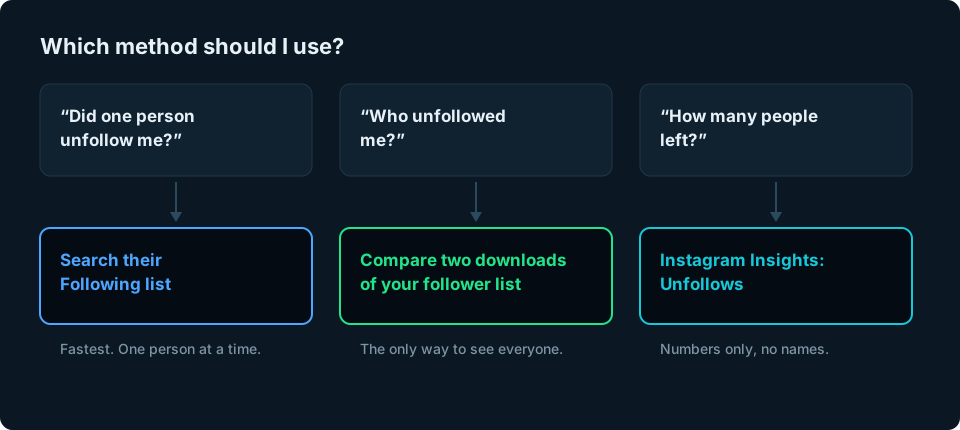
There are three safe ways to see who unfollowed you on Instagram:
- Check one person: open their profile, tap Following and search for your username. If you are not there, they no longer follow you.
- Check everyone: download your follower list from Instagram twice, a week or a month apart, and compare the two. Anyone on the first list but not the second has gone from your followers, usually because they unfollowed you.
- Check how many: if you have a professional account, Instagram Insights shows the number of unfollows over a period, but not who they were.
Method 1: Check if one person unfollowed you
This is the quickest way if you are wondering about someone in particular.
- Go to their profile.
- Tap Following to see the accounts they follow.
- Type your username into the search box at the top.
If your account appears, they still follow you. If it does not, they have unfollowed you, or something else has happened (see "Missing does not always mean unfollowed" below).
This only works if their profile is public, or private but you follow them. It is fine for one or two people, but slow for more.
Method 2: Compare two downloads of your follower list
This is the most reliable built-in way to find every account that has disappeared from your followers between two dates. Most of those will be unfollows, but not all of them (see "Missing does not always mean unfollowed" below). Instagram lets you download a copy of your own data, including the full list of your followers. Take one download now and another later, and compare them.
How to download your follower list
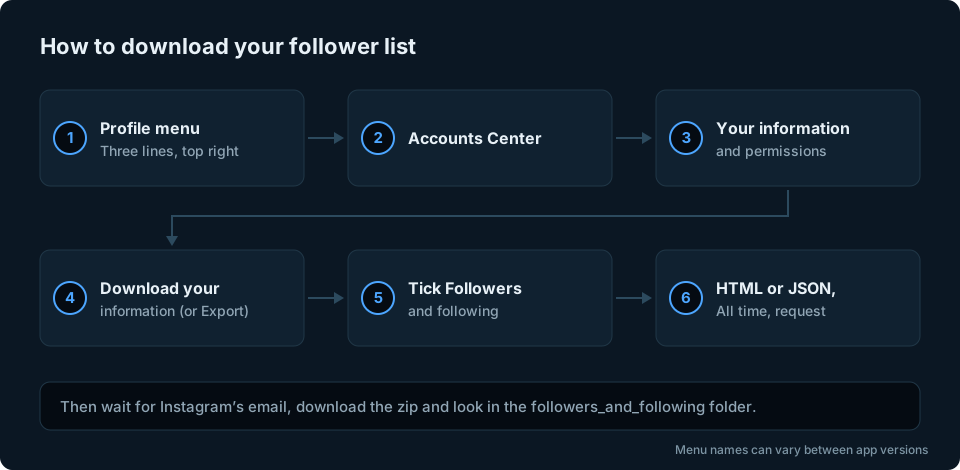
- Go to your profile and tap the menu (three lines, top right).
- Open Accounts Center, then Your information and permissions.
- Tap Export your information, then Create export and Export to device. (Older versions of the app call this Download your information.)
- Choose to customise the information, and select only Followers and following.
- Pick a format. HTML opens in a web browser and is easiest to read. JSON is better if you want to use a spreadsheet or a tool.
- Set the date range to All time, then request the download.
Instagram emails you when the file is ready. For follower lists this is usually within minutes or hours, but it can take longer. The download link only lasts a few days, so save the file somewhere safe.
Inside the zip file, your followers are usually in connections/followers_and_following/, in a file named followers_1 (with .html or .json at the end). If you have a lot of followers, there may also be followers_2, followers_3 and so on. Use all of them, not just the first. Instagram does change these names from time to time, so look around if they are not there.
How to compare the two lists
When your second download arrives, you have two lists of usernames. Anyone on the old list who is missing from the new list has left.
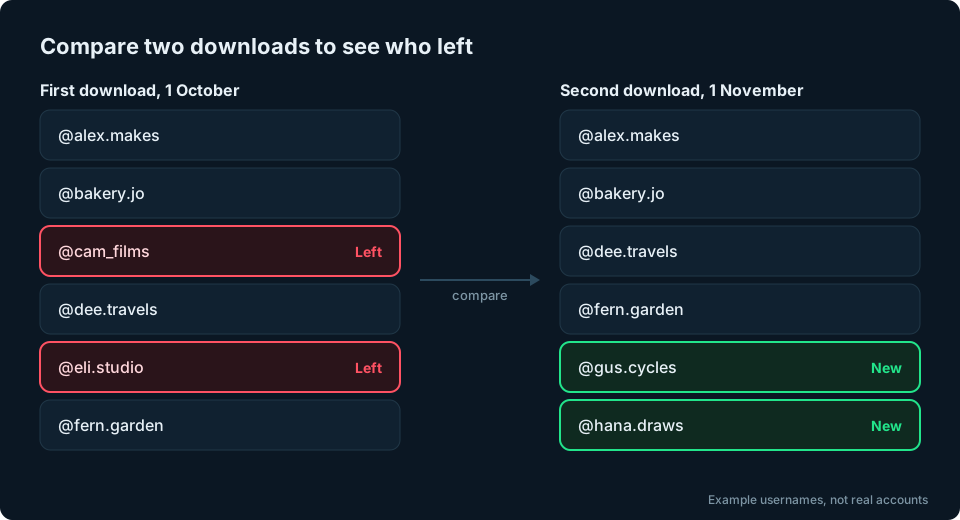
For a small account, open both HTML files in your browser and scan them. For anything bigger, a spreadsheet does it in seconds:
- Paste the old list of usernames into column A of a spreadsheet, one per row.
- Paste the new list into column B.
- In C1, type
=IF(COUNTIF(B:B,A1)=0,"Left","")then fill it down to the last row of your old list.
Every row marked Left is a username that was on your old list but is not on your new one. This works in Excel and Google Sheets. If you keep each download, you build up a history you can check whenever your count drops.
Method 3: See how many people unfollowed you
If you have a professional account (creator or business), go to Professional dashboard, then Account insights, then Followers. Instagram shows Follows and Unfollows for the period you pick.
It will not tell you who they were, but it does show whether people left on one day or gradually. That is often the more useful question. Our guide on why you might be losing followers on Instagram explains how to read that pattern.
Missing does not always mean unfollowed
Before you take it personally, there are several reasons an account can disappear from your followers that have nothing to do with you:
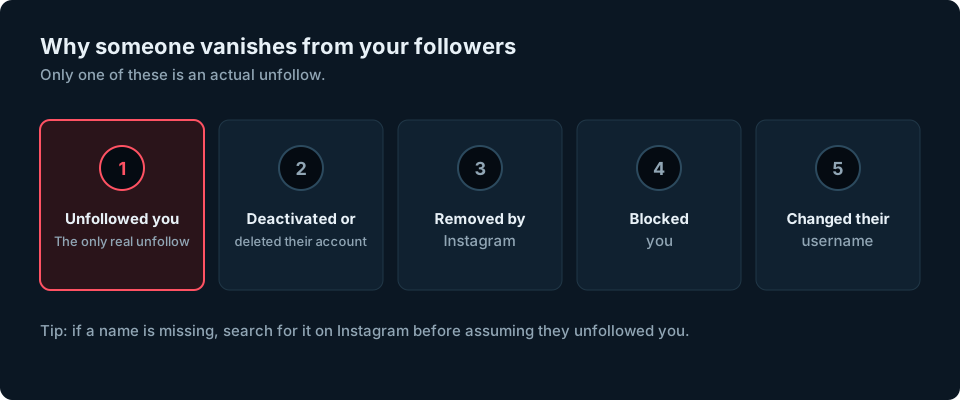
- They deactivated or deleted their account. It vanishes from everyone's follower lists.
- Instagram removed the account, for example as part of a sweep of fake or inactive accounts.
- They blocked you, which also removes them from your followers.
- They changed their username. If you compare two downloads by username, someone who renamed themselves can look like one person leaving and a new person arriving. Check whether a "new" follower appeared at the same time.
So if a name is missing, search for it on Instagram before you assume the worst.
Unfollowed you, or never followed you back?
These are two different questions, and people often mix them up.
- Who unfollowed you is about change over time, so you need two downloads from different dates.
- Who does not follow you back is about right now. A single download is enough, because it contains both your followers and the accounts you follow (in a file usually called following). Anyone on your following list who is not on your followers list does not follow you back.
If your download is not working
- The email has not arrived. Small exports usually arrive within minutes or hours, but it can take longer. Check your junk folder and the email address shown in Accounts Center.
- You cannot find the follower file. Unzip the download first, then look inside the connections folder. Names can change between versions of the app.
- There are several follower files. Larger accounts get followers_1, followers_2 and so on. Combine them before comparing.
- The list looks incomplete. Check that you chose All time as the date range, not a shorter period.
- The JSON file looks like code. That is normal. Choose HTML instead if you want something you can read in a browser.
Should you use an unfollower app?
There are lots of apps and browser extensions that promise to show who unfollowed you. Many ask you to log in with your Instagram username and password. We recommend avoiding them:
- Your password. Giving your login to a third party means trusting them with your whole account, including your messages.
- Instagram's rules. Instagram states that data scraping goes against its Terms of Use. Apps that repeatedly read your follower list can get your account flagged or restricted.
- They miss things. Most only start tracking from the day you install them, and they break whenever Instagram changes how its app works.
Methods 1 and 2 above use only Instagram's own features, so there is nothing to sign up for and no third party gets access to your account. If you have already connected an app, you can review and remove it in Instagram's settings under Apps and websites, and changing your password afterwards is sensible.
Frequently asked questions
Does Instagram tell you when someone unfollows you?
No. Instagram does not send any notification when someone unfollows you. Your follower count simply goes down.
Can you see who unfollowed you on Instagram without an app?
Yes. Search one person's Following list for your name, or compare two downloads of your own follower list using the steps above.
Will someone know if I unfollow them?
They will not get a notification. They could still find out using the same methods in this guide, or by noticing your name missing from their followers.
Why did my follower count drop but nobody I know unfollowed me?
A drop does not necessarily mean someone you know has left. Instagram may have removed spam or fake accounts, other people may have deactivated their profiles, or people you do not know well may have unfollowed you. Our guide on losing Instagram followers covers this in detail.
The bottom line
Instagram keeps unfollows quiet, but it does give you the tools to investigate yourself. For one person, check their Following list. For everyone, download your follower list now, download it again in a few weeks and compare. It is slower than an app, but it uses Instagram's own data and keeps your login to yourself.
Keeping an eye on how your audience changes across all your accounts is exactly what we are building GridStats for.