How to see your followers on Snapchat (and who follows you)

Photo by PNW Production on Pexels
Snapchat makes this more confusing than it should be. Open your profile and you will find Friends and Following, but perhaps no Followers tab and no follower count at all. That is because Snapchat treats friends and followers as two different things, and followers only come with a Public Profile.
This guide explains the difference, shows you exactly where to see who follows you, how to find your follower count and what you can and cannot see on an ordinary account. It is based on Snapchat's own support pages, which are linked as we go.
The short answer
- To see who follows you: tap your profile icon, find Friends & Followers, tap View All and open the Followers tab.
- No Followers tab? The most likely reason is that you do not have a Public Profile. Without one, Snapchat only shows Friends and Following, and nobody can follow you one-way.
- To see how many followers you have: open your Public Profile and go to the Insights tab. The Audience section shows your follower count.
- Snapchat does not tell you who unfollowed you. There is no notification and no list of people who left.
Friends and followers are not the same on Snapchat
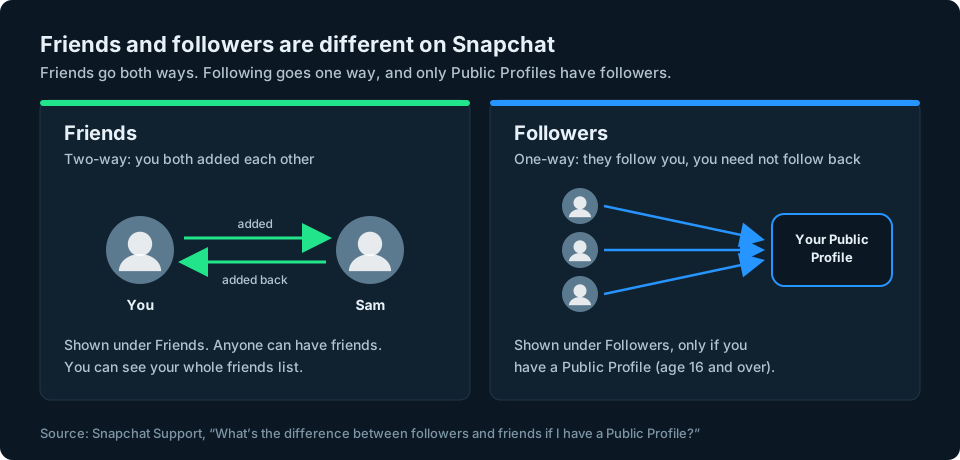
Snapchat describes a friend as a two-way relationship: you add someone, they add you back and you are friends. A follower is one-way. Someone follows your Public Profile and you do not have to follow them back (Snapchat Support: followers and friends).
That is why so many people search for their Snapchat followers and come away confused. Most Snapchat accounts are built around friends. If you have never set up a Public Profile, everyone connected to you is a friend, someone you follow or someone waiting for you to add them back.
How to see who follows you on Snapchat
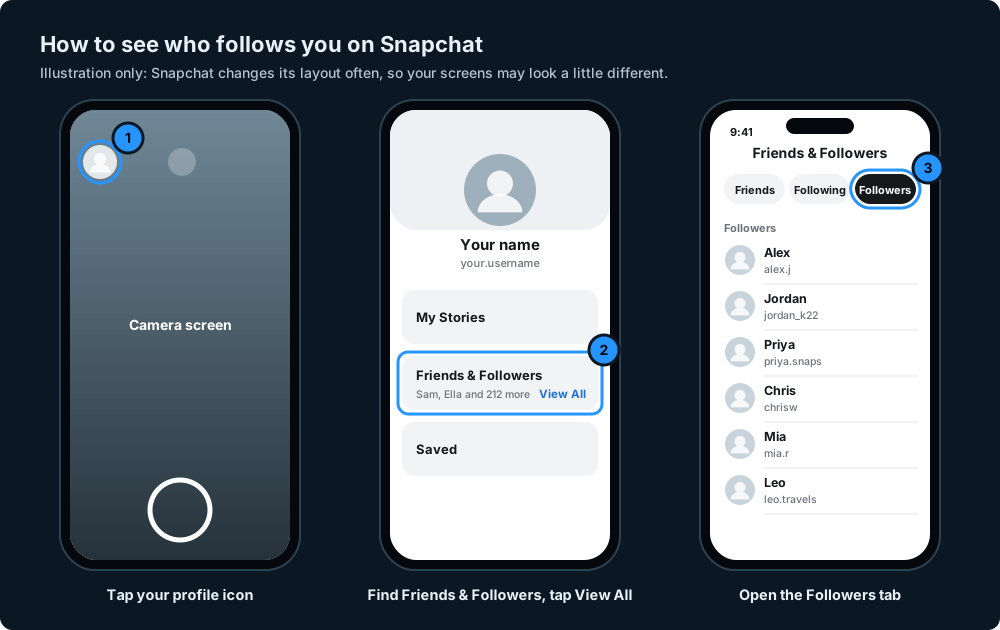
If you have a Public Profile, your followers are listed in the app:
- Open Snapchat and tap your profile icon (your Bitmoji or Story circle) in the top left of the camera screen.
- On your profile, find Friends & Followers and tap View All.
- Tap the Followers tab to see the people who follow you.
The same screen has a Friends tab and a Following tab, so you can switch between the three lists. These steps come from Snapchat's help page on followers and friends.
Why you do not have a Followers tab
If you only see Friends and Following, the most likely explanation is that you do not have a Public Profile. Snapchat says the Followers tab only appears once you have one (Snapchat Support).
Every account starts with a private profile that only your friends can see. A Public Profile is optional and visible to anyone on Snapchat (What is a Public Profile on Snapchat?). To have one:
- You need to be 16 or over, although local laws can set a different minimum age.
- Your birthday needs to be in your Snapchat settings. If you are old enough but cannot see the option, Snapchat suggests adding it.
- Accounts that have broken Snapchat's Community Guidelines may not be able to have one.
Those rules come from Why don't I have a Public Profile?. Creating a Public Profile does not change your existing privacy settings for contacts or your Story, according to Snapchat's list of Public Profile features.
How to get a Public Profile
Tap your profile icon and look for a Public Profile option on your profile. If your account is eligible, follow the prompts to create it and add a photo, bio and location. Snapchat explains the setup in a short video on How do I start using my Public Profile?. If you cannot see the option, check the age and birthday rules above.
How to see how many followers you have
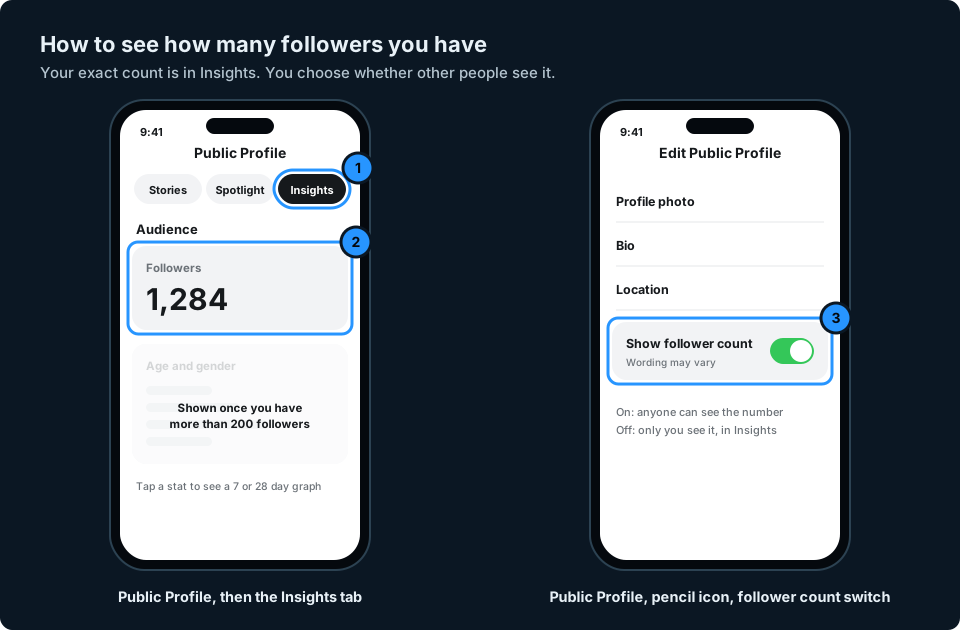
Your follower count is in Insights, which comes with a Public Profile:
- Tap your profile icon and open your Public Profile.
- Go to the Insights tab.
- Look at the Audience section, which shows how many followers you have.
Snapchat adds age and gender details once you have more than 200 followers. Below that, you still see the total (How do I view Audience Insights?). Tapping a stat in Insights opens a graph over 7 or 28 days (Viewing and Understanding Analytics).
Show or hide your follower count
You decide whether other people can see your count. On your Public Profile, tap the pencil icon and turn the follower count switch on or off. Snapchat's own pages call it both "Show Follower Count" and "Show How Many Follow Me", so look for either (How do I show my follower count?). With it off, you can still see your count in Insights.
If you only have friends: what you can see
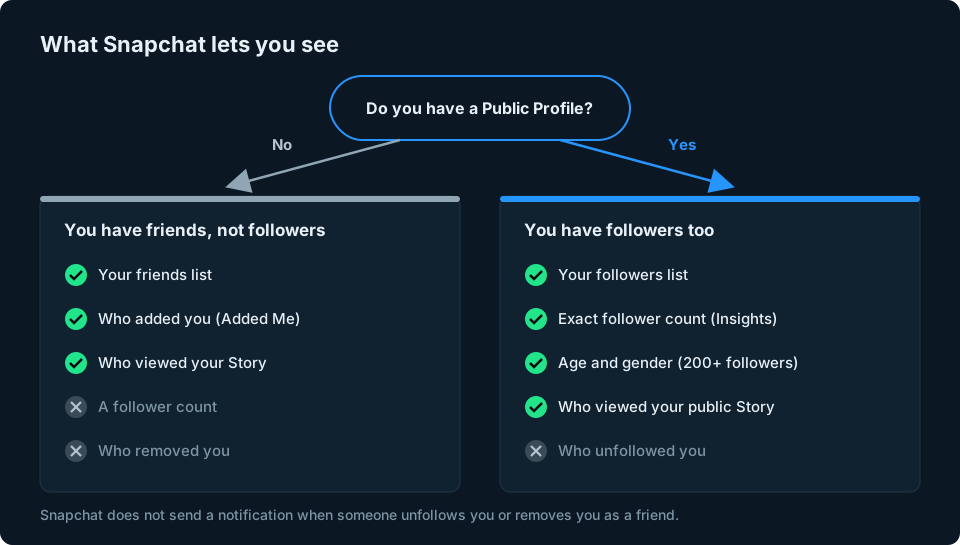
Without a Public Profile there is no follower count, but you can still see a lot about the people connected to you:
- Your friends list: tap your profile icon, then View All under Friends & Followers.
- Who added you: on your profile, tap Add Friends. People who added you appear under Added Me, where you can accept or ignore them (How to Add Friends on Snapchat).
- Who has not added you back: a grey "pending" icon on the Chat screen can mean the other person has not accepted your friend request yet, depending on their privacy settings (What the Chat screen icons mean).
- Who watched your Story: open your Story to see who viewed it.
Can you see who unfollowed you on Snapchat?
No. Snapchat does not send a notification when someone unfollows your Public Profile or removes you as a friend, and it does not keep a list of people who left.
Your follower count in Insights can show that you have lost followers overall, but not who left. It is also a net figure: if three people unfollow and three new people follow on the same day, the number does not move at all.
The practical answer is the same as on other platforms: note your follower count regularly, so a drop stands out. To work out who left, you would need a copy of your followers list that you saved earlier, such as screenshots, and compare it by hand. Snapchat has no built-in way to do this, and it is slow once you have more than a few dozen followers.
Watch out for follower tracking apps
Apps that promise to show your Snapchat followers or unfollowers usually ask for your username and password. Snapchat says unauthorised third-party apps and plug-ins break its Terms of Service, can put your account and your friends' accounts at risk and can get your account locked. Its support team cannot unlock an account locked for this reason (Can I use third-party apps or plug-ins with Snapchat?).
Legitimate Snapchat integrations sign you in through Snapchat's own approved login and permissions. Check what information an app asks for, and never type your Snapchat password into a third-party app or website.
Can you see someone else's followers?
Not the list. On someone's Public Profile you may see how many followers they have, but only if they have chosen to show the count. Snapchat does not show you who follows other people.
Keeping an eye on your followers
Snapchat gives you your follower count in Insights, but only for Snapchat, and only inside the app. If you also post on Instagram, TikTok or YouTube, that means checking each app separately to see how your audience is doing.
That is the problem we are building GridStats to solve: one screen on your iPhone with your audience numbers from every platform and how they have changed. Snapchat is one of the platforms we want to support, although how it works will depend on what Snapchat allows apps to access. If you want to hear when GridStats launches, use the button at the top of this page.
Frequently asked questions
Can I see who follows me on Snapchat?
Yes, if you have a Public Profile. Tap your profile icon, tap View All under Friends & Followers and open the Followers tab. Without a Public Profile, people can only add you as a friend, so there is no followers list.
Can someone follow me on Snapchat without being my friend?
Yes, if you have a Public Profile. Following is one-way, so people can follow your Public Profile without you adding them back. Without a Public Profile, people can only add you as a friend.
Why don't I have a Followers tab on Snapchat?
Most likely because you do not have a Public Profile. Snapchat only shows the Followers tab to accounts with one. You need to be 16 or over (or the minimum age where you live), and your birthday needs to be in your settings.
How do I see how many followers I have on Snapchat?
Open your Public Profile and go to the Insights tab. The Audience section shows your follower count. Age and gender details appear once you have more than 200 followers.
Does Snapchat tell you when someone unfollows you?
No. There is no notification when someone unfollows you or removes you as a friend. A drop in your follower count in Insights shows you have lost followers overall, but not who left.
Can I hide my follower count on Snapchat?
Yes. On your Public Profile, tap the pencil icon and turn off the follower count switch. You will still see the number yourself in Insights.