How to see your followers on Facebook (profiles, pro mode and Pages)

Photo by Jakub Zerdzicki on Pexels
Ask Facebook how many followers you have and the answer depends on what kind of account you are asking about. A regular profile, a profile in pro mode and a Facebook Page all handle followers differently. Some regular profiles can still have public followers, while pro mode and Pages give you more tools for seeing and understanding your audience.
This guide explains who counts as a follower on Facebook, where to find your followers on a computer and on your phone, why the Followers option is sometimes missing and how to see who follows your Page. It is based on Meta's own Facebook Help Centre pages, which are linked as we go.
The short answer
- On your profile: go to your profile, click More below your cover photo, click Friends, then click Followers. On a phone, do this at facebook.com in your browser, which is the route Meta documents.
- The list only shows followers who are not your friends. Your friends follow you automatically, but Facebook does not show which of them do.
- No Followers option? Either nobody outside your friends follows you, your Who can follow me setting is set to Friends or your profile no longer supports public following.
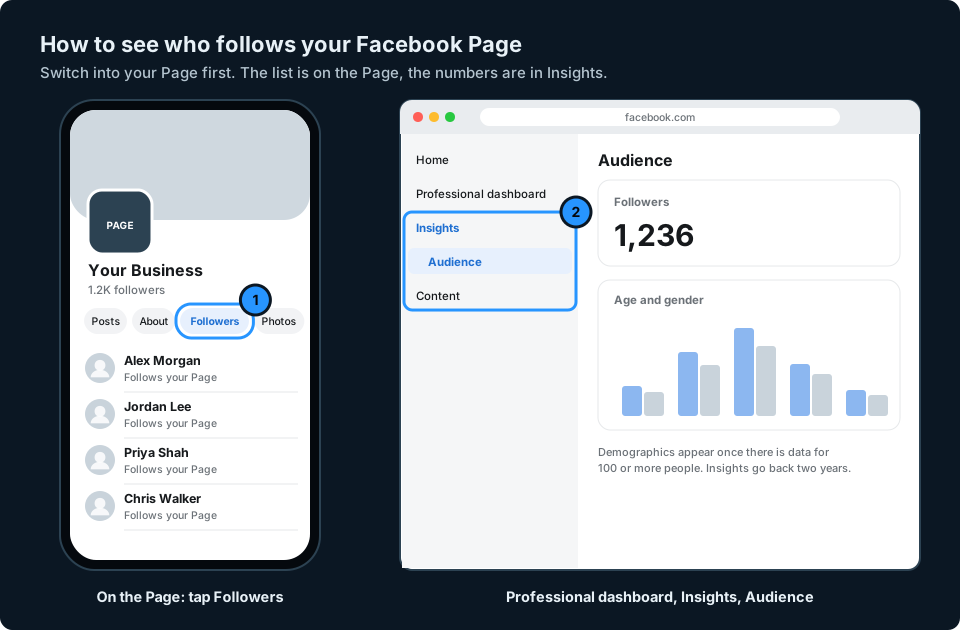
- On a Facebook Page: switch into your Page and click or tap Followers below the cover or Page photo. For the numbers, go to Professional dashboard, then Insights, then Audience.

| Account type | Who follows you | Where to look |
|---|---|---|
| Regular profile | Your friends, plus public followers if your profile still allows them | Profile, More, Friends, Followers |
| Profile in pro mode | Your friends and public followers | The same Followers list, plus audience insights |
| Facebook Page | Followers only | Followers tab on the Page, plus Page Insights |
Who counts as a follower on Facebook
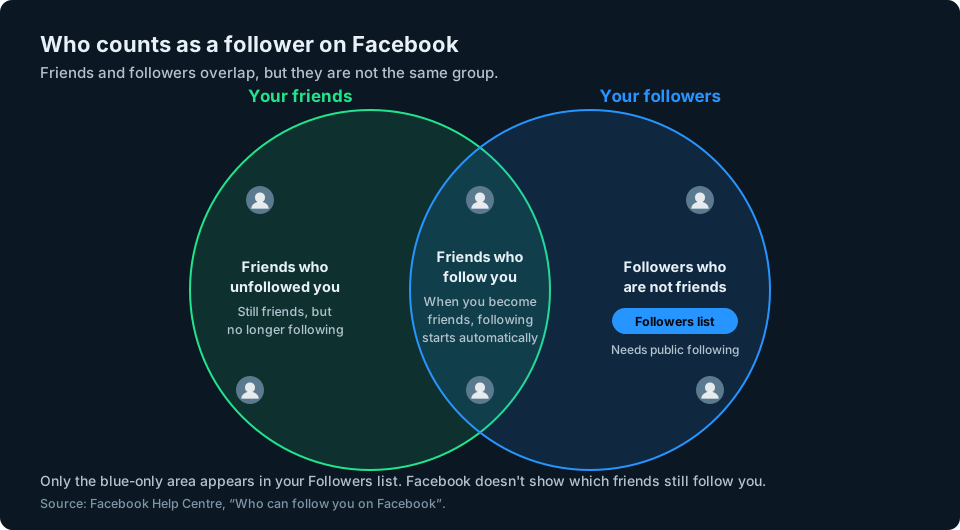
Following on Facebook works in three ways, according to Meta's help page on who can follow you:
- Friends follow you automatically. When you become friends with someone, they start following you. They can unfollow you later without ending the friendship.
- Other people can only follow you if you allow it. That depends on your Who can follow me setting, which is either Friends or Public. Pro mode sets it to Public.
- Your Followers list leaves your friends out. Facebook says you can see a list of followers who are not already your friends, and that you won't see which of your friends follow you.
So a profile with 300 friends and no public followers has an empty Followers list, even though many of those friends may still be following it. And because friends can unfollow without unfriending, the list never tells you which friends still follow you.
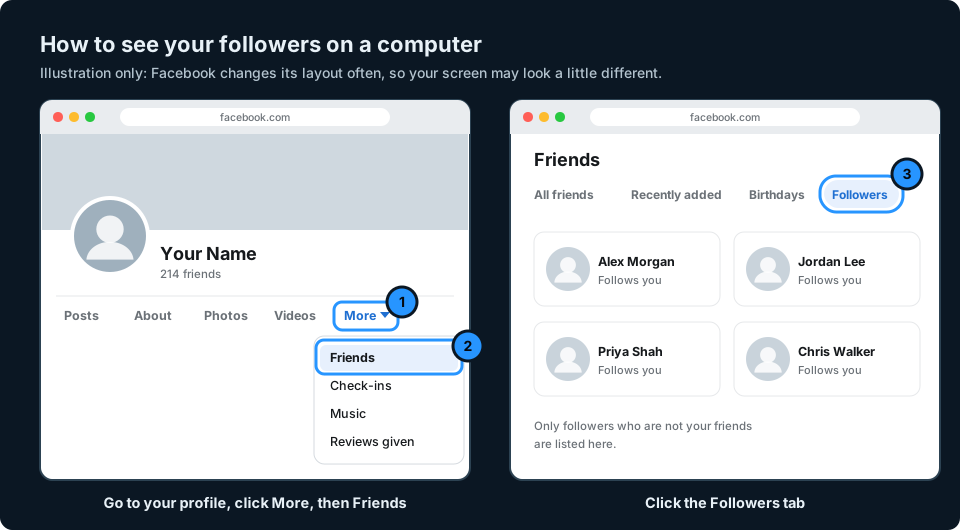
How to see your followers on a computer
These are the steps Meta gives for a computer:
- Go to your profile.
- Click More below your cover photo.
- Click Friends.
- Click Followers.
If you don't have any followers outside your friends, you won't see the Followers option at all (Facebook Help Centre).
How to see your followers on iPhone or Android
Meta gives the same four steps for Facebook in a phone's web browser. The simplest way to follow them on your phone is to go to facebook.com in Safari or Chrome, sign in and open your profile.
In the Facebook app itself, Meta's help pages only cover the follower settings, not the list. The app layout also changes more often than the website. If you cannot find a Followers option in the app, use the browser instead.
Why you can't see a Followers option
There are three usual reasons:
- Nobody outside your friends follows you. The option only appears once you have at least one follower who is not a friend.
- Your Who can follow me setting is Friends. Then only your friends can follow you, and they never appear in the list.
- You have a regular profile. Meta is gradually removing the Public follower option from regular profiles. People who want public followers are being moved to pro mode instead.
How to change who can follow you
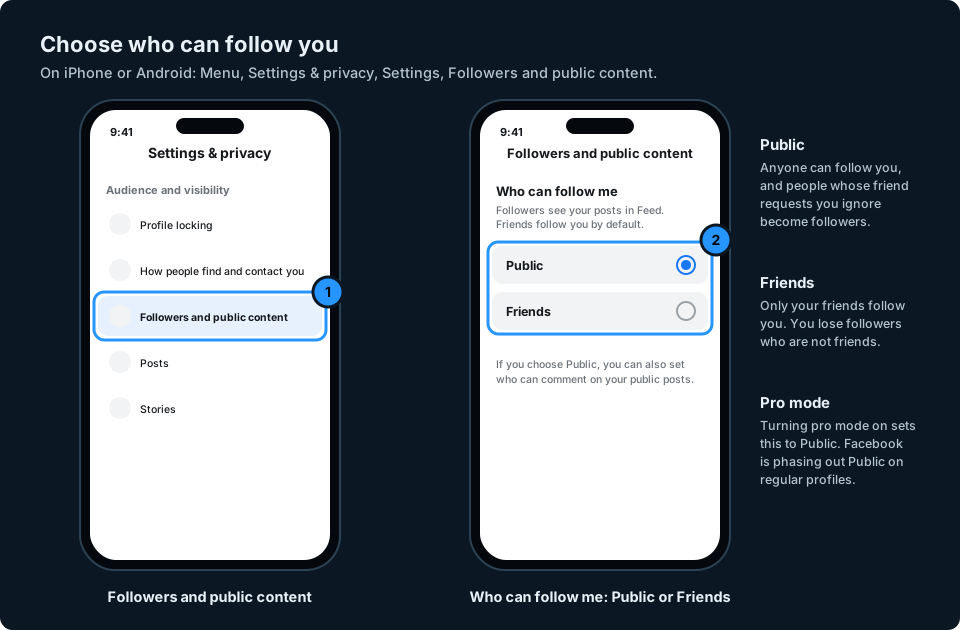
On iPhone or Android:
- Open the Facebook app and tap Menu. Where it sits depends on your phone and app version.
- Scroll down and tap Settings & privacy, then Settings.
- Scroll down and tap Followers and public content.
- If your account shows a Who can follow me setting, choose Friends or Public. Not every account type offers both.
On a computer, click your profile picture, then Settings and privacy, then Settings. Under Audience and visibility, click Followers and public content (Facebook Help Centre).
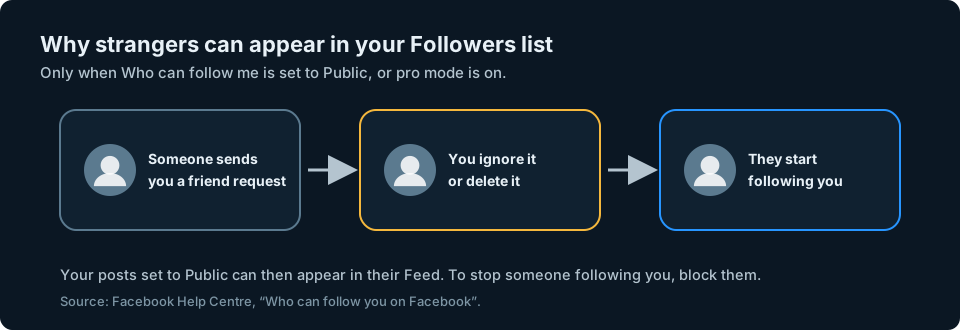
Why strangers turn up in your Followers list
If you allow public followers, anyone whose friend request you ignore or delete automatically starts following you. Facebook's advice is that if you don't want someone to follow you, you can block them (Facebook Help Centre).
Pro mode: followers on your personal profile
Pro mode adds professional tools to your existing profile rather than creating a new one. Your friends and posts stay the same. Turning it on sets Who can follow me to Public and gives you content and audience insights, so you can see how your following changes (Turn pro mode on or off).
To turn it on from a computer:
- Click your profile photo in the top right, then click your name.
- Click Options below your cover photo.
- Click Turn on pro mode, then Turn on.
Be careful if you turn it off again. Who can follow me goes back to Friends and you lose any followers who are not your friends. Your insights are no longer available either.
How to see who follows your Facebook Page
Pages have no friends, only followers. Meta is replacing Page likes with follows, so the list you can see is the people who follow your Page, not those who liked it. Some Pages may still show a Like button while it is being phased out (See who follows your Facebook Page).
On a computer:
- Click your profile photo in the top right, click See all profiles and choose your Page.
- From your Page's Feed, click your Page name in the left menu.
- Click the Followers tab below your cover photo. You may need to click More first.
On iPhone or Android, tap Menu or your profile picture and switch into your Page. Then tap Menu again, tap your Page name and tap Followers below your Page photo.
See your Page's follower numbers
For totals and audience details, switch into your Page, click Professional dashboard, then Insights, then Audience (See insights about your Page's followers). Meta is renaming Professional dashboard to Creator Dashboard or Business Dashboard, so you may see one of those names instead.
Page Insights go back two years. Age, gender and location details only appear once there is data for 100 or more people (See Page Insights on Facebook).
Does Facebook tell you when someone unfollows you?
No. Facebook doesn't give you a simple history of everyone who has unfollowed your profile or Page. You may notice a follower total going down, but the total doesn't tell you who left. Meta also confirms that unfollowing a friend doesn't send them a notification (Facebook Help Centre). For the checks you can do, see how to see who unfollowed or unfriended you on Facebook.
Keeping an eye on your followers
Facebook shows your follower numbers in different places depending on the account type, and only for Facebook. If you also post on Instagram, YouTube or TikTok, that means checking each app separately to see how your audience is doing.
That is the problem we are building GridStats to solve: your social audience numbers together on one screen on your iPhone, and how they have changed. Facebook Pages and pro mode profiles are among the account types we want to support, depending on the data Meta makes available. If you want to hear when GridStats launches, use the button at the top of this page.
Frequently asked questions
How do I see my followers on Facebook?
Go to your profile, click More below your cover photo, click Friends, then click Followers. The list only shows followers who are not your friends. On a phone, the same steps work in your browser at facebook.com.
Why can't I see my followers on Facebook?
Usually because nobody outside your friends follows you, or because Who can follow me is set to Friends. Facebook only shows the Followers option once you have at least one follower who is not a friend.
Are my Facebook friends also my followers?
Usually. When you become friends with someone, they automatically start following you, but they can unfollow you later without unfriending you. Facebook does not show which of your friends follow you in your Followers list.
Why do people I don't know follow me on Facebook?
If you allow public followers, anyone whose friend request you ignore or delete starts following you automatically. You can block anyone you don't want following you, or set Who can follow me to Friends.
How do I see who follows my Facebook Page?
Switch into your Page, open it and click or tap Followers below the cover or Page photo. For follower numbers and demographics, go to Professional dashboard, then Insights, then Audience.
Can I see who unfollowed me on Facebook?
Not directly. Facebook doesn't notify you when someone unfollows you and doesn't keep a list of people who have stopped following you. A falling follower total shows a net loss of followers, but not who unfollowed you.