Social Blade alternatives: 8 free and paid tools compared
Illustration: GridStats
Social Blade has been the go-to free site for checking anyone's subscriber or follower count for more than a decade. Type in a channel name and you get its numbers, a growth chart and a rank. But plenty of people go looking for something else, usually for one of three reasons: the free version only shows a few weeks of daily figures and comes with ads, they want help actually growing a YouTube channel or they really want to keep an eye on their own accounts rather than other people's.
The right alternative depends on which of those you are after. This guide sorts the main options by the job they do, with what each one costs and the reasons you might pass on it.
The short answer
- To look up any YouTube channel: ViewStats or Playboard.
- To look up Instagram accounts: Not Just Analytics.
- To look up accounts across YouTube, TikTok and Instagram: NoxInfluencer.
- To grow your own YouTube channel: vidIQ or TubeBuddy.
- To check influencers before a brand deal: HypeAuditor.
- To manage several of your own accounts in one place: Metricool, or each platform's own analytics for free.

What Social Blade does well, and where it stops
Social Blade tracks public statistics for YouTube, TikTok, Twitch, Instagram and Facebook. For any account it shows the current count, recent daily changes, a growth chart, a rank and projections. The free version is genuinely useful for a quick check.
The limits are what send people elsewhere:
- Short daily history. Social Blade's own plans page is inconsistent here: its feature notes say free users get the last 14 days of daily figures, while its comparison table lists up to 30 days for a logged-in free account. When we checked without logging in, we saw 14 days. Longer trends are still visible in its weekly and monthly charts.
- Paying the minimum removes ads, not the history limit. Bronze costs $59.99 a year and removes ads, but still has up to 30 days of daily table data. Silver ($149.99 a year) gives up to 60 days, and the top tiers go up to a year or more.
- Public numbers only. Social Blade can only see what anyone can see. It has no access to your watch time, reach or who unfollowed you.
- Estimates, not facts. The earnings figures are wide ranges based on assumed ad rates, and subscriber gains are worked out from shortened public counts (more on that below).
None of these are flaws exactly. They are what any site that reads public data has to live with, and every lookup tool in this guide shares them.
Public stats versus your own analytics
It helps to know what any outside tool can and cannot see. Platforms show some numbers to everyone and keep the rest for the account owner.

If you are investigating your own account, start with the platform's own analytics. They show follower trends, reach and engagement that no public statistics tool can see. They will not give you a list of the people who unfollowed you, though. Instagram Insights, for example, shows how many people followed and unfollowed, not who. To find individual unfollowers you need to compare follower lists taken at different times, which our guide on how to see who unfollowed you on Instagram walks through.
Why the numbers differ between tools
YouTube shortens public subscriber counts once a channel passes 1,000 subscribers. Between 10,000 and 99,999 the public number moves in steps of 100. Between 1 million and 9.99 million it moves in steps of 10,000, so a channel with 1,236,000 subscribers shows as 1.23M. Every outside tool sees the shortened number, not the real one.
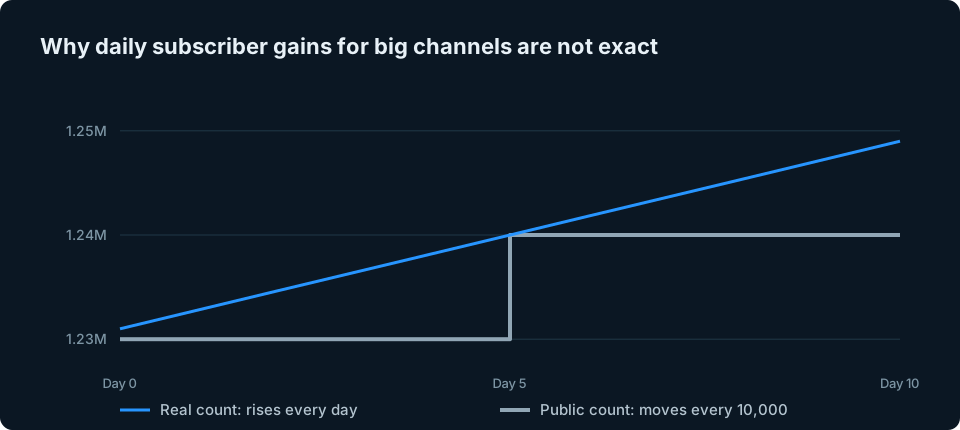
Some tools simply report the jump on the day it shows up. Others present averages and projections built from those jumps. Either way, judge subscriber growth over a month or more, not day by day.
Social Blade vs ViewStats: what our real-world test found
To see how much this matters, we looked up one of our own YouTube channels, a Final Cut Pro plugin channel with about 11,000 subscribers, on Social Blade and ViewStats on 23 October 2026.
| Social Blade | ViewStats | |
|---|---|---|
| Subscribers shown | 11K | 11,000 |
| Subscribers gained, last month | 0 (30 days) | 0 (28 days) |
| Views gained, last month | 2,036 (30 days) | 1,918 (28 days) |
| Estimated earnings, last month | $1 to $8 | $4 to $12 |
Both tools reported no net subscriber change in a month, even though the channel was getting around 2,000 views. That does not mean nobody subscribed. At this size the public count only moves in steps of 100, so any change smaller than that, up or down, does not show up outside YouTube Studio.
The daily view figures were more interesting. For 10 to 22 October both tools recorded exactly 935 new views, but they split them across the days differently. The differences are consistent with the two sites collecting the public counts at different times of day, though we cannot see their schedules.
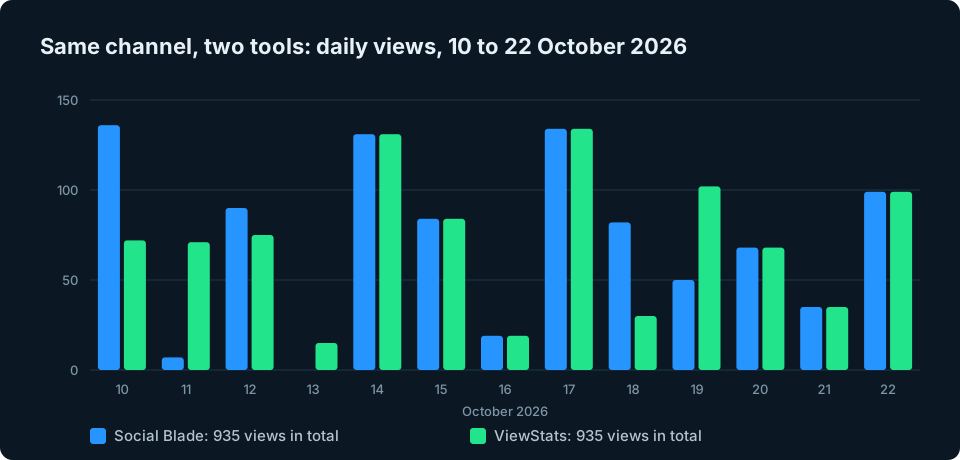
So if two tools disagree about yesterday, neither is necessarily wrong. Compare totals over a week or a month instead. The earnings estimates are a different matter: they are guesses built on assumed ad rates, and the two sites gave noticeably different ranges for the same channel.
The 8 best Social Blade alternatives
ViewStats: best for YouTube video research
ViewStats is a YouTube analytics site with a clean design and a strong focus on what makes videos take off, such as outlier videos that beat a channel's usual views. The free version covers channel and video stats, including how views split between long videos and Shorts, which Social Blade does not show.
- Cost: free account. Pro is shown at checkout and varies by country. Business starts at $249 a month (pricing).
- Watch out for: YouTube only, and many of the research tools need Pro.
Playboard: best for YouTube rankings by country
Playboard ranks YouTube channels by country and category, with daily, weekly, monthly and all-time charts. It is free to browse, and you can sign in to save favourite channels. Subscriber counts are checked once a day.
- Cost: free to browse.
- Watch out for: a channel needs at least 1,000 subscribers and 1,000,000 total views to be ranked, so small channels will not show up. YouTube only.
Not Just Analytics: best for checking Instagram accounts
Not Just Analytics is the closest thing to Social Blade for Instagram. Enter a public profile and it shows follower growth, engagement rate, average likes and comments and how often the account posts, plus an estimate of how genuine its followers are.
- Cost: free to try, with limited searches and history on the free version. Paid plans start at €15.83 a month or €190 a year, before VAT (pricing).
- Watch out for: Instagram only, and the free version keeps only a short follower history.
NoxInfluencer: best for free lookups across platforms
NoxInfluencer covers YouTube, TikTok and Instagram and has a set of free tools, including channel stats, rankings, video analytics and trends. Its main product is a paid platform for brands looking for influencers.
- Cost: free tools. The brand platform's price is given on request.
- Watch out for: the advanced features are paid with no published price, and its earnings calculator is as rough as Social Blade's.
vidIQ: best for YouTube growth ideas
vidIQ works inside YouTube through a browser extension and app, adding stats to videos you watch plus keyword research, competitor tracking and AI video ideas. It has also added some Instagram features, such as Reel ideas and a Reel analyser. It is the tool to pick if you want to know what to make next, not just how a channel is doing.
- Cost: free plan with 150 AI credits a month. Boost is $19 a month or $199 a year, and Max is $49 a month or $468 a year (plans).
- Watch out for: it is built for growing your content rather than simply tracking numbers, and it is mainly a YouTube tool, with a smaller set of Instagram features.
TubeBuddy: best for optimising uploads and testing thumbnails
TubeBuddy is the other big YouTube helper. The free plan covers one channel with basic keyword and tag tools. Pro unlocks full keyword research, and Legend adds A/B testing of thumbnails and titles plus bulk processing.
- Cost: free for one channel. TubeBuddy's pricing page shows prices at checkout; a September 2026 price check found Pro at $12 a month and Legend at $27 a month, both billed yearly.
- Watch out for: many of the most useful features need a paid plan (A/B testing needs Legend), and it is YouTube only.
HypeAuditor: best for vetting influencers
HypeAuditor audits influencer accounts, including checks for fake or low-quality followers, and is used by brands before paying for a campaign. It has a range of free tools.
- Cost: free tools. Plans start at $299 a month billed annually, according to HypeAuditor, with final prices quoted to each team.
- Watch out for: far too expensive for most individual creators.
Metricool: best for managing several of your own accounts
Metricool connects several platforms in one dashboard and also schedules posts. Unlike the lookup tools above, it connects to your own accounts on several platforms, so it can show their private analytics as well as the public numbers.
- Cost: free for 1 brand, with 30 days of analytics and no LinkedIn or X. Starter costs $25 a month, or $20 a month billed yearly, for up to 5 brands (pricing). Connecting X costs extra.
- Watch out for: it is a full social media management tool, which is more than you need if you only want to see your numbers.
Your own accounts: the platforms' own analytics
For your own accounts, the most accurate source is always free: YouTube Studio, Instagram Insights (you need a professional account, either creator or business) and TikTok's analytics in TikTok Studio. They show exact subscriber and follower numbers, plus reach, watch time and where your audience comes from.
The catch is that each one only shows its own platform. With accounts on three or four platforms, you end up opening three or four apps to answer "how are we doing this week?"
If you simply want to see your own follower counts across several platforms, without scheduling posts or managing campaigns, that is the gap GridStats is being built to fill. The iPhone app is in development, and you can ask to hear when it launches using the button at the end of this guide.
Social Blade and the 8 alternatives at a glance
| Tool | Best for | Platforms | Free option | Paid from |
|---|---|---|---|---|
| Social Blade | Quick public stats | YouTube, TikTok, Twitch, Instagram, Facebook | Yes, 14 to 30 days of daily data | $59.99 a year |
| ViewStats | YouTube video research | YouTube | Yes | Pro shown at checkout |
| Playboard | YouTube rankings by country | YouTube | Yes | Not published |
| Not Just Analytics | Checking Instagram accounts | Free to try | €15.83 a month | |
| NoxInfluencer | Free lookups across platforms | YouTube, TikTok, Instagram | Free tools | On request |
| vidIQ | YouTube growth ideas | Mainly YouTube, some Instagram | Yes, 150 AI credits a month | $19 a month |
| TubeBuddy | Optimising uploads, A/B tests | YouTube | Yes, one channel | $12 a month, billed yearly |
| HypeAuditor | Vetting influencers | Instagram, YouTube and more | Free tools | $299 a month, billed annually |
| Metricool | Managing your own accounts | Instagram, Facebook, TikTok, YouTube and more | Yes, 1 brand | $25 a month |

How to choose in three questions
- Whose numbers do you want? Someone else's: use a public stats tool. Your own: start with each platform's own analytics, which are free and exact.
- Which platforms? For YouTube only, ViewStats, Playboard, vidIQ and TubeBuddy go deeper than Social Blade. For Instagram, try Not Just Analytics. Across several platforms, look at Social Blade, NoxInfluencer or Metricool.
- Do you want numbers or advice? Social Blade and Playboard give you numbers. vidIQ, TubeBuddy and ViewStats try to tell you what to do with them.
If you are just checking a rival's channel now and then, Social Blade's free version is still hard to beat. Most people who outgrow it want either YouTube growth help or a better view of their own accounts.
Frequently asked questions
Is there a free alternative to Social Blade?
Yes. ViewStats, Playboard, vidIQ and TubeBuddy all have free versions for YouTube, Not Just Analytics is free to try for Instagram and NoxInfluencer has free tools for YouTube, TikTok and Instagram. For your own accounts, each platform's own analytics are free.
Is Social Blade accurate?
Its total views and current counts match what the platforms show publicly. Daily subscriber gains are less reliable because YouTube shortens public subscriber counts, and earnings figures are rough ranges based on assumed ad rates. In our test, Social Blade and ViewStats agreed on total views but split them across the days differently.
Can Social Blade show who unfollowed me?
No. Social Blade only sees an account's follower total, not who follows or unfollows it. Platform analytics such as Instagram Insights show how many people unfollowed, not who. For Instagram, our guide on how to see who unfollowed you explains the safe ways to find out.
What is the best Social Blade alternative for Instagram?
To check other people's accounts, Not Just Analytics is the closest match, with NoxInfluencer as a free option and HypeAuditor for brands. For your own account, use Instagram Insights, which is free with a professional account. If your follower count is falling, our guide on why you are losing Instagram followers may help.
Which is better, ViewStats or Social Blade?
For YouTube on its own, ViewStats shows more detail for free, such as the split between views on long videos and Shorts. Social Blade covers more platforms, including TikTok, Twitch, Instagram and Facebook.
The bottom line
There is no single replacement for Social Blade, because people use it for different jobs. For public YouTube stats, try ViewStats or Playboard. For Instagram, try Not Just Analytics. To grow a channel, try vidIQ or TubeBuddy. For your own accounts, start with the free analytics each platform already gives you.
The one gap is a simple view of your own audience across every platform at once, without a full social media management tool. That is what we are building with GridStats: every account you run as a tile on one screen, showing followers and how they changed over the last day, week or month.