Instagram unfollow tracker apps: how they work and what to check first
Photo by Alex Green on Pexels
Instagram doesn't tell you who unfollowed you, so plenty of apps and websites offer to do it for you. Some ask you to log in, some ask you to upload a file, and many charge a subscription.
We haven't tested these apps, so we won't recommend or criticise any of them by name. Instead, this guide explains the three ways an unfollow tracker can get hold of your follower list, what Instagram itself says about third-party apps, a checklist to run through before you use one and a free way to track unfollowers yourself without handing anything over. Everything here comes from Instagram's own Help Centre and Meta's documentation, linked as we go.
The short answer
- Instagram doesn't share who unfollowed you, so every tracker has to work it out by comparing your follower list over time.
- Never give an app your Instagram password. Instagram warns that it can give the app complete access to your account and may lead to your account being restricted.
- Upload-based trackers avoid the password, but you're still trusting them with a copy of your data. Include only your followers and following.
- The free option: download your own follower list from Instagram twice, a few weeks apart, and compare them.

How unfollow trackers get your follower list
To tell you who unfollowed you, a tracker needs your full list of followers at two points in time. There are three ways it can get that list.
1. You give it your username and password
The app logs in to Instagram as you and reads your follower list directly. This is the riskiest option. In its warning about apps that offer likes and followers, Instagram says that if you give a non-Instagram app your login details or an access token, it can gain complete access to your account, including your messages, and could post spam on your profile (Instagram Help Centre).
Instagram also lists giving your username and password to a third-party app or website, and using an app to interact with Instagram in unauthorised ways, among the reasons an account can be restricted for data scraping (Why your account has been restricted for data scraping).
2. You sign in through Instagram's official login
Some apps use Instagram's own sign-in screen instead of asking for your password. That's safer, because you never type your password into the app, and you can remove its access at any time.
But it limits what the app can see. Meta's documentation for apps using Instagram login lists profile details such as your follower count and following count, for professional (business or creator) accounts (Meta for Developers). That documentation doesn't describe access to a list of individual followers. So an app relying on those documented details can track changes in your totals, not identify which accounts left. Official login also means you don't hand over your password, but it doesn't make every app that uses it trustworthy, so still check what it asks for.
3. You upload your own Instagram data
Instagram lets you export a copy of your information, including your followers and the accounts you follow. Some trackers ask you to upload that export and compare it with an earlier one.
This avoids sharing your password, which is a real advantage. But the file contains other people's usernames. Some tools read the file on your own device, while others upload it to their servers, so check which happens before you supply it. If you go this way, export only your followers and following rather than everything, and check the privacy policy to see what happens to your file and whether you can delete it.
What Instagram says about third-party apps
Instagram's help pages are clear on a few points:
- Don't share your login details with apps that aren't Instagram. Instagram says it can put your security, and your friends' security, at risk.
- Automated collection isn't allowed. Instagram's Terms of Use don't allow accessing or collecting information in unauthorised ways, and it has teams that detect and block scraping (Instagram Help Centre).
- Accounts can be limited. Instagram says accounts that keep using non-Instagram apps to gain followers may find parts of their account limited, or may be disabled. That warning is about apps that sell likes and followers, but the same login risks apply to any app you give your password to.
A checklist before you use any unfollow tracker
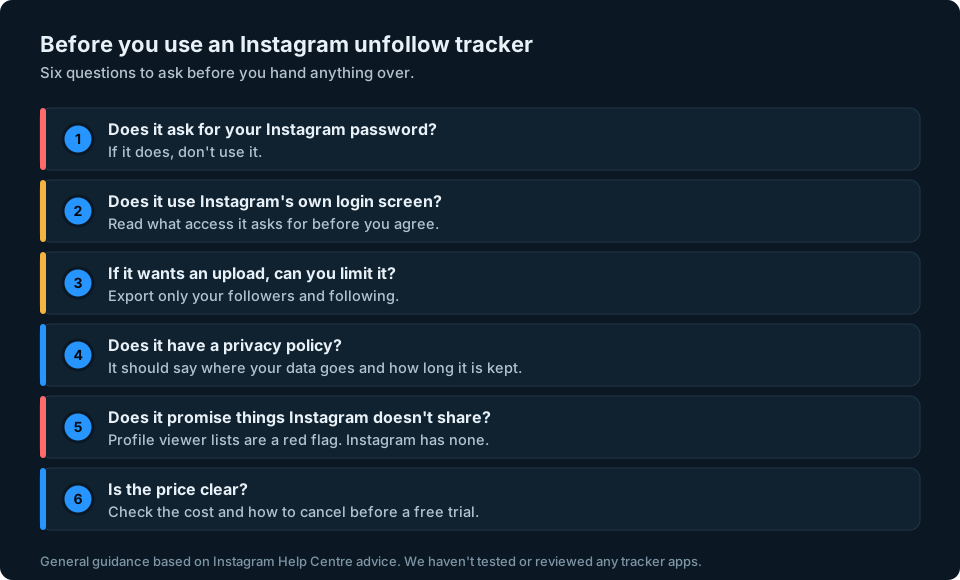
- Does it ask for your Instagram password? If it does, don't use it.
- Does it use Instagram's own login screen? If so, read what access it asks for before you agree.
- If it wants an upload, can you export just your followers and following? You don't need to share your messages, photos or anything else.
- Does it have a privacy policy that says where your data goes, how long it's kept and how to delete it?
- Does it promise things Instagram doesn't share? Instagram doesn't show anyone who viewed your profile, so a tracker that claims to is a red flag (see our guide to whether you can see who viewed your Instagram profile).
- Is it clear what it costs and how to cancel? Check before you start a free trial.
The free way: compare your own exports
You don't need an app at all. Instagram will give you your own follower list, and comparing two copies shows which accounts are missing. These are the export steps from Instagram's Review and export a copy of your Instagram information page:
- Go to your profile and tap Menu.
- Tap Accounts Centre, then Your information and permissions.
- Tap Export your information, then Create export.
- Choose your Instagram profile, then Export to device.
- Choose specific information to export and pick your followers and following.

Do it again a few weeks later, then compare the two lists in a spreadsheet. A username on the first list but not the second could mean someone unfollowed you, you removed them, their account was deleted or disabled, or they changed their username. Comparing lists tells you what changed, but not always why. Our guide to seeing who unfollowed you on Instagram walks through the comparison step by step.
If you've already used an unfollow tracker
If you're not sure what an app has access to, it's worth tidying up:
- Remove its access. Go to your profile, tap Menu, then Website permissions, then Apps and websites. Tap Active, then Remove next to the app (Instagram Help Centre).
- Change your password if you ever typed it into the app or its website. Instagram advises this if you've shared your login details with an app.
- Check your login activity and remove any logins you don't recognise, as Instagram suggests in its advice on data scraping.
- Cancel any subscription through the App Store or Google Play if you paid there, as deleting the app doesn't always cancel it.
Keeping an eye on your audience
Most people use an unfollow tracker because they've noticed their follower count dropping and want to know why. Watching your numbers over time tells you when it's worth looking, and our guide to why you might be losing Instagram followers covers the usual causes.
That's the problem we're building GridStats to solve: your social audience numbers together on one screen on your iPhone, with how they've changed over 24 hours, 7 days and 30 days. GridStats tracks follower numbers, not who unfollowed you, and it isn't designed to ask for your Instagram password. We want to support Instagram through its official sign-in, subject to the data and permissions Meta makes available. If you want to hear when GridStats launches, sign up at the top of this page.
Frequently asked questions
Do Instagram unfollow trackers work?
They can, but only by comparing your follower list at two different times, because Instagram doesn't share who unfollowed you. How they get that list matters: from your password, from Instagram's official login or from a file you upload.
Can Instagram ban you for using an unfollow tracker?
Instagram says accounts can be restricted for data scraping, and lists giving your username and password to a third-party app or website among the reasons. Avoiding apps that ask for your password is the safest approach.
Is there a free Instagram unfollow tracker?
Yes, you can do it yourself. Export your followers from Accounts Centre, export them again a few weeks later and compare the two lists in a spreadsheet.
Is it safe to upload my Instagram data to an unfollow tracker website?
It's safer than giving your password, but you may be sharing a list of your followers' usernames. Some tools read the file on your device and others upload it, so check which, export only your followers and following and read the privacy policy first.
Can an app see who unfollowed me through Instagram's official login?
Meta's documentation for apps using Instagram login describes follower and following counts, not a list of individual followers. So an app relying on those documented details can show how your count changes, but not which accounts left.
What should I do if I gave an app my Instagram password?
Change your password, remove the app's access under Website permissions and check your login activity for anything you don't recognise.