Can you see who viewed your Instagram profile? What Instagram actually shows
Photo by Mayara Caroline Mombelli on Pexels
It's a question thousands of people search for every month, and the short answer is no. Instagram doesn't show you a list of the people who have looked at your profile, and it doesn't tell anyone when you look at theirs.
What Instagram does show is more useful than most people realise: exactly who has watched your Stories, how many times your profile has been visited and how many views your posts and reels get. This guide explains each one, where to find it and why apps that promise to reveal your profile viewers aren't worth the risk. It's based on Instagram's own Help Centre, linked as we go.
The short answer
- Profile viewers: Instagram doesn't show who viewed your profile. There is no list, for any type of account.
- Story viewers: yes. Open your Story and swipe up to see the usernames of people who watched it, for up to 48 hours after you post it.
- Profile visits: if your account has insights, you can see a total number of profile visits, but not who the visitors were.
- "Who viewed my profile" apps: they can't see anything Instagram doesn't share. Don't give them your login.

Can you see who viewed your Instagram profile?
No. Instagram has no feature that lists who has visited your profile, and that's the same for personal, creator and business accounts. Instagram's Help Centre explains how to see who has watched your Story, but there's no equivalent for profiles.
It works both ways. Looking at someone's profile, scrolling their grid or opening a post doesn't send them a notification, and your name doesn't appear anywhere for them to find. They would only know you'd been there if you interacted, for example by liking, commenting, following or watching their Story.
How to see who viewed your Instagram Story
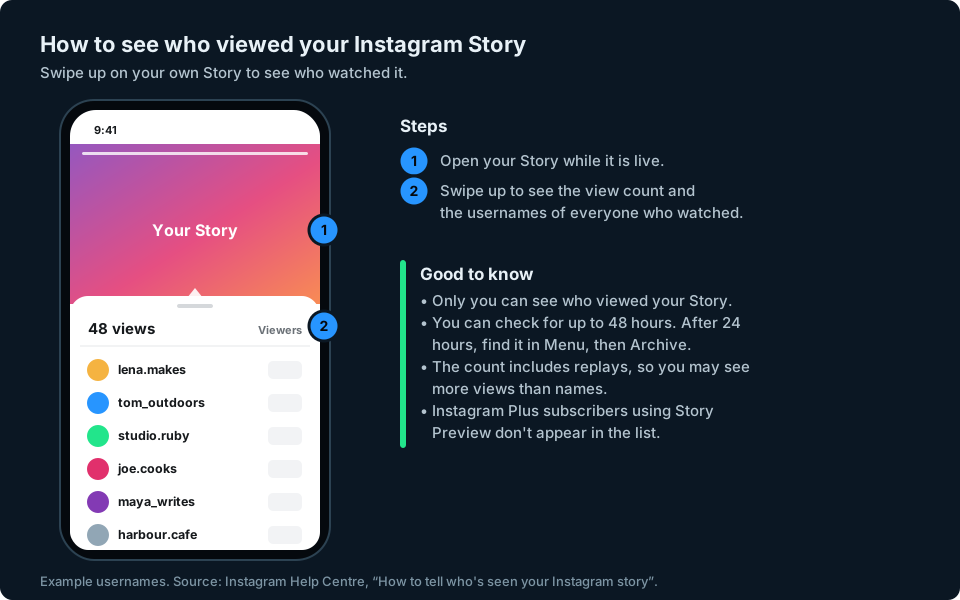
Stories are the one place where Instagram shows you names. These are the steps from Instagram's Help Centre page How to tell who's seen your Instagram story:
- Open your Story while it's live.
- Swipe up on the screen.
- You'll see how many people viewed each photo or video, with their usernames.
Only you can see this list. Your Story disappears from your profile after 24 hours, but Instagram says you can still see who viewed it for up to 48 hours after you posted it. Go to your profile, tap the Menu button, tap Archive, open the Story and swipe up.
Two details explain why the numbers don't always add up:
- Views can include replays. Story views can include repeat views from the same account, so the number of views can be higher than the number of usernames in your list.
- Story previews can be anonymous. Instagram Plus, a paid subscription Meta launched in June 2026, includes Story Preview, which lets subscribers preview a Story without appearing in your viewer list. Instagram's wording covers previews only, so a subscriber who watches normally should still appear. It isn't available everywhere yet.
How to see how many people visited your profile
You can't see who visited your profile, but you can see how often it happens. Meta defines profile visits as the number of times your Instagram profile was visited (Meta Business Help Centre).
You'll find it in your insights. Instagram says insights are available to public accounts, both personal and professional, and cover up to the last 90 days, although which numbers you see can vary by account type (View account and content insights on Instagram):
- Go to your profile.
- Tap Professional dashboard if you have a professional account, or Your dashboard if you have a personal one. If you can't see it, tap Menu, then Insights (below For professionals) or Your dashboard (below Your insights and tools).
- Open your insights and look for Profile visits. Instagram rearranges its insights screens from time to time, so it may sit inside another section, such as views or profile activity.
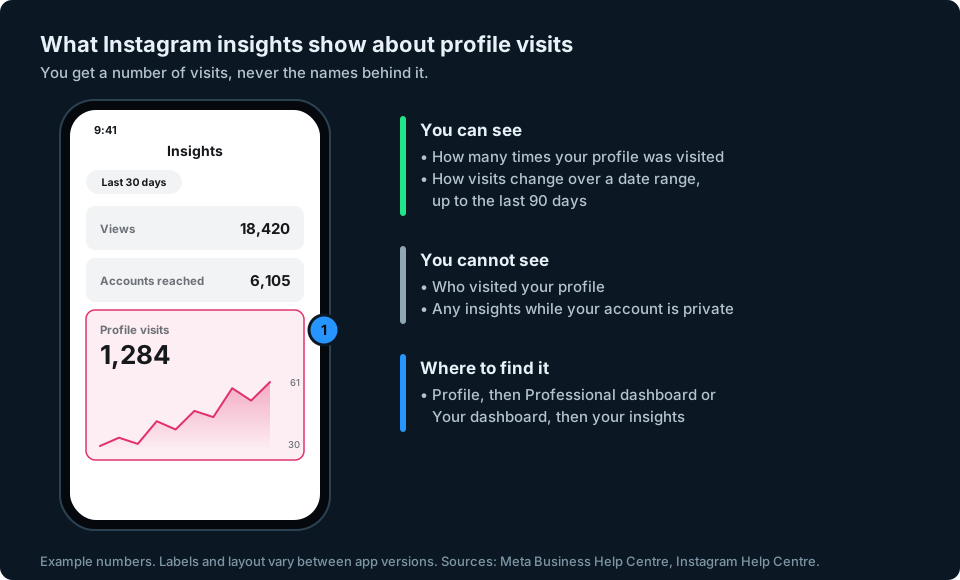
If you can't find insights or profile visits, check your account type. Instagram says insights need a public account: you lose access if you switch to private, and you can get your past insights back if you switch to public again within 90 days.
Profile visits are most useful as a trend. If they rise after a post, that post made people curious enough to tap through to your profile. If visits are high but follows are low, your bio and grid may not be convincing visitors to stay.
What about posts and reels?
You can't see who viewed a post or reel, but you can see how many views it had. Your insights show views for each post and reel. If you have a professional account, Instagram also lets you show view counts on the posts and reels in your profile grid, which only you can see, while view counts on your Reels tab are visible to everyone (Show or hide view counts on your Instagram profile).
The only names you'll see are of people who interact: who liked, commented, shared to their Story or tagged you.
Do “who viewed my profile” apps work?
No. Apps and websites that claim to show who viewed your Instagram profile can only work with the information Instagram makes available, and Instagram doesn't make a list of profile viewers available to anyone, including you. At best, these apps show the people who interact with you most and call them "viewers". At worst, they're after your login.
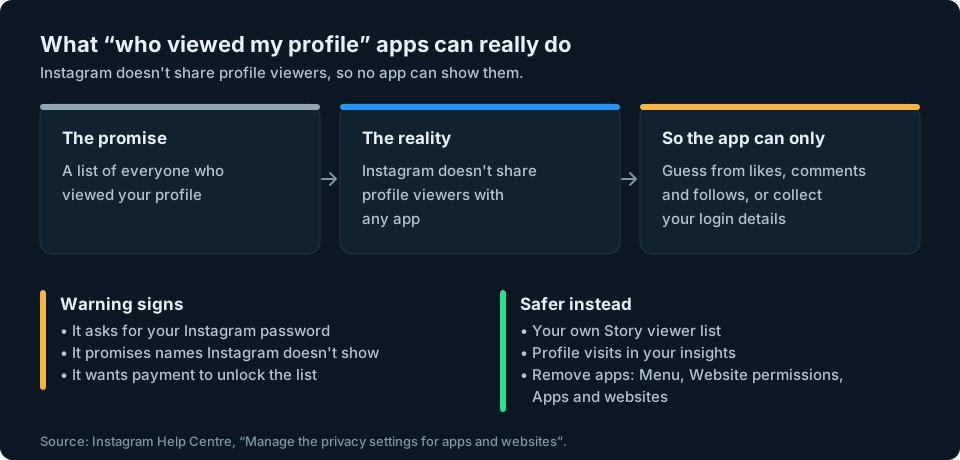
Common warning signs:
- It asks for your Instagram password rather than using Instagram's own login screen.
- It promises names that Instagram itself doesn't show you.
- It wants payment to "unlock" the full list of viewers.
If you've already connected one, you can remove its access. Instagram's page on apps and websites you've connected gives the steps: go to your profile, tap Menu, then Website permissions, then Apps and websites. Tap Active and then Remove next to the app. If you typed your password into an app or website, change your password too.
Keeping an eye on your audience
Most people who search for profile viewers really want to know whether their account is growing and who's paying attention. Profile visits, Story viewers and follower numbers together tell you far more than a list of viewers ever would. If your follower count is dropping and you want to know who left, our guide to seeing who unfollowed you on Instagram covers the safe ways to check.
If you post on Instagram and other platforms, keeping track of all those numbers in separate apps is slow. That's the problem we're building GridStats to solve: your social audience numbers together on one screen on your iPhone, with how they've changed over 24 hours, 7 days and 30 days. Instagram is among the platforms we want to support, depending on the data Instagram makes available. GridStats won't show who viewed your profile, because Instagram doesn't share that. If you want to hear when GridStats launches, sign up at the top of this page.
Frequently asked questions
Can someone see if I look at their Instagram profile?
No. Instagram doesn't tell people when someone views their profile, and there's no list for them to check. They'd only know you'd visited if you interacted, for example by liking, commenting, following or watching their Story.
Can you see who views your Instagram if you have a business account?
Not by name. Business and creator accounts can see how many times their profile was visited in their insights, but not who visited.
Can someone see if I viewed their Instagram Story?
Yes. Your username appears in their Story viewer list for up to 48 hours after they posted it. The exception is Instagram Plus subscribers using Story Preview: Instagram says people who preview your Story that way aren't shown in the list.
Why do I have more Story views than viewers?
Because Story views can include repeat views from the same account, while each person's username appears only once in the list.
Can you see who viewed your Instagram highlights?
Only for the first 48 hours after the original Story was posted, through the normal Story viewer list. After that, Instagram doesn't show who viewed it.
Are Instagram profile viewer apps safe?
No. Instagram doesn't share who viewed your profile with any app, so they can't give you a real answer. Many ask for your login details, which puts your account at risk. If you've used one, remove its access under Website permissions and change your password.