How to spot fake Instagram followers (and what to do about them)
Photo by SHVETS production on Pexels
Fake followers are accounts that follow you without any genuine interest in what you post, often to inflate follower numbers or spread spam. Some are automated bots, some are run by people and some were created to sell follows. You can't always tell for certain, but there are clear warning signs, and Instagram gives you tools to remove them and cut down on new ones.
This guide is about your own account. It covers the signs a follower may be fake, how to go through your follower list, how to remove followers, how to reduce bot follows, why Instagram's own clean-ups can make your count drop and why buying followers or using "fake follower checker" sites is a risk. It's based on Instagram's own Help Centre and announcements, linked as we go.
The short answer
- Look for several signs together: no profile photo, no posts, a random username, following thousands of accounts and spammy comments or messages.
- Remove them yourself: in your Followers list, tap the X next to the account, then tap Remove. On public accounts, Instagram may also flag suspected spam followers for you to review.
- Cut down on new ones: use Limit interactions, consider a private account and report spam accounts to Instagram.
- Expect the odd drop: Instagram removes fake accounts and inauthentic follows, so your count can fall when it does.
- Don't buy followers or share your password with checker sites. Instagram warns this can put your account at risk.

Signs a follower might be fake
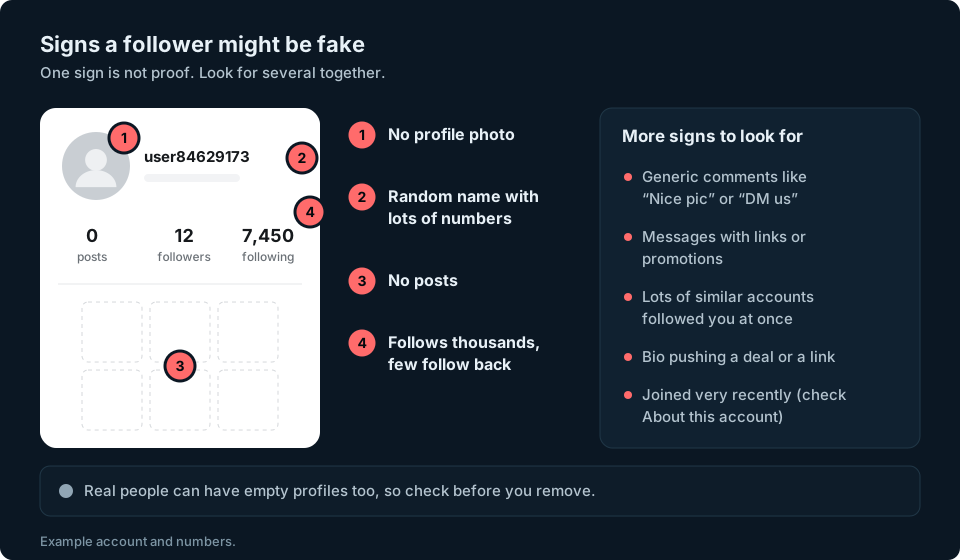
Instagram doesn't publish a simple checklist for spotting a fake follower, and no single sign proves anything. Plenty of real people never post, use a cartoon as their picture or keep their account private. But when several of these turn up on the same account, it's worth a closer look:
- No profile photo, or a stock-looking image.
- A username that looks random, often a name followed by a long string of numbers.
- No posts, or only a handful that look copied from elsewhere.
- Following thousands of accounts while very few follow it back.
- Generic comments such as "Nice pic!" or "DM us to collaborate" left on lots of posts.
- Messages or bios pushing links, giveaways or offers to grow your account.
- Arriving in a burst, with lots of similar accounts following you within a short time.
- A very new account, or lots of name changes. Instagram's About this account feature shows the Date joined and a Former username count, and for certain accounts the country the account is based in (What is "About this account" on Instagram and Threads).
How to check your follower list for fakes
The most reliable check is the simplest: look through your own followers. You don't need an app for this.
- Go to your profile.
- Tap Followers at the top to open the list.
- Scroll through, or use the search bar if you're checking a particular account.
- Tap any account that looks suspicious to open its profile and look for the signs above.
If you have a lot of followers, start with the most recent ones. Instagram hasn't said how the list is ordered, so your notifications, which tell you when someone starts following you (How notifications work on Instagram), are a better guide to who followed you lately. It also helps to watch your follower numbers over time. A jump of dozens or hundreds of followers overnight, with no obvious reason, is worth investigating. It could be spam, but a sudden increase alone isn't proof.
Instagram also does some of this checking for you. Its Help Centre says it may flag accounts that are potentially spam, bots or irrelevant, and that this is automatically available for public accounts, though it may not have reached everyone yet (Manage unwanted followers on Instagram). If Instagram has flagged any of your followers, you'll see a notification called Flagged for review when you open your Followers list. Instagram announced this filtering in December 2023 (Instagram @Creators blog).
How to remove fake followers
Once you've found a follower you're sure is fake, you can remove it. At the time of writing, Instagram's Help Centre page on removing followers is written for private accounts. If you have a public account and don't see the option, use the flagged review below or block the account instead (Remove a follower on Instagram). On iPhone:
- Tap Profile or your profile picture to go to your profile.
- Tap Followers at the top.
- Tap X to the right of the follower you want to remove.
- Tap Remove to confirm.
Instagram says the person won't be notified that you've removed them.
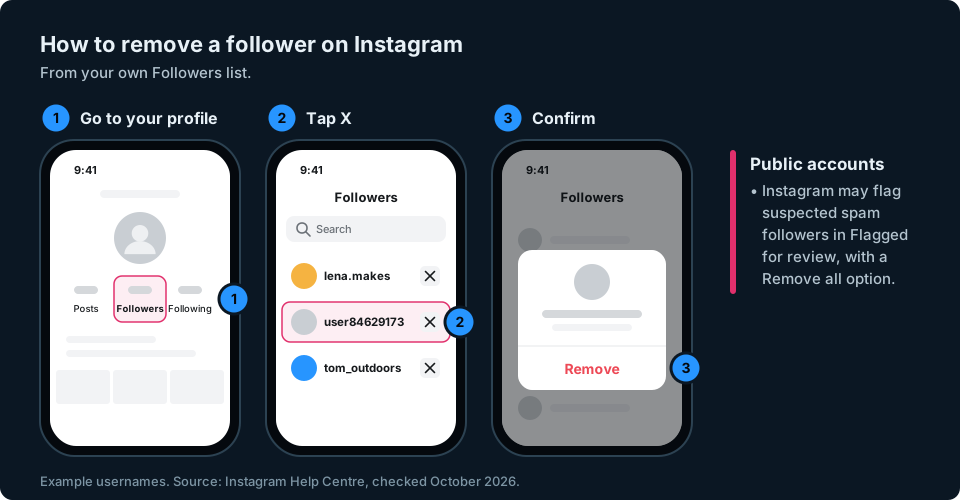
For larger numbers, use Instagram's flagged review. On a public account:
- Go to your profile and tap Followers.
- If Instagram has flagged any followers, tap the Flagged for review notification.
- Tap Remove all to remove every flagged follower at once, or tap Remove next to each account.
- If an account isn't spam, tap Options next to it and then Not spam or irrelevant.
Instagram says removed accounts aren't notified. New follows from flagged accounts also arrive as requests in a Flagged folder, even on a public account, and any you don't approve within 30 days are declined automatically. You can turn this filtering off from Menu, then Follow and invite friends, then Flag for review.
If an account is clearly spam, you can also report it. Open its profile, tap Options in the top right, tap Report and follow the on-screen instructions (Report a post or profile on Instagram). Instagram says reports are anonymous, so the account won't see who reported it.
How to cut down on bot follows
You can't stop every bot from finding your account, but Instagram has tools to control who follows you and reduce unwanted interactions:
- Use Limit interactions during a spam wave. Go to your profile, tap Menu, then below How others can interact with you tap Limit interactions. You can limit Recent followers (accounts that followed you in the last week), Accounts that don't follow you or Everyone but your close friends, for up to four weeks at a time. Instagram says new comments and chats from limited accounts are hidden. Limiting interactions doesn't stop an account from following you, but it can reduce unwanted comments and messages (Temporarily limit people from interacting with you on Instagram).
- Consider a private account. New followers have to send a request, which you can approve or ignore. Making your account private won't remove anyone who already follows you, so you'll still need to remove unwanted followers yourself. This suits personal accounts better than businesses that want to be found.
- Don't engage with spam. Avoid replying to suspicious comments or messages, and don't open links you don't trust. Report spam accounts instead.
- Steer clear of growth apps. Apps that swap follows or sell likes often bring in exactly the kind of accounts you're trying to get rid of.
Why Instagram removing fake accounts can make your count drop
Instagram removes fake and inauthentic activity itself. In November 2018 it announced it was removing inauthentic likes, follows and comments from accounts that use third-party apps to artificially grow their audience (Reducing Inauthentic Activity on Instagram).
That means your follower count can drop even though no real person has left. If some of your followers were spam accounts and Instagram removes them, they disappear from your count, and you may not be told which ones went. A sudden one-off drop, especially after a burst of suspicious follows, can be exactly this. Our guide to why you might be losing Instagram followers covers this and the other common causes.

Why buying followers and "fake follower checkers" are risky
Buying followers is the quickest way to end up with fake ones. Instagram's Help Centre explains why you shouldn't use apps that offer likes and followers (Why you should not use apps that offer likes and followers on Instagram). Instagram warns that giving these apps your login details can give them complete access to your account, that it may remove engagement they generated and that accounts which keep using them may find parts of their account limited, or may be disabled or terminated. Bought followers are unlikely to be genuinely interested in your content, so they can make your engagement look weaker rather than stronger.
"Fake follower checker" sites promise to tell you what percentage of your followers are fake. Treat them with care:
- Never give one your Instagram password. If a site asks for it, close the page.
- Their results aren't proof. A site may use public profile details or information you supply, but a fake follower score is still an estimate, not a confirmed list of bots.
- Watch for upsells. Some offer to "fix" your score by selling you followers or engagement, which brings you back to the first problem.
- Read the privacy policy before you enter anything, including just your username.

If you've already typed your password into one of these sites, change your password. Instagram's Help Centre gives the same advice to anyone who has shared their username and password with one of these apps. Instagram also says data scraping, meaning collecting information in unauthorised ways, goes against its Terms of Use (Instagram Help Centre).
Keeping your audience real
A smaller audience of real people is worth far more than a big number padded with bots. Genuine followers are more likely to be interested in your posts, respond to your Stories and recommend your account to others. Their activity gives you more useful information about your audience. Checking your recent follow notifications every few weeks, along with any accounts Instagram has flagged for review, is a simple way to spot suspicious followers early.
Spotting a sudden jump or drop is much easier when you can see how your numbers change over time. We're working on something to make that simpler across all your accounts, so sign up at the top of this page to hear when it's ready.
Frequently asked questions
How can I tell if my Instagram followers are fake?
Look for several warning signs on the same account: no profile photo, no posts, a random username, following thousands of accounts or spammy comments and messages. One sign alone isn't proof, because real people can have empty profiles too.
Does Instagram remove fake followers automatically?
Yes, it can. Instagram removes inauthentic activity itself, and on public accounts it may flag suspected spam followers for you to review. Follow requests from flagged accounts are declined automatically if you don't approve them within 30 days.
Can Instagram tell me which followers are bots?
Instagram can flag accounts it suspects are spam or bots, but that isn't proof. Review flagged accounts before removing them, and tap Not spam or irrelevant if Instagram has got one wrong.
Will someone know if I remove them as a follower?
No. Instagram says people aren't notified when you remove them as a follower, including through its flagged review. They may notice later that they no longer follow you if they check.
Why did my Instagram followers drop suddenly?
It can be Instagram removing fake or spam accounts. People unfollowing, deactivating or deleting their accounts can also lower your count.
Is it safe to use a fake follower checker?
Not if it asks for your Instagram password. A checker's score is only an estimate, not a confirmed list of bots, so your own Followers list and Instagram's flagged review are safer places to start.
Can buying followers get your Instagram account banned?
It can. Instagram says accounts that keep using apps that offer likes and followers may have parts of their account limited, or may be disabled or terminated. Bought followers can also be removed in Instagram's clean-ups.