How to track your X (Twitter) follower count over time

Photo by Michael Burrows on Pexels
Your follower count on X (formerly Twitter) is always on your profile, but X doesn't give every account a simple chart of how that number has changed over time. If you want to know whether you're growing, the most reliable way is to keep your own record, and it takes about two minutes a week.
This guide shows where to find your follower and following counts, what X's help pages say (and don't say) about follower history, how to set up a simple weekly log and why your count sometimes drops for reasons that have nothing to do with your posts. It's all about your own account, and it's based on X's own help pages, linked as we go.
The short answer
- Your counts: your follower and following numbers sit just below your bio on your profile, in the app and on the web.
- Your history: X's help pages don't currently explain who can see a follower growth chart, so don't rely on one being there.
- Your own record: note your follower and following counts once a week in a spreadsheet. After a month or two you'll have a clear trend.
- Missing followers: X says accounts can disappear from your follower list because of spam filtering, unfollowing or deactivation. A missing account doesn't always mean your total has fallen.

Where to see your X follower and following counts
Both numbers are on your profile, and anyone who visits your profile can see them too.
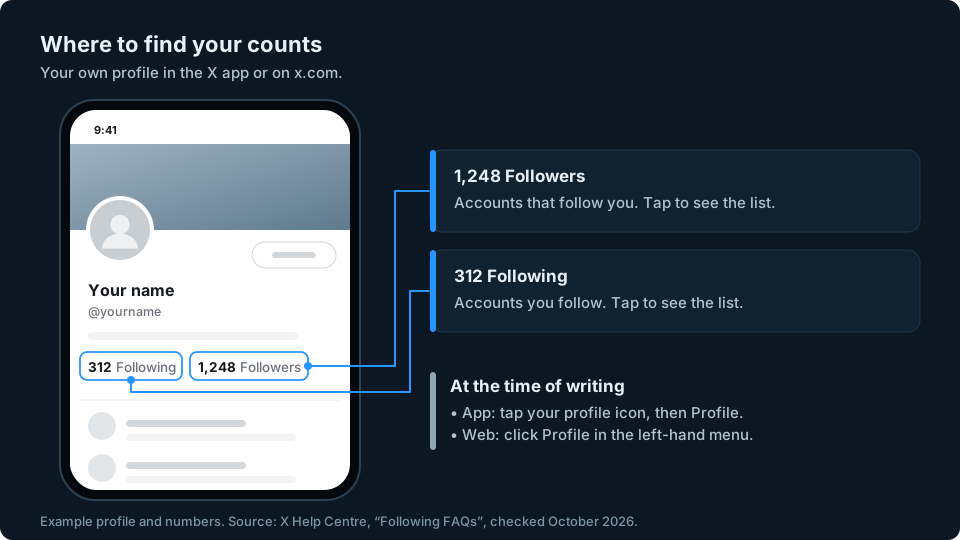
X says the followers link on your profile shows how many followers you have and who they are (Following FAQs). At the time of writing, in the X app:
- Tap your profile icon in the top menu.
- Tap Profile.
- Look just below your bio. You'll see two numbers: Following (the accounts you follow) and Followers (the accounts that follow you).
- Tap either number to see the list of accounts behind it.
On the web at x.com:
- Click Profile in the menu on the left.
- Your Following and Followers counts appear below your bio.
- Click either one to open the list.
Your followers list may show more than one tab, such as Verified Followers, depending on your account and the version of X you're using. X also says that by default it emails you when someone new follows you, and you can change that in your email preferences.
Your following count matters for one practical reason. X says every account can follow up to 5,000 accounts, and after that the limit depends on your own ratio of followers to following (About following on X). If you follow a lot of accounts, keeping an eye on both numbers tells you when you're getting close.
Does X show your follower history?
Not in a way X documents clearly. The official pages we checked don't make clear which accounts can see a follower growth chart. X documents some analytics tools, but that doesn't confirm what's available in your account. If you switch to a free Professional Account, X says Professional Home on desktop includes account analytics over the past 28 days, though not everyone has it yet while X tests it (Professional Accounts). X's page About X Premium, now part of what X calls The X Subscription, lists the features in each paid tier, and when we checked it didn't mention analytics at all. X has changed its analytics several times over the years, so the honest answer is: look in your own account. If you can find a follower growth view, use it. If you can't, or it only covers a short period, your own log fills the gap.
X does give you two other things that help:
- Post analytics. X's ads help says its Post Activity Dashboard is free for all X users who have an ads account or register at analytics.x.com. It shows impressions, engagements and follows for each post over the last 28 days by default, and you can change the date range and export the data as a .CSV file (Post and Video Activity Dashboards). It doesn't chart your follower count, but its Follows figure shows how many people followed you directly from each post. X says you'll find the dashboard under Posts at analytics.x.com, or under Analytics, then Post activity, at ads.x.com. Many posts also show a view count next to the analytics icon, although X lists exceptions, including Community posts and older posts (View counts).
- Your X archive. This is a download of your account, and X says it includes a list of your followers and a list of accounts you follow (How to download your X archive). It isn't a follower history. But if you download two archives a few months apart, you can compare their follower lists to see which accounts appear in one but not the other. You won't know exactly when or why an account disappeared.
To request your archive in the iPhone app, X's steps are: tap your profile icon in the top menu, then Settings and privacy, then Account. Under Data and permissions, tap Your X data, verify your identity with a code, then under Download your data tap Request data. X says it may take a few days to prepare.

How to track your X follower count with a weekly log
A simple spreadsheet beats any screen you can't be sure will still be there next month. Here's how to set one up.
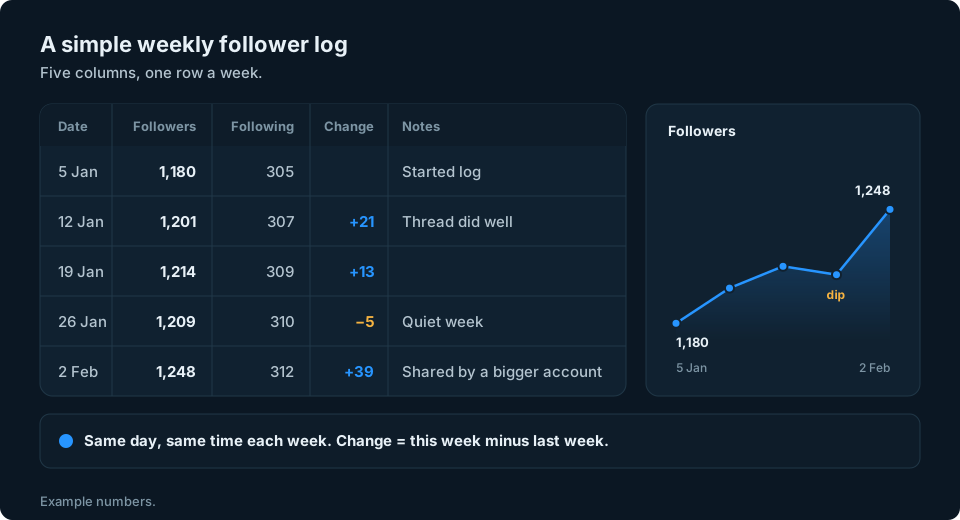
- Create a spreadsheet with five columns: Date, Followers, Following, Change and Notes.
- Pick a regular time, such as Monday morning. Checking at the same time each week keeps the numbers comparable.
- Copy your two numbers from your profile into the sheet.
- Work out the change. Subtract last week's follower count from this week's. If your headings are in row 1 and Followers is column B, enter =B3-B2 in cell D3 for your second entry, then copy the formula down. Leave the first Change cell blank. A change of +21 means your total rose by 21, not necessarily that only 21 people followed you.
- Add a note when something happened: a post that took off, a quiet week, a mention from a bigger account or a week you didn't post.
- Make a chart after four or five weeks. A simple line chart of the Followers column shows your trend at a glance.
What the changes mean
Once you have a few weeks of numbers, a few patterns are worth knowing:
- Steady small gains show your follower total is rising. The numbers alone don't tell you why, which is what your notes column is for.
- A sudden jump is worth investigating. Check your notes and any post analytics you have for possible explanations. X's post-level Follows figure counts follows directly from a post, so it may explain part of the increase, but not the whole weekly change.
- A small dip in a single week isn't necessarily a sign of a problem. There are several possible explanations (see the next section).
- A slow decline over several weeks is worth a closer look. Check when you last posted and whether your recent posts are what your followers originally came for.
A weekly check is a simple starting point. Daily records give more detail if you need it, while monthly records show a broader trend. Neither the numbers nor how often you check can explain on their own what caused a change.
Why your X follower count can drop
Not every drop is someone deciding to unfollow you. X's help page on common following issues says that if a follower seems to have vanished, it's likely the account was hidden for spam activity, unfollowed you or deactivated their account.

There are a few more reasons to know about:
- Locked accounts. X says that when accounts are locked, it removes them from follower counts across profiles, so if an account that follows you is locked, the number on your profile may go down (Following FAQs). When Twitter introduced this in 2018, it said most people would see a change of four followers or fewer (Confidence in Follower Counts).
- The quality filter. X says that to see the full list of your followers, including suspected spam accounts, you can turn off the quality filter. On iPhone, X's steps are to go to your Notifications timeline, tap the gear icon and use the slider next to Quality filter (About the Notifications timeline). This changes the list you see, not the people who follow you.
- Your own actions. If you remove a follower or block an account, your count goes down too. X says removing a follower is currently available on the web only.
If you're worried that a chunk of your followers might not be real people, the warning signs are similar across platforms. Our guide on how to spot fake Instagram followers covers what to look for.
Keeping an eye on your audience
Most people who search for a follower tracker want an answer to one simple question: is my account growing? A weekly number in a spreadsheet answers that better than checking your profile every day. The trend over a couple of months tells you far more than any single drop.
If X is one of several accounts you keep an eye on, copying numbers from each app soon gets tedious. We're working on something to make that easier, so sign up at the top of this page if you'd like to hear when it's ready.
Frequently asked questions
How do I see my follower count on X?
Go to your profile. Your Followers and Following counts are just below your bio, in the app and on x.com. X says the followers link shows how many followers you have and who they are.
Can you see your follower history on X?
Not reliably. X's help pages don't currently explain who can see a follower growth chart, so the dependable option is to note your follower count weekly in a spreadsheet.
Why did my X follower count go down?
X says an account can disappear from your follower list because it was hidden for suspected spam, unfollowed you or was deactivated. That doesn't always mean your total has fallen. X also says locked accounts are removed from follower counts, which can reduce the number on your profile.
Can I see who unfollowed me on X?
You can compare the follower lists in two X archives to see which accounts are missing from the later list. That doesn't prove they unfollowed you, because accounts can also disappear for other reasons, such as deactivation, and the comparison doesn't tell you exactly when or why the change happened.
Is there a limit to how many accounts you can follow on X?
Yes. X says every account can follow up to 5,000 accounts, and beyond that the limit depends on your ratio of followers to following.
Do I need X Premium to see analytics?
X's ads help describes free Post and Video Activity Dashboards for users with an ads account or who register at analytics.x.com, and its Premium page doesn't list analytics as a feature of any tier. That doesn't settle access to every analytics feature or a follower growth chart, so check what's available in your own account.