Can you see who viewed your X (Twitter) profile? What X actually shows

Photo by Vitaly Gariev on Pexels
No. X (formerly Twitter) doesn't show you a list of the people who have looked at your profile. None of its help pages describe such a feature for free or paid accounts, personal or professional. Likewise, nothing in X's help pages says anyone is told when you look at their profile.
What X does show is how many times your posts were viewed, how people interacted with them and how often they clicked your name or profile photo. This guide explains what each number means, where to find it, who else can see it and why apps that promise to reveal your profile viewers can't deliver. It's based on X's own Help Centre and documentation, linked as we go.
The short answer
- Profile viewers: X doesn't show who viewed your profile. Its help pages describe no such list, for any type of account.
- Post views: most posts show a view count that anyone on X can see. It's a number, not a list of names.
- Your analytics: your own posts' analytics show impressions, engagements and profile clicks, still as numbers only.
- "Who viewed my X profile" apps: they can't see anything X doesn't share. Never give them your password.
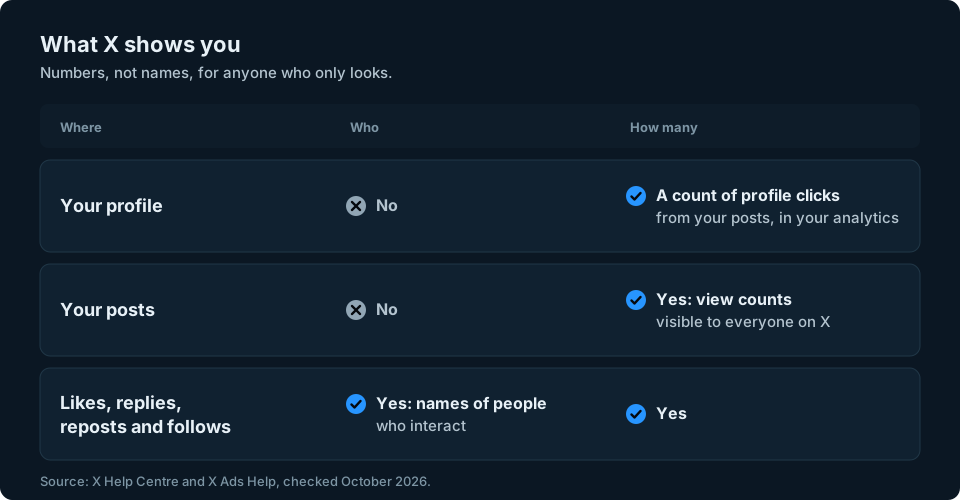
Can you see who viewed your X profile?
No. X has no feature that lists who has visited your profile. Its Help Centre explains how view counts work on posts, but there's no page explaining how to see profile visitors, and X's Premium page doesn't list it as a paid feature either. X's documentation for developers tells the same story: the profile figure it offers is a count of clicks on your own posts, available only to you, not a list of people.
It works both ways. X's help pages describe no notification or list that would tell someone you opened their profile, scrolled their posts or read their replies. They'd only know you'd been there if you did something visible, such as following them, liking a post, replying or reposting.
There's one catch worth knowing. When you read someone's post, you may add one to its view count. X's help page doesn't describe any way to see who a view came from, but the number does go up.
What "views" on an X post means
The number next to the small analytics icon under each post is its view count. X explains how it works on its View counts help page:
- Anyone logged in to X who sees the post counts as a view, wherever they see it, whether that's in Home, Search or on a profile.
- Your own views count. If you're the author, looking at your own post adds a view.
- Views aren't unique. If someone looks at a post more than once, they may be counted more than once.
- Embedded posts don't count. If a post is shown on another website, those views don't add to the count.
You'll see the count under each post in your timeline, and next to the date and time when you open a post. X says it can take up to a minute after posting for the count to appear. Some posts don't have a view count at all: Community posts, X Circle posts and older posts.

Who can see your post view counts?
Everyone on X. X's help page says that whether you're the author or a reader, anyone on X can see view counts on posts. That includes posts from protected accounts, for people who are allowed to see them, and promoted posts. So a view count is public information, not a private stat for you alone.
How to see profile clicks in your X analytics
Beyond the public view count, X gives you more detail on your own posts. X's ads help page Post and Video Activity Dashboards says the Post Activity Dashboard is free for all X users who have an ads account or register at analytics.x.com. On the web:
- Go to analytics.x.com and sign in with your X account.
- Select the Posts tab to see your Post Activity Dashboard.
- Find the post you're interested in to see its numbers. The dashboard shows the last 28 days by default, and you can change the date range.
If you run ads, you can also get there from ads.x.com by opening the Analytics drop-down and choosing Post activity.
The dashboard shows figures such as impressions, engagements, likes, replies, reposts, link clicks and follows. The one closest to profile views is User profile clicks, which X defines as clicks on the name, @handle or profile photo of the post's author. It counts clicks on those parts of your post, not confirmed visits to your profile or the number of different people.

X's documentation for developers confirms that profile clicks are a private metric available for your own posts. Impressions count how often a post appears on someone's screen, including repeat appearances, so like views they aren't a count of different people (X API metrics).
X also offers some account-level analytics. Its page on Professional Accounts says Professional Home, available on desktop to people who switch to a free Professional Account, includes account analytics over the past 28 days, although not everyone has it yet while X tests it. X's help pages don't say what other account analytics ordinary or paid accounts get, and X changes these screens from time to time. None of them name the people who looked at your profile.
Profile clicks are most useful as a trend. If a post gets lots of views but few profile clicks, it reached people without prompting many to look at your profile. If profile clicks are high but follows are low, it may be worth reviewing your bio, pinned post and recent posts to see whether they give visitors a reason to follow.
Do "who viewed my X profile" apps work?
No. Apps and websites that claim to show who viewed your X profile can only work with what X makes available, and X's help pages describe no list of profile viewers for anyone, including you. A list built from likes, replies or follows would only show who interacts with you, not who viewed your profile. Be especially wary of any service that asks for your X password.
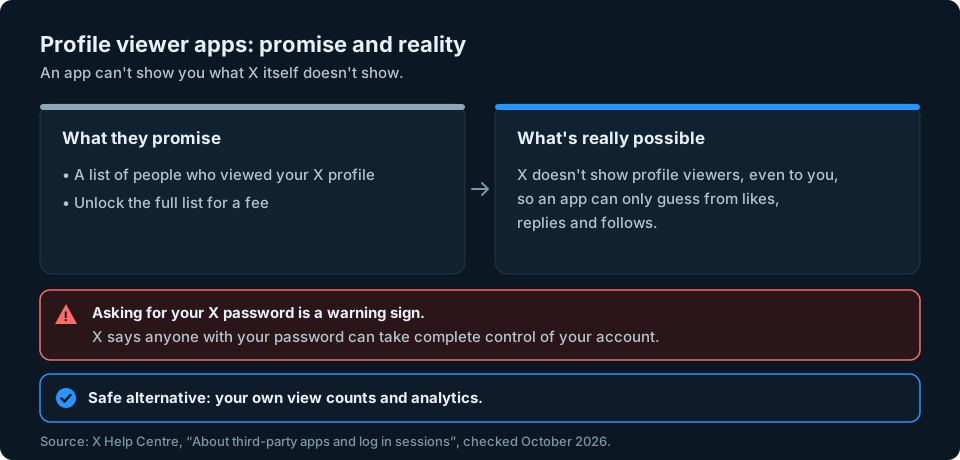
X's page About third-party apps and log in sessions is clear about the risks. It says you should be cautious before giving any third-party app access to your account, and that when you give your username and password to someone else, they can gain complete control of your account and lock you out. Apps you connect may also be able to post on your behalf, read your Direct Messages or see your email address, and they handle your information under their own rules, not X's.
Common warning signs:
- It asks for your X password rather than using X's own sign-in screen. X says it doesn't share your password with apps.
- It promises names that X itself doesn't show you.
- It wants payment to "unlock" the full list of viewers.
How to remove an app's access to your X account
If you've already connected an app that promised profile viewers, you can cut it off. X's help page gives these steps:
- Sign in to your account and go to Settings and privacy.
- Go to the Apps and sessions section. X says all the apps connected to your account are listed there.
- Click or tap Revoke access next to the app, or click the app's name and use Revoke access at the bottom of the page.
X doesn't spell out every screen in between, and its menus move from time to time, so if you can't see Apps and sessions straight away, look through the sections inside Settings and privacy.
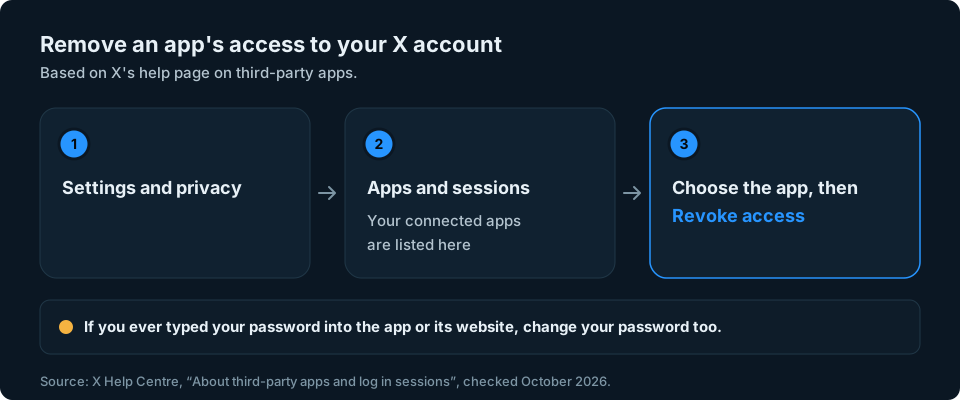
X says that if you suspect a bad app is still connected, you should revoke its access immediately and change your password, and that if you previously gave an app your password, you should do both. X also says it can't troubleshoot third-party apps.
Keeping an eye on your audience
Most people who search for profile viewers really want to know whether their account is growing and whether their posts are landing. View counts, profile clicks and your follower number together answer that far better than a list of viewers would. Our guide to tracking your X follower count shows how to see that number change over time. If you're on Instagram too, the answer there is much the same: see whether you can see who viewed your Instagram profile.
If you're checking numbers across X and other platforms, we're working on something to make that quicker. Sign up at the top of this page to hear when it's ready.
Frequently asked questions
Can someone see if I look at their X profile?
Not as far as X's help pages describe. X has no feature that lists profile visitors, so there's nothing for them to check. They'd only know if you interacted, for example by following, liking, replying or reposting.
Does X show who viewed my posts?
No. Most posts show a view count, but not the names of viewers. You can see who liked, replied to, reposted or quoted a post, but that doesn't reveal everyone who viewed it.
Can other people see how many views my posts have?
Yes. X says anyone on X can see view counts on posts, whether they're the author or a reader.
Does X Premium let you see who viewed your profile?
No. X's list of Premium features doesn't include seeing who viewed your profile, and none of X's help pages describe that feature for any account.
Does looking at my own post add a view?
Yes. X says that if you're the author, viewing your own post counts as a view, and views aren't unique, so repeat views can be counted too.
Are "who viewed my X profile" apps safe?
Don't trust any app that promises a list of your X profile viewers. X's help pages describe no way for it to get that list. If you've connected one, revoke its access in Apps and sessions. If you typed your password into it or think your account is compromised, change your password too.