How does Snap Score work? What counts and what doesn't

Photo by Werner Pfennig on Pexels
Your Snap Score is the number under your name on your Snapchat profile. It generally grows as you use the app, Snapchat says there's no way to lower or reset it and the exact formula is secret. That leaves a lot of room for guesswork online, so this guide sticks to what Snapchat actually says, and is clear about the parts nobody outside Snapchat knows.
Everything here is based on Snapchat's own support pages, which are linked as we go.
The short answer
- What it is: a running total tied to your account, worked out by what Snapchat calls a secret equation.
- What counts: the Snaps you send, the Snaps you receive, the Stories you post and "a couple other factors" that Snapchat does not name.
- Can it go down? Snapchat says there's no way to lower or reset your score.
- Where to see it: under your name on your profile. A friend's score is on their Friendship Profile.
- What it isn't: a follower count. Snap Score measures activity, not audience.
What is a Snap Score?
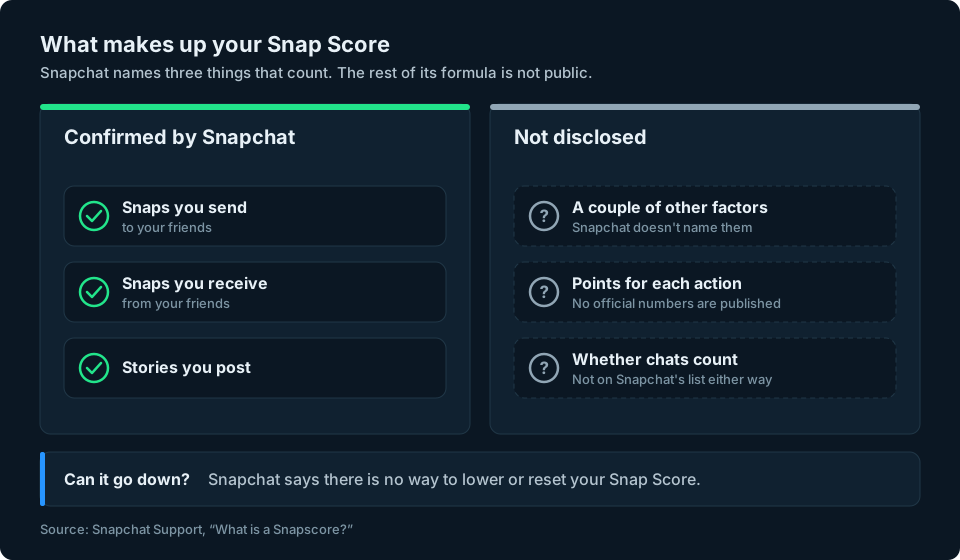
Snapchat describes your Snapscore (it writes it as one word) as a score determined by a "super-secret, special equation" that combines the Snaps you have sent and received, the Stories you have posted and a couple of other factors (Snapchat Support: What is a Snapscore?).
Think of it as a running score based partly on your activity over time. Snapchat doesn't reveal the full calculation, so it isn't a simple count of Snaps or Stories. It isn't a ranking, a rating or a measure of how popular you are.
What makes your Snap Score go up
Snapchat confirms three things:
- Sending Snaps to friends.
- Receiving Snaps from friends.
- Posting Stories.
Beyond that, Snapchat only says "a couple other factors" are involved and does not say what they are or how much each action is worth (What is a Snapscore?).
You will find plenty of websites that list exact points per Snap, bonus points for streaks or a formula for Stories. Snapchat has not published any of that, so treat precise numbers as guesses, however confidently they are written.
Do chats count towards your Snap Score?
Snapchat names Snaps sent, Snaps received and Stories posted as factors in your score. It doesn't specifically mention text chats, but it also says other factors are involved. That means we can't confirm from Snapchat's own explanation whether ordinary chat messages affect the score.
Does opening a Snap count?
Snapchat says Snaps you receive count, but it does not explain whether that happens when a Snap arrives or when you open it.
Can your Snap Score go down?
Snapchat says there is no way to lower or reset your Snapscore (What is a Snapscore?). Using Snapchat less won't make your score fall, although it may grow more slowly.
That is a big difference from a follower count, which goes up and down as people follow and unfollow you.
Snap Score vs followers: what's the difference?
People often mix the two up because both are numbers on your profile. They measure very different things.
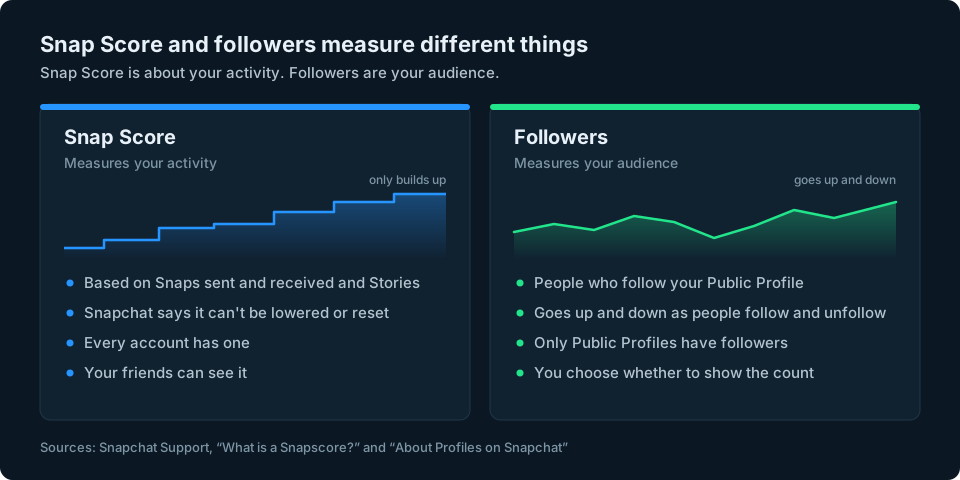
- Snap Score grows with what you do: the Snaps you swap and the Stories you post. Every account has one.
- Followers are people who follow your Public Profile. Only Public Profiles have them, and your follower count is in the Insights tab. Our guide to seeing your followers on Snapchat explains where to find it and why ordinary accounts have friends instead.
A high Snap Score does not mean a big audience. Someone who regularly exchanges Snaps with a small group of friends could have a higher score than someone with a much larger audience. Snap Score and follower count measure different things.
How to see your Snap Score
- Open Snapchat and tap your profile icon in the top left of the camera screen.
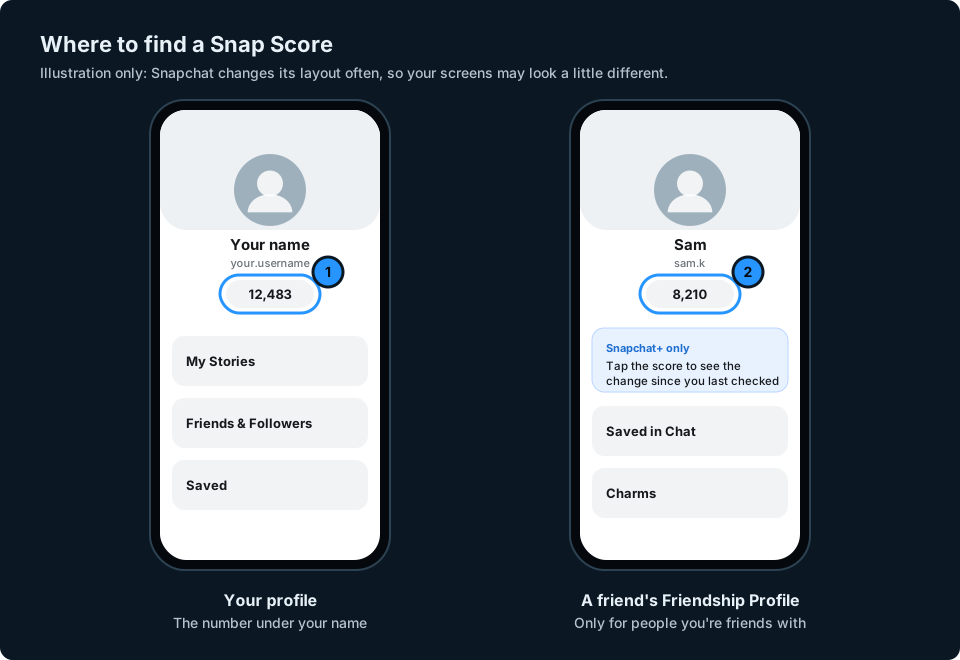
- Look under your name. The number shown there is your Snap Score.
Snapchat confirms the score appears under your name on your profile (What is a Snapscore?).
How to see a friend's Snap Score
Open a chat with the friend and tap their Bitmoji or name to open their Friendship Profile. Their Snap Score is shown there. Snapchat's help pages refer to tapping "a friend's Snapscore in their Friendship Profile" (How do I see how much my friend's Snapscore has changed?).
A Friendship Profile is only between you and that friend (About Profiles on Snapchat), so this works for people you are friends with. Snapchat's help pages do not describe a way to see the score of someone who is not your friend.
Snapchat+ also offers a feature showing how much a friend's score has changed since a previous check (Snapchat Support). It is separate from the score on your own profile.
Can you hide your Snap Score?
Snapchat's help pages do not describe a setting to hide your Snap Score from friends. You can choose whether to show your follower count on a Public Profile, but that is a separate number.
What is the Snapscore Multiplier?
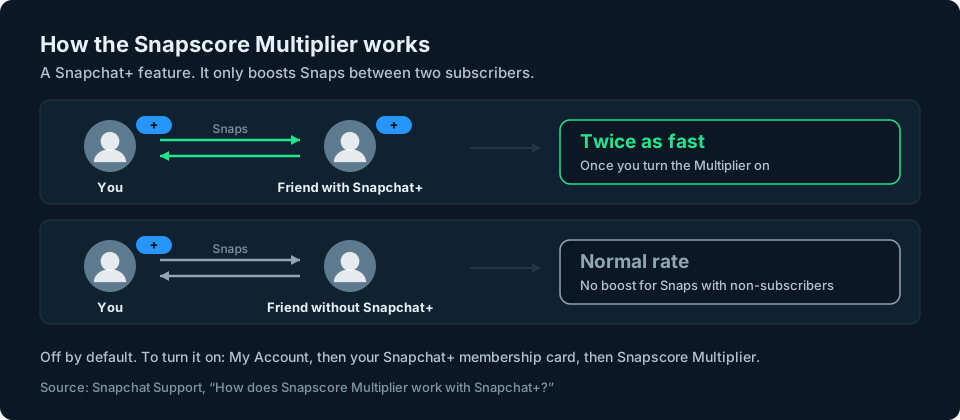
The Snapscore Multiplier is a Snapchat+ feature. Snapchat says it lets subscribers grow their score twice as fast when they exchange Snaps with other Snapchat+ subscribers. Snaps with friends who do not subscribe are not boosted (How does Snapscore Multiplier work with Snapchat+?).
It is off until you turn it on. To switch it on, go to My Account, tap your Snapchat+ membership card and turn on the Snapscore Multiplier option.
Watch out for Snap Score boosters
Searches for ways to boost or buy a Snap Score lead to apps and websites that ask for your Snapchat login. Snapchat warns that unauthorised third-party apps and plug-ins breach its Terms of Service, can put accounts at risk and may result in an account lock that its support team cannot reverse (Can I use third-party apps or plug-ins with Snapchat?).
Never give a Snap Score booster your Snapchat password. Snapchat warns that unauthorised apps using your login details can put your account at risk. A bigger number isn't worth losing access to your account.
Keeping an eye on the numbers that matter
Snap Score is a fun measure of how much you use Snapchat, but it says nothing about your audience. If you post on Snapchat to reach people, the number to watch is your follower count, and if you also post on Instagram, TikTok or YouTube, that means checking each app separately.
We're working on a simpler way to keep an eye on your audience numbers across social platforms. Snapchat support will depend on what its official tools allow. You can sign up at the top of this page to hear when it's ready.
Frequently asked questions
How does Snap Score work?
Snapchat works out your Snap Score with a secret equation. It confirms that Snaps you send, Snaps you receive and Stories you post all count, plus a couple of other factors it does not name. Snapchat says it can't be lowered or reset.
What is a good Snap Score?
There is no official good or bad score. It reflects activity over time, including Snaps sent and received and Stories posted, but Snapchat doesn't disclose the full formula. It is not a measure of popularity or audience.
Does Snap Score go up with chats?
Chat messages are not on Snapchat's list of things that count. Snapchat names Snaps sent, Snaps received and Stories posted, plus other factors it does not name, and has not said whether chats are one of them.
Does Snap Score go up when you receive a Snap but don't open it?
Snapchat says Snaps you receive count, but it doesn't say whether that happens when the Snap arrives or when you open it.
Can I reset or lower my Snap Score?
No. Snapchat says there is no way to lower or reset your Snapscore.
How do I see someone's Snap Score?
If you are friends, open their Friendship Profile by tapping their Bitmoji or name in your chat. Their score is shown there. Snapchat's help pages do not describe a way to see the score of someone who is not your friend.
Can I hide my Snap Score?
Snapchat's help pages do not describe a setting to hide it. The follower count on a Public Profile can be hidden, but that is a different number.
Is Snap Score the same as followers?
No. Snap Score is based on your activity, and Snapchat says it can't be lowered or reset. Followers are people who follow your Public Profile, and that number goes up and down. Your follower count is in the Insights tab of your Public Profile.