How many followers do you need to go live on TikTok?
Photo by Kaboompics.com on Pexels
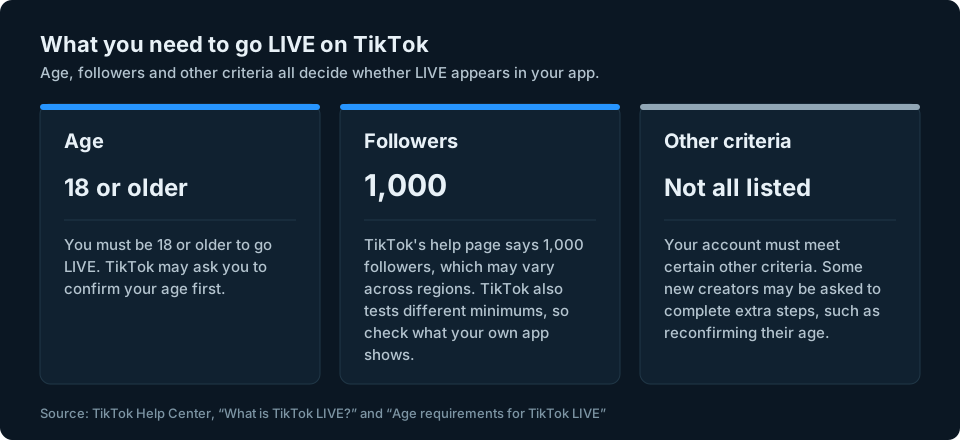
Search for how many followers you need to go LIVE on TikTok and you will see one number again and again: 1,000. That is the number TikTok gives in its own help guidance, but it isn't a universal threshold. TikTok says it may vary across regions and that it tests different minimums. The age rule matters just as much as the number.
This guide sets out what TikTok itself says about who can go LIVE, how to start a LIVE once you qualify and what to check if the option is missing. It is based on TikTok's own Help Center and newsroom, which are linked as we go.
The short answer
- Age: you must be 18 or older to go LIVE, and TikTok may ask you to confirm your age first.
- Followers: TikTok's help page says you need 1,000 followers to go LIVE, although this may vary across regions and TikTok has said it tests different minimums.
- Other criteria: TikTok says accounts must meet "certain other criteria" too, and some new creators may be asked to complete extra steps.
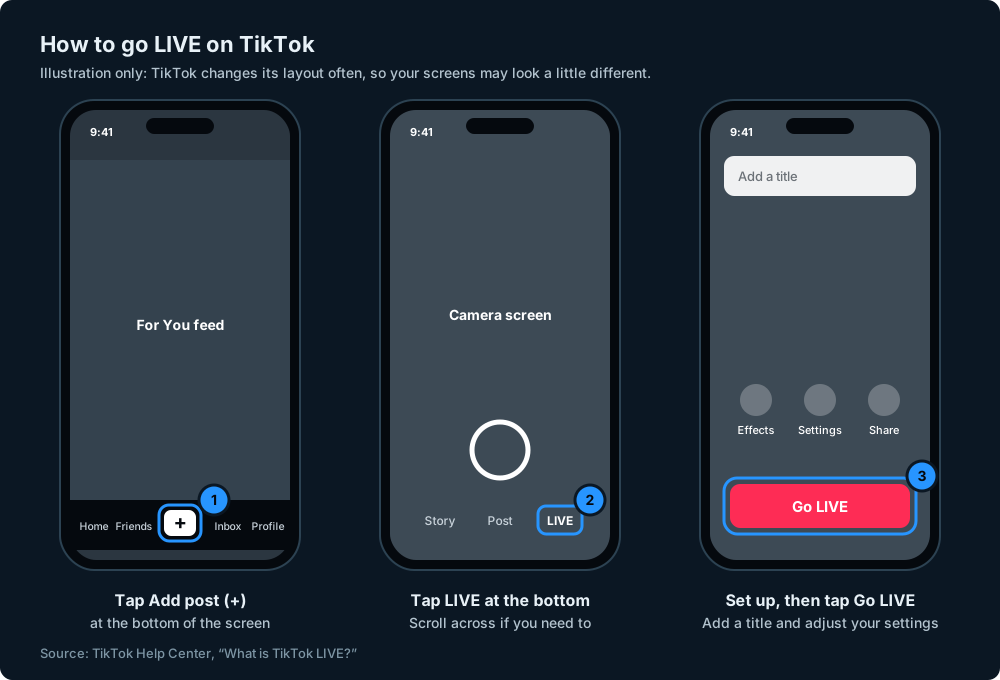
- To go LIVE in the app: tap the Add post (+) button at the bottom, then tap LIVE at the bottom (you may need to scroll across to find it).
- Without enough followers: TikTok doesn't offer a way round its own requirements. The honest route is to keep posting and grow your audience.
What TikTok says you need to go LIVE
You must be 18 or older
TikTok's Help Center is clear on this one: you must be at least 18 years old to go LIVE (What is TikTok LIVE?). The age requirements page puts it the same way: "You must be aged 18 or older to go LIVE." TikTok may ask you to confirm your age before you start. If TikTok confirms you are at least 18, you meet the age requirement. If it can't confirm your age when verification is required, you won't be able to go LIVE (Age requirements for TikTok LIVE).
The minimum age used to be 16. TikTok raised it to 18 from 23 November 2022 (TikTok Newsroom: Enhancing the LIVE community experience), which is why older articles still mention 16.
You need to meet a follower requirement
TikTok's help page lists the requirement as "1,000 followers to go LIVE (may vary across regions)" (What is TikTok LIVE?). Its newsroom adds that an account "must meet certain other criteria, including follower requirements", and that TikTok is "testing different minimum follower requirements" for newer creators (TikTok Newsroom: Helping creators build thriving LIVE communities).
So 1,000 is the figure to aim for, but it isn't the whole story. Where you live can change the number, your account might be offered LIVE at a different point while TikTok tests its rules, and the other criteria below still apply. Check whether LIVE is available in your own app, bearing in mind that TikTok may still ask you to confirm your age before you can start.
Your account must meet other criteria
Followers and age aren't the whole story. TikTok mentions "certain other criteria" without listing them all, and says "some new LIVE creators may be asked to complete additional steps to gain LIVE access", such as reconfirming their age. It also says new creators may gain access to individual LIVE features in phases, rather than receiving every feature at once (TikTok Newsroom).
TikTok's own troubleshooting page puts it simply: only creators who meet the eligibility requirements can go LIVE, and if you meet them and still have a problem, you can report it (Issues with TikTok LIVE).
How to check your follower count
Your follower count is shown on your TikTok profile: tap Profile at the bottom of the app and look at the numbers under your name. If you want to see who is in your followers list, or work out why the number has dropped, our guide to seeing who unfollowed you on TikTok walks through it.
Bear in mind that your count can go down as well as up. TikTok says that if it finds inflated numbers, it "will remove the associated fake followers or likes" (TikTok Community Guidelines: Integrity and authenticity), so a count near the threshold isn't fixed.
How to go LIVE on TikTok
Once your account qualifies, starting a LIVE from the app takes a few taps:
- Open TikTok and tap the Add post (+) button at the bottom of the screen.
- Tap LIVE at the bottom. You may need to scroll across the options to find it.
- Add a title, use the LIVE tools or adjust your LIVE settings, including who can comment.
- Tap Go LIVE to start.
To finish, tap End LIVE at the top, then End now. You can also change tools and settings during a LIVE by tapping More at the bottom, then Settings. These steps come from TikTok's help page What is TikTok LIVE?.
Going LIVE from a computer
TikTok says that to go LIVE on a web browser you must download LIVE Studio (Windows) or OBS Studio (Linux, macOS or Windows) (Moderating on TikTok LIVE). The same eligibility rules apply: a computer isn't a way round them.
Can't see the LIVE option? What to check
If you scroll through the options after tapping Add post (+) and there is no LIVE, these are the things to check, in order:
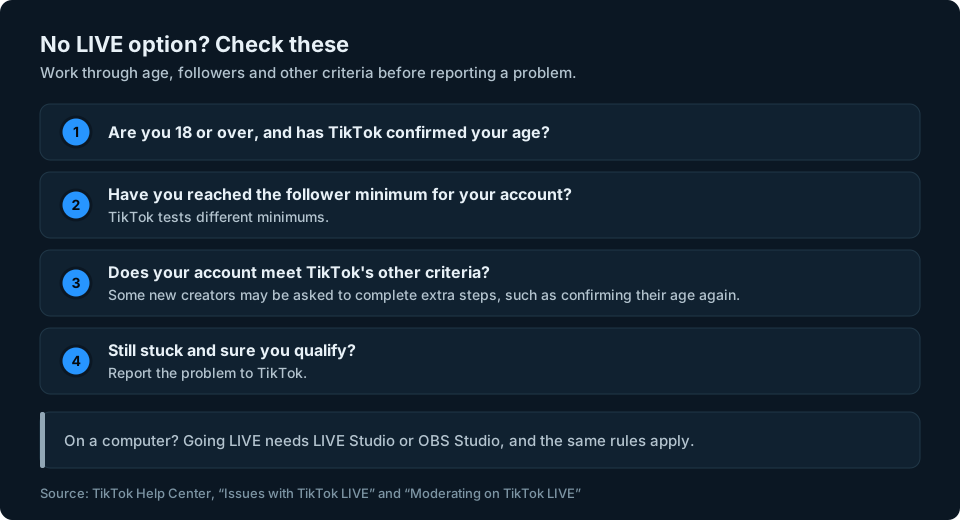
- Your age. You need to be 18 or older, and TikTok may need to confirm it. If TikTok hasn't been able to confirm your age, you won't be able to go LIVE.
- Your followers. You may not have reached the minimum that applies to your account yet. Remember TikTok says it tests different minimums, so a friend with fewer followers having LIVE doesn't mean you should.
- Other criteria. TikTok says accounts must meet other criteria as well, and some new creators may be asked to complete extra steps, such as confirming their age again. Access to individual LIVE features may also be introduced in phases.
- Still stuck? If you are sure you meet the requirements, TikTok says you can report the problem to it (Issues with TikTok LIVE).
How TikTok confirms your age
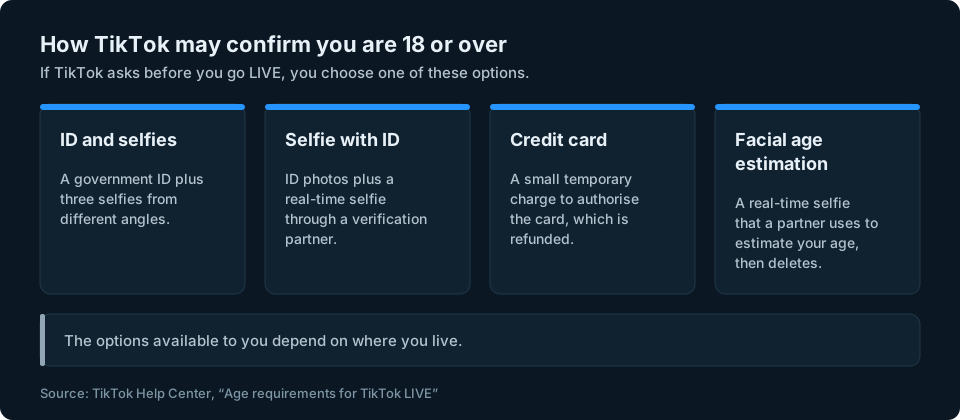
Depending on where you live, TikTok may ask you to confirm you are over 18 before you go LIVE. You may not be asked if you have already confirmed it or if it isn't required where you are. The options TikTok lists, which vary by location, are (Age requirements for TikTok LIVE):
- ID and selfies: photos of a government-issued ID plus three selfies from different angles.
- Selfie with ID: photos of your ID and a real-time selfie, through a verification partner.
- Credit card authorisation: a small, temporary charge to check your card, which is refunded.
- Facial age estimation: a real-time selfie sent to a partner that estimates your age and then deletes the selfie.
TikTok also says that if it confirms someone is under 18, they lose access to LIVE and other features with a minimum age.
Can you go LIVE without 1,000 followers?
This is one of the most searched questions about TikTok LIVE, so here is the straight answer. TikTok doesn't offer a way to skip its own LIVE requirements, and you won't find one in its Help Center.
What is true:
- The number isn't always 1,000. TikTok's help page says the requirement may vary across regions, and TikTok says it tests different minimums, so some accounts may be offered LIVE at a different point. You can't choose which, but it does mean the only real test is your own app.
- Growing your audience is the route. Posting regularly and building a following is how you reach the threshold. It takes time, but it avoids the risks of buying followers or using services that promise to unlock LIVE.
What to avoid:
- Buying followers. TikTok's Community Guidelines don't allow services that "artificially increase engagement, such as selling followers or likes", and TikTok says it will remove fake followers it finds (Integrity and authenticity). Bought followers can disappear and take you back below the line.
- "Unlock LIVE" offers. Videos and sites that promise a trick to go LIVE early are best ignored. TikTok doesn't document a setting or app that lets you bypass its LIVE eligibility requirements.
Watch out for apps and services that ask for your login
Some services promise to get you LIVE faster or grow your followers quickly, and ask for your TikTok username and password to do it. Never give your TikTok password to a third-party app or website. Handing over your login puts your whole account at risk, and services that sell followers or engagement break TikTok's rules anyway. If you want to stream from a computer, TikTok names its own options: LIVE Studio or OBS Studio.
Once you are LIVE: settings worth knowing
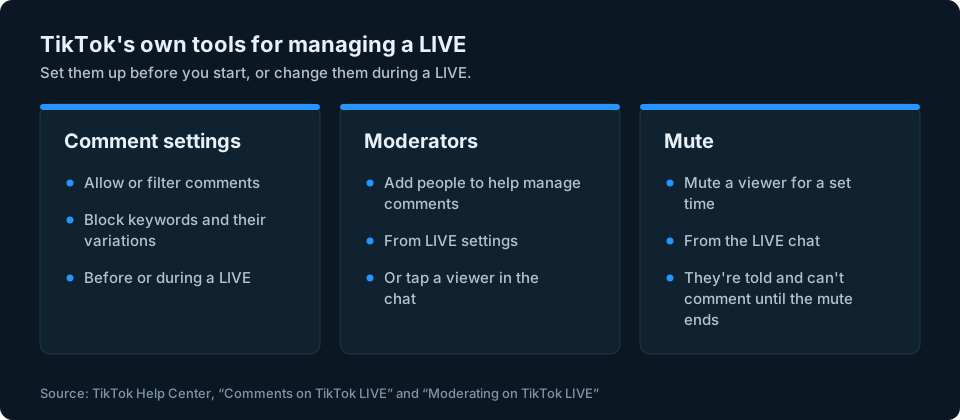
Once you can go LIVE, TikTok has several tools to help you manage your broadcasts:
- Comment settings: before or during a LIVE you can allow or filter comments and block keywords and their variations (Comments on TikTok LIVE).
- Moderators: you can add moderators from LIVE settings, before or during a LIVE, to help manage comments (Moderating on TikTok LIVE).
- Muting viewers: you can mute a viewer's account for a set amount of time from the LIVE chat.
On gifts: TikTok says you must be at least 18 (19 in South Korea) to send or receive Gifts during a LIVE, and that LIVE and Gift features aren't available everywhere (What is TikTok LIVE?).
Keeping an eye on your follower count
If you are working towards LIVE, your follower count is the number to watch. It is worth noting it down regularly, so you can see whether you are getting closer and spot a sudden drop if TikTok removes fake followers.
We're working on a simpler way to keep an eye on your audience numbers across social platforms. You can sign up at the top of this page to hear when it's ready.
Frequently asked questions
How many followers do you need to go live on TikTok?
TikTok's help page says you need 1,000 followers to go LIVE, although this may vary across regions and TikTok has said it tests different minimums. You also need to be 18 or older. Check whether LIVE is available in your app. TikTok may still ask you to complete an age check before you can start.
How old do you have to be to go live on TikTok?
You must be 18 or older. TikTok may ask you to confirm your age before you go LIVE, and if it can't confirm it, you won't be able to start a LIVE.
Can I go live on TikTok without 1,000 followers?
TikTok doesn't offer a way round its LIVE requirements. The 1,000 figure may vary across regions and TikTok tests different minimums, so some accounts may be offered LIVE at a different point, but the only reliable check is whether LIVE appears in your own app.
Why can't I see the LIVE option on TikTok?
Usually because your account doesn't meet the requirements yet: you need to be 18 or over with your age confirmed, meet the follower requirement and meet TikTok's other criteria. If you are sure you qualify, you can report the problem to TikTok.
How do I go live on TikTok?
Tap the Add post (+) button at the bottom of the app, then tap LIVE at the bottom, scrolling across if you need to. Set up your LIVE, including your comment settings, then start it.
Can I go live on TikTok from a computer?
Yes, if your account is eligible. TikTok says you need to download LIVE Studio (Windows) or OBS Studio (Linux, macOS or Windows) to go LIVE from a computer.
Will buying followers let me go live sooner?
It isn't worth the risk. TikTok's Community Guidelines don't allow services that sell followers or likes, and TikTok says it removes fake followers it finds, which could take you back below the requirement.