How to get more followers on Facebook (profiles and Pages)
Photo by Pixabay on Pexels
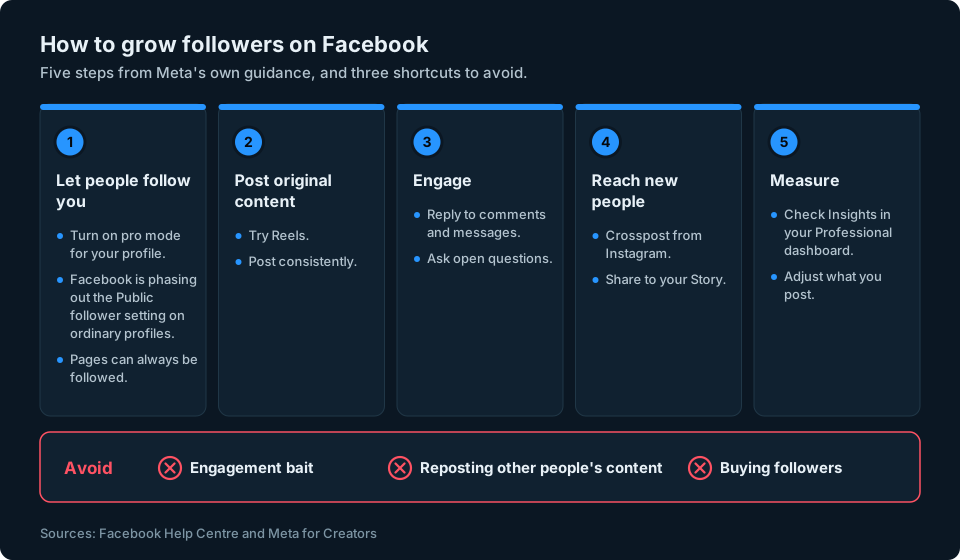
Getting more followers on Facebook starts with something many people miss: making sure people can actually follow you. After that, it comes down to posting the kind of content Facebook shows to new people, talking to the people who turn up and avoiding the shortcuts that quietly shrink your reach.
This guide covers both personal profiles and Facebook Pages. It sticks to what Meta itself says, through the Facebook Help Centre and Meta's own guidance for creators, which is linked as we go. The aim is steady growth from people who genuinely want to follow what you post.
The short answer
- Let people follow you. On a profile, turn on professional mode (pro mode) so people who aren't your friends can follow you (Facebook is phasing out the old Public follower setting on ordinary profiles). A Page can always be followed.
- Start with Reels. Meta's own advice for growing on Facebook is to start with Reels, because they help new people find you.
- Post original content regularly. Meta says profiles and Pages get the most distribution when most of what they post is their own, although nothing guarantees more views or followers.
- Reply and engage. Answer comments and messages, ask open questions and look after the people who already follow you.
- Share your Instagram content too. Crossposting can help your posts reach people who don't already follow you on Facebook.
- Avoid shortcuts. Engagement bait, reposted content and bought followers all work against you.
- Check your numbers. Insights in your Professional dashboard can show how your following changes over time.
Step 1: make sure people can follow you
On a Facebook profile, friends and followers are not the same thing. When you become friends with someone, they automatically start following you. People who aren't your friends can follow you if you turn on pro mode for your profile (Who can follow you on Facebook).
Facebook is changing how this works. Its help page says the Public option in the follower setting is being removed from ordinary (default) profiles, gradually, so some profiles still have it for now. If yours does and you allow the public to follow you, Facebook says you can either keep letting anyone follow you by using pro mode, or stay on a regular profile and only let friends follow you. If you don't choose, it turns pro mode on automatically to keep your followers (Who can follow you on Facebook).
If your profile only allows friends to follow you, people outside your friends list won't be able to follow it. That is the first thing to check before trying to grow a public audience. Our guide to seeing your followers on Facebook explains the difference between friends and followers in more detail.
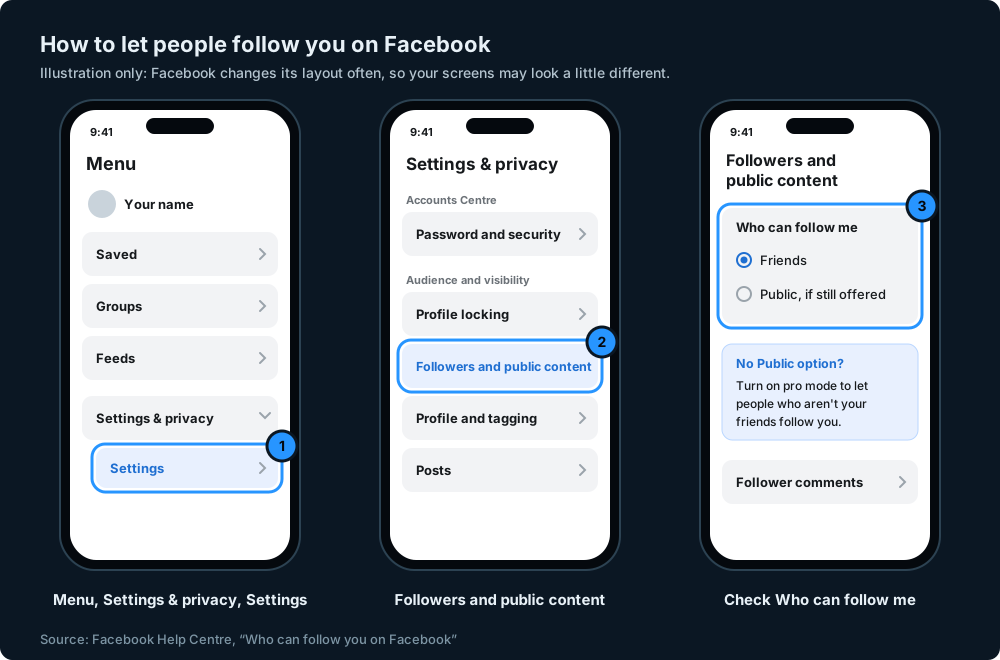
How to change Who can follow me
On iPhone or Android:
- Open the Facebook app and tap Menu.
- Tap Settings & privacy, then Settings.
- Tap Followers and public content.
- Check Who can follow me. If you still see a Public option, you can choose it for now; if not, turn on pro mode (below) to allow public followers.
On a computer, click your profile picture, then Settings and privacy, then Settings. Under Audience and visibility, click Followers and public content (Facebook Help Centre: followers and public content).
As the Public option is being phased out of ordinary profiles, pro mode is the long-term way to let people who aren't your friends follow you.
Turn on pro mode for your profile
Pro mode adds professional tools to your existing profile rather than creating a new account. Your friends and posts stay as they are. Turning it on sets Who can follow me to Public and gives you insights about your content and audience (Facebook Help Centre: turn pro mode on or off).
To turn it on from a computer, click your profile photo in the top right, click your name, click Options below your cover photo, then Turn on pro mode.
Think before turning it off again later. Facebook's help page says that when you turn off pro mode, your Who can follow me preference changes to Friends and "you will lose any followers who are not your friends". You can allow public followers again by turning pro mode back on (Turn pro mode on or off for your Facebook profile).
Profile or Page?
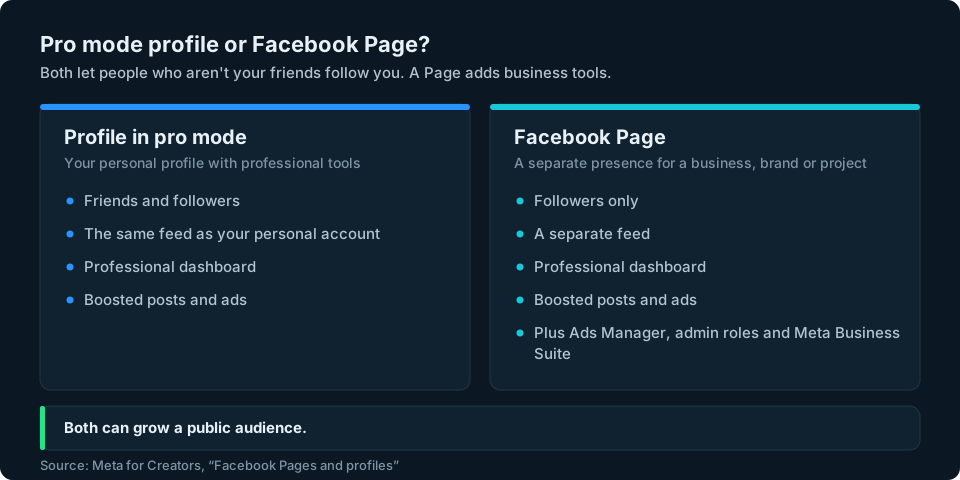
If you are building an audience for a business, a brand or a project, a Facebook Page may suit you better than your personal profile. Meta's creator guidance says both pro mode profiles and Pages can grow a public audience, use the Professional dashboard and boost posts. The main differences are that a pro mode profile has friends and followers and shares your personal feed, while a Page has followers only, its own feed and business tools such as Ads Manager, admin roles and Meta Business Suite (Meta for Creators: Facebook Pages and professional mode for profiles).
Step 2: post what Facebook shows to new people
Meta explains that your posts reach people in two ways: people who already follow you, and people who don't, through shares and recommendations such as Suggested for you (Meta for Creators: Grow). Reaching people who don't already follow you is where new followers can come from, so it helps to make content that Facebook may recommend.
Start with Reels
Meta's growth guide for creators says that if you are new to Facebook, you should start with Reels, because they help you get noticed by new people. It also recommends posting frequently and consistently, so people have a reason to come back (Meta for Creators: best practices for growing your Facebook presence).
Meta's own tips for Reels include:
- Tell a story, with a clear beginning, middle and end, or a strong hook.
- Share your point of view. Show your personality or teach people something.
- Join trends with your own angle, and use one or two relevant hashtags. Meta notes that tags like #Explorepage and #Reels won't get you featured.
- Shoot vertically at 9:16.
- Share widely, to your Story and from Instagram to Facebook.
These come from Meta's Reels best practices.
Keep it original
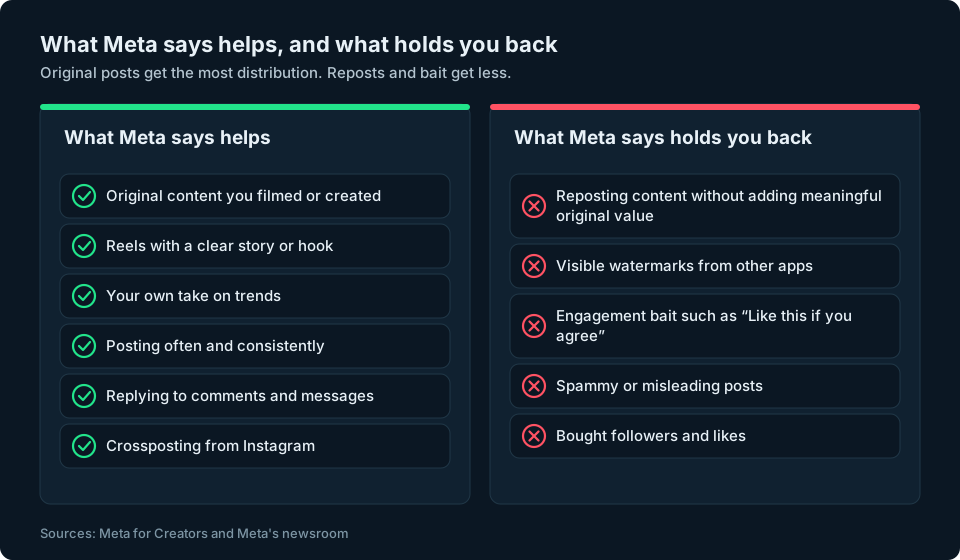
This is the one that catches people out. Meta says profiles and Pages get the most distribution when most of what they post is content they filmed or created themselves. It also says it wants to combat "the repeated reposting of content from other creators without permission or meaningful enhancements". Accounts that repeatedly reuse other people's videos, photos or text this way can see reduced distribution on everything they share and can lose access to monetisation for a time (Meta for Creators: combating unoriginal content).
You can use content you're approved to use from other sources, as long as you make it your own through creative editing, a voiceover or commentary. Meta says these changes must be meaningful: simply stitching clips together or adding your watermark doesn't count. It also asks creators to avoid visible watermarks from other apps.
Plan your posts
Meta suggests planning posts ahead, using the post composer to schedule them where that option is available, checking recommended times to post and sharing to relevant Groups where your audience already spends time, following each Group's rules (Meta for Creators). Posting on a regular rhythm is easier when the posts are ready before the week starts.
Step 3: talk to the people who turn up
Followers stay when they feel there is someone on the other end. Meta's guide to fan engagement suggests:
- Reply to comments and messages, and prioritise your most loyal fans when you are short of time.
- Ask open-ended questions in your posts, and consider a Live Q&A.
- Recognise regulars. The top fan badge and weekly engagement list show your most active supporters, and Meta suggests regular shout-outs.
- Keep the comments a good place to be. You can automatically hide comments that match criteria you set, such as those with links or certain words, and limit who can comment on a post.
These come from Meta for Creators: Fan Engagement 101.
Step 4: bring in people from elsewhere
Crosspost from Instagram
If you already post on Instagram, you can share your Reels, posts and Stories to Facebook automatically. Meta points out that the two apps have different audiences, which can help you find new followers. You need an Instagram creator or business account, and you switch it on in Instagram under Settings and privacy, then Crossposting, where you can choose Stories, posts and Reels separately (Meta for Creators: Crossposting).
Meta's advice is to tailor what you share for your Facebook audience rather than treating it as a copy.
Share your link
The simplest growth often happens off Facebook. Put a link to your profile or Page wherever people already find you: your website, your email signature, your other social profiles and anything you print. Someone who already knows your work is far more likely to follow than a stranger.
Step 5: measure and adjust
Meta's growth advice ends with measuring what works: keep an eye on follower growth and your Professional dashboard, and adjust as you go (Meta for Creators).
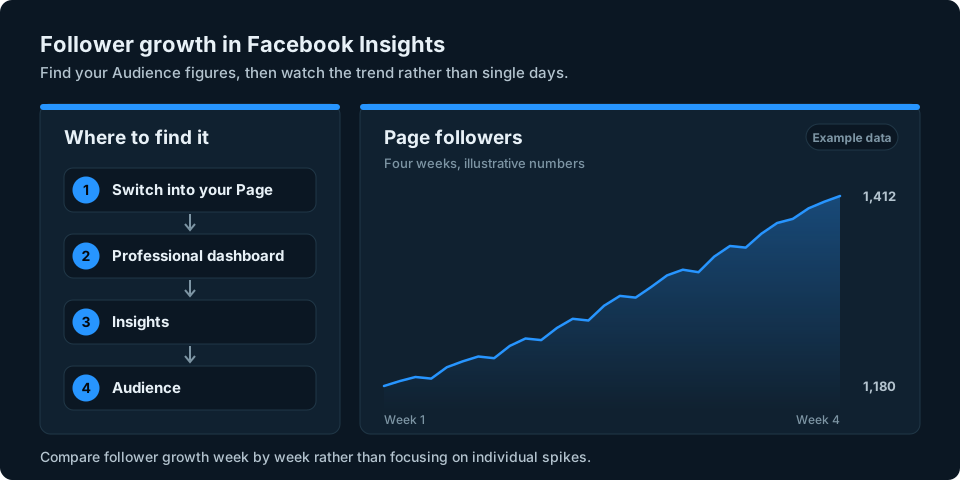
For a Page, switch into the Page and go to Professional dashboard, then Insights, then Audience (Facebook Help Centre: insights about your Page's followers). Meta is renaming Professional dashboard to Creator Dashboard or Business Dashboard, so you may see one of those names instead. Page Insights go back two years, and age, gender and location details appear once there is data for 100 or more people (Facebook Help Centre: Page Insights).
Look at follower changes week by week rather than day by day. A single post can cause a spike, but the trend over a month tells you whether your routine is working. If you see a sudden drop instead, our guide to who unfollowed or unfriended you on Facebook explains what Facebook does and doesn't show.
Watch out for shortcuts
Engagement bait
Posts like "LIKE this if you agree" or "Share if you're a dog person" might seem like an easy win. Facebook says it reduces the reach of engagement bait, and Pages that use it repeatedly face bigger drops across their posts. Genuine requests for help or advice are not affected (Meta: Fighting engagement bait on Facebook).
Buying followers or likes
Paid followers and likes are what Meta calls fake engagement, and it has taken legal action against services that sell them (Meta: Taking action against fake engagement and ad scams). Bought followers are unlikely to become a genuinely interested audience, and inflated follower numbers don't guarantee more views, comments or shares. They can also make your account look less trustworthy to real people and to brands. Our guide to spotting fake Instagram followers covers the warning signs, which are similar on Facebook.
Follow for follow and growth apps
Swapping follows with strangers gives you followers who aren't interested in what you post. Apps and websites that promise followers often ask for your Facebook login. Never type your Facebook password into a third-party app or website.
Keeping an eye on your growth
Facebook shows your follower numbers in Insights, but only for Facebook. If you are also building an audience on Instagram, YouTube or TikTok, that means checking each app separately to see what is working.
We're working on a simpler way to keep an eye on your audience numbers across social platforms. You can sign up at the top of this page to hear when it's ready.
Frequently asked questions
How do I get more followers on Facebook?
First make sure people can follow you: turn on pro mode for your profile, or use a Page. Then post original content often, starting with Reels, reply to the people who comment and crosspost from Instagram if you use it. Meta says original content gets the most distribution.
Why can't people follow me on Facebook?
Usually because only your friends can follow you. Facebook is removing the Public follower option from ordinary profiles, so turn on pro mode to let people who aren't your friends follow you.
Do my Facebook friends count as followers?
Facebook says that when you become friends with someone, they automatically start following you. Friends and people who follow you without being friends are different relationships on Facebook. To grow beyond your friends, you need public followers on a profile, or a Page.
Should I use a Facebook Page or my profile with pro mode?
Both can grow a public audience. A pro mode profile keeps your friends and personal feed. A Page has followers only, its own feed and business tools such as Ads Manager and admin roles, which suits a business or brand.
Do Reels help you get more followers on Facebook?
Meta's own advice for growing on Facebook is to start with Reels, because they help new people find you. Meta recommends original Reels with a clear story, an interesting point of view or a strong hook.
Is it worth buying Facebook followers?
No. Meta treats paid followers and likes as fake engagement and has taken legal action against services that sell them. Bought followers are unlikely to become a genuinely interested audience, and inflated follower numbers don't guarantee more views or engagement.
Does reposting content help on Facebook?
Simply reposting someone else's content is unlikely to help. Meta says repeated reposting without permission or meaningful enhancements can lead to reduced distribution. Adding genuine creative value is different from making superficial changes.
How can I see if my Facebook followers are growing?
On a Page or pro mode profile, go to Professional dashboard, then Insights, then Audience. Compare your follower numbers week by week rather than day by day.