How to get more followers on Pinterest (using Pinterest's own advice)

Photo by cottonbro studio on Pexels
Pinterest works differently from most social apps. People come to it to search for ideas and plan things, not to scroll through a feed of friends, so your follower count plays a different part than it does on Instagram or TikTok. Followers still matter: they have a reason to keep coming back to your Pins, and their saves and engagement can help your content reach more people.
This guide covers where to see your followers, how followers fit into how Pinterest shows Pins and the practical steps Pinterest itself recommends for building an audience. It is based on Pinterest's own help pages and business advice, which are linked as we go.
The short answer
- See your followers: tap your profile picture, then Followers under your name.
- Set up your profile: use a clear name, bio and focused boards. A free business account gives you analytics, and you can claim your website if you have one.
- Pin fresh content regularly: Pinterest suggests adding new content every week rather than chasing a set number of Pins.
- Write for search: use clear titles, descriptions and board names with the words people actually search for.
- Aim for saves: saves tell Pinterest your Pins are useful, which can show them to more people over time.
- Don't buy followers: Pinterest's rules ban buying engagement, and apps that ask for your password put your account at risk.
How followers work on Pinterest
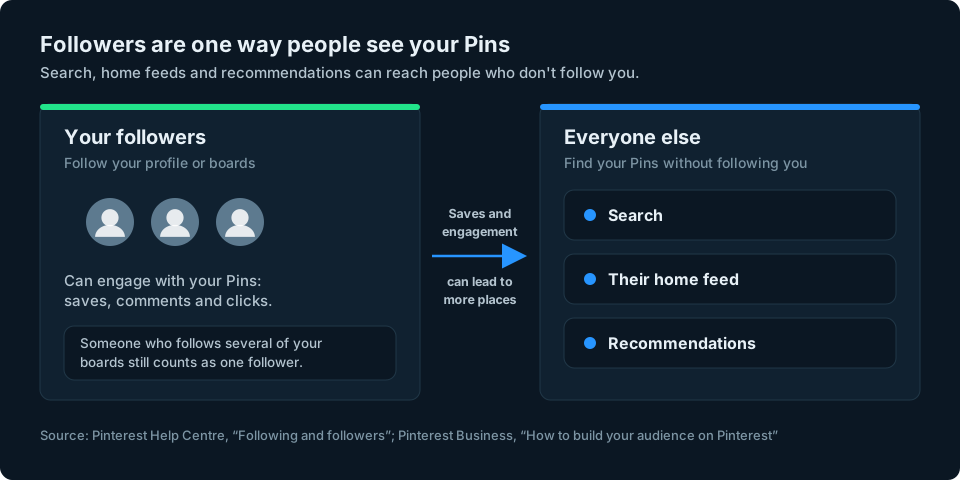
Pinterest counts your followers as the people who follow you or your boards. Someone who follows several of your boards still counts as one follower (Pinterest Help: Following and followers).
In a 2018 post introducing its Following tab, Pinterest's creators team described followers as your most engaged fans, and explained that engagement from followers could help Pins reach more people through search, feeds and recommendations. The exact way Pinterest shows followed accounts may have changed since then. The same post notes that a follower count means something different on Pinterest than on other sites (Pinterest Creators: Reach your followers and beyond).
In practice, that means two things:
- Many people will see your Pins without following you. Pinterest describes people using it like a search engine, so a Pin with a clear title and description can be found by anyone searching for that idea (Pinterest Business: How to build your audience on Pinterest).
- Followers come from being worth following. When people keep finding useful Pins from you in search, some of them follow you to see more. Growing followers is mostly a result of posting good, findable ideas over time.
How to see your followers
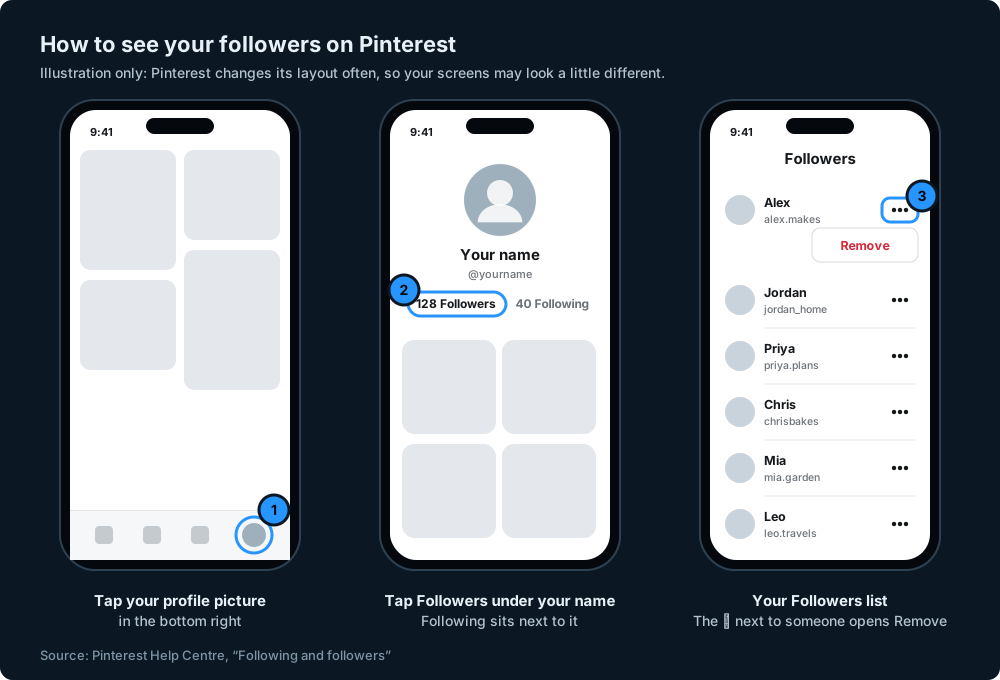
- Open the Pinterest app and tap your profile picture in the bottom right.
- Tap Followers under your name to see the people who follow you.
- To see who you follow, tap Following instead. You can switch between People and Boards.
On a computer, click your profile picture in the top right, then click Followers under your name. These steps come from Pinterest's help page on following and followers, which also explains how to remove a follower: open Followers, tap the ellipsis icon next to their name, choose Remove and confirm.
Does Pinterest Analytics show followers?
Pinterest Analytics needs a business account. On a computer, click the menu icon at the top left and choose Analytics, then Overview. In the app, open your profile, tap the menu control at the top left and select Analytics. Pinterest's help page gives instructions for both computer and mobile (Pinterest Help: Pinterest Analytics).
Analytics focuses on how your Pins perform: impressions, engagements, saves, Pin clicks, outbound clicks, your total audience and your engaged audience. Pinterest also lists Follows as a metric for individual Pins. This is different from your current total number of followers, which you can see on your profile. Analytics shows the last 30 days by default and can go back about a year and a half.
Step 1: set up your account properly
Use a free business account
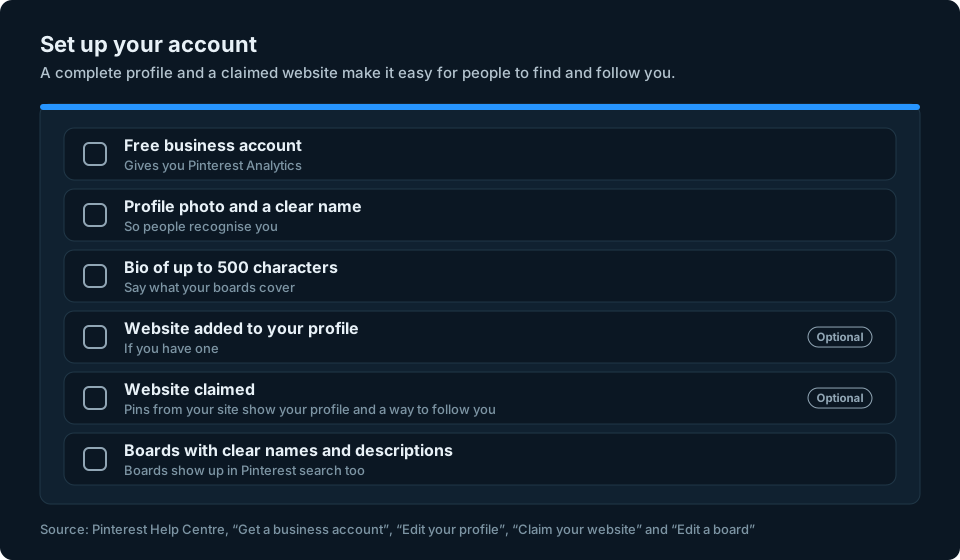
A business account is free. It gives you Pinterest Analytics and the option to run ads, and converting keeps your existing Pins and followers. Business accounts are public, so you'll need to make your account public if it's currently private. You can switch back to a personal account at any time (Pinterest Help: Get a business account). In the app, tap your profile picture, then your profile photo, then Account management and Convert to a business account.
Make your profile clear
Your profile is what people see when they wonder whether to follow you. Pinterest lets you set a profile photo, a name, a bio of up to 500 characters and a website (Pinterest Help: Edit your profile). Use the bio to say plainly what people will find on your boards, in the words they'd search for.
Claim your website
If you own a website and can edit its code or DNS settings, you can claim it on Pinterest. If you don't have a website, you can skip this step. Once it's claimed, whenever someone saves an image from your site, your profile picture appears with the Pin, the Pin links to your profile and people can follow you from it. You can also see how often your content is shared (Pinterest Help: Claim your website).
To claim it, go to Settings, then Link to Pinterest, and click Claim next to Websites. Pinterest gives you a tag to add to your site, a file to upload or a DNS record to add, then you click Verify. Most social media profiles and marketplace shops can't be claimed, and each website can only be claimed by one Pinterest account.
Step 2: organise your boards
Boards show up in Pinterest search too, so Pinterest recommends giving each one a clear title and descriptive text (How to build your audience on Pinterest). A board called "Ideas" tells nobody anything. A board called "Small garden ideas for patios" tells people exactly what they'll find.
You can change a board's name, description, cover and header image at any time. In the app, open the board, tap the ellipsis icon and choose Edit board and header image (Pinterest Help: Edit a board). Remember that people can follow individual boards as well as your whole profile, so focused boards give them more reasons to follow.
Step 3: add fresh Pins every week
Pinterest's own advice is to add new content every week, to keep your current followers engaged and reach new people. It says to focus on the content itself rather than "anchoring to a specific number of Pins per week" (How to build your audience on Pinterest).
The same page suggests:
- Mixing formats, such as video, carousels and collages.
- Reusing what you already have, such as photos and videos made for other platforms, to save time.
- Planning around moments when people are searching and planning, such as seasons and events. Pinterest's trends tool shows topics that are growing for different audiences.
Make each Pin easy to read
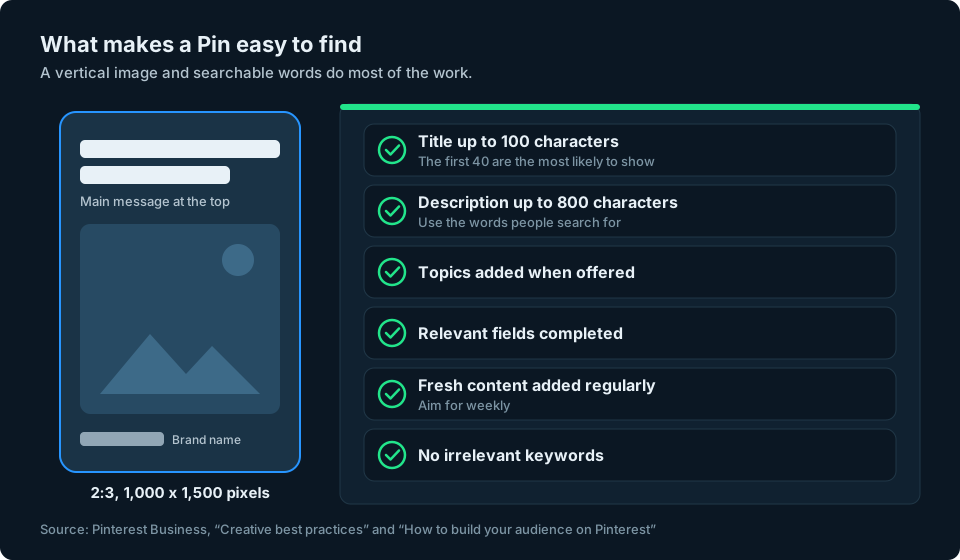
Pinterest's creative advice for ads is useful when making ordinary Pins too. It recommends a vertical 2:3 image, such as 1,000 by 1,500 pixels, because most people use Pinterest on their phone and images outside that ratio may be cut off in the feed. Keep any text short, put the main message near the top and make your name or brand visible without letting it take over (Pinterest Business: Creative best practices).
Step 4: write for search
Because people use Pinterest like a search engine, the words on your Pins matter. Pinterest suggests filling in every field when you create a Pin, even ones that don't show to people, because they power its recommendations. Always add a title and description with relevant keywords, and add topics when the option appears (How to build your audience on Pinterest).
Pinterest's creative specifications give Pin titles a limit of 100 characters, with the first 40 most likely to appear, and descriptions a limit of 800 characters (Creative best practices). Write them the way a person would search: "easy weeknight pasta for two" tells Pinterest and readers much more about your Pin than "Tuesday dinner".
Don't overdo it. Pinterest's rules list "stuffing" irrelevant keywords as a spam tactic (Pinterest Community Guidelines).
Step 5: aim for saves and talk to people
Pinterest says saves signal that your content is useful and inspiring, so it may show those Pins to more interested people, creating "a halo of additional reach over time". It suggests encouraging saves with clear language and specific calls to action (How to build your audience on Pinterest).
The same page recommends keeping an eye on comments, replying when people need help and being authentic. Pinterest describes the goal as an "active community that values and engages with your content", not a passive follow.
Watch out for shortcuts
Buying followers
Pinterest's Community Guidelines ban "buying or selling engagement", running accounts that aren't authentic and using automation Pinterest hasn't approved (Pinterest Community Guidelines). Bought followers are unlikely to save or click your Pins, so they do little for your reach, and buying them risks breaking Pinterest's rules. Bought followers are no substitute for genuine interest in your Pins, so focus on content people want to save and come back to. If you're tidying up suspicious accounts elsewhere, our guide to spotting fake Instagram followers explains the warning signs.
Apps that ask for your password
Pinterest says it will never ask for your password by email, message or phone, and recommends logging in only on pinterest.com and the official apps, turning on two-factor authentication and being wary of deals that seem too good to be true (Pinterest Help: Protect your account). Never give a follower booster your Pinterest password.
Keeping an eye on your growth
Your Pinterest follower count may rise or fall from week to week. Recording it every week or month, alongside the Pins you publish, helps you see the longer-term trend rather than judging your progress by a single day's number. If you also post on Facebook, our guide to getting more followers on Facebook covers that side.
We're working on a simpler way to keep an eye on your audience numbers across social platforms, Pinterest included. You can sign up at the top of this page to hear when it's ready.
Frequently asked questions
How do I get followers on Pinterest?
Set up a clear profile, claim your website if you have one, organise focused boards with clear names and add fresh Pins every week with titles and descriptions that use the words people search for. People who keep finding useful Pins from you are the ones who follow you.
Do followers matter on Pinterest?
Yes, but differently from other platforms. Followers can keep up with your content, and their saves and engagement may help your Pins reach more people. Pinterest also lets people discover your Pins through search and recommendations without following you.
How do I see my followers on Pinterest?
Tap your profile picture, then tap Followers under your name. On a computer, click your profile picture in the top right, then Followers.
Does someone who follows my boards count as a follower?
Yes. Pinterest counts people who follow you or your boards, and someone who follows several of your boards counts as one follower.
How often should I post on Pinterest?
Pinterest suggests adding new content every week, and says to focus on the content rather than a specific number of Pins per week.
Is a Pinterest business account free?
Yes. Converting is free, keeps your Pins and followers, and gives you Pinterest Analytics. Business accounts are public, so a private account has to be made public first. You can switch back to a personal account at any time.
Should I buy Pinterest followers?
No. Pinterest's Community Guidelines ban buying or selling engagement, and bought followers are unlikely to save or click your Pins, so they do little for your reach.