How to see your newest Instagram followers (and why they're not always in order)

Photo by Adrienn on Pexels
Instagram doesn't have a single "newest followers" button, but you can see who followed you recently. The quickest place is your notifications, where Instagram tells you when someone starts following you. Your followers list shows everyone, but it isn't always in the order you'd expect.
This guide explains where to find your newest followers, what Instagram does and doesn't say about how your followers list is sorted, why new follower notifications sometimes go missing and what a sudden rush of followers can mean. It's based on Instagram's own Help Centre, linked as we go, and it's about your own account.
The short answer
- Notifications: Instagram notifies you when someone starts following you or requests to follow you, and you can filter your notifications to show follows. This is the best place to see who followed you recently.
- Followers list: tap Followers on your profile to see everyone who follows you. Instagram hasn't said how this list is ordered, so the newest people aren't guaranteed to be at the top.
- Missing alerts: check your new follower notification setting in Instagram and that Instagram notifications are allowed on your iPhone.
- A copy to keep: you can export your own follower information from Accounts Centre.
- A sudden burst: lots of new followers at once can mean a post did well, or that fake accounts have found you.

Where to see your recent Instagram followers
Your notifications are the closest thing Instagram has to a "new followers" list. Instagram's Help Centre says you get a notification when an account starts following you or requests to follow you, alongside likes, comments, mentions and tags (How notifications work on Instagram).
- Open Instagram and go to your feed.
- Tap the heart icon in the top right to open your notifications.
- To see only follows, tap Filter in the top right, choose the follows category, then tap Apply.
- Look for lines that say someone started following you. Recent ones are near the top.
- Tap a name to open their profile. At the time of writing there's usually a Follow back button if you want to follow them too.
To go back to all your notifications, tap Filter, then Clear.
Two things can make this list look shorter than you expect. Instagram may combine several follows into one line, such as one name "and 3 others started following you". Tapping that line may show the other accounts included. Notifications aren't a permanent record of everyone who has followed you, so don't rely on them for a complete history.
If your account is private, new followers have to ask first. Their requests appear in your notifications as follow requests, and they only become followers once you approve them.

Why your followers list isn't always in order
To see everyone who follows you, go to your profile and tap Followers. You can search the list for a name, which is the easiest way to check whether a particular person follows you.
What you can't rely on is the order. Instagram hasn't published how it sorts your followers list, and many people notice it isn't strictly newest first. Don't assume the people at the top followed you most recently. Scrolling down from the top isn't a reliable way to find everyone who followed you this week.
It's easy to mix up with the other tab. At the time of writing, the app may show a Sort by option on your Following tab, which lists the accounts you follow, with choices such as Date followed: Latest. Instagram's Help Centre doesn't document sorting either list, and we couldn't confirm any date sort for your Followers tab, so don't rely on the Following sort to tell you who followed you.
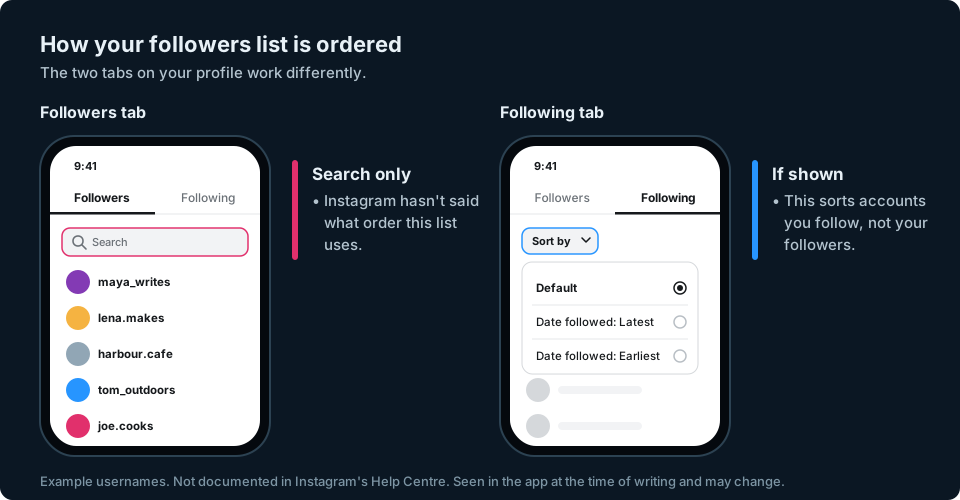
If you want a copy of your followers list to keep, your own data export is the better option. These are the steps from Instagram's Review and export a copy of your Instagram information page:
- Go to your profile and tap Menu in the top right.
- Tap Accounts Centre (Instagram is gradually moving people to Meta Account, so you may see that name instead), then Your information and permissions.
- Tap Export your information, then Create export.
- Select your Instagram profile and tap Next.
- Select Export to device.
- Choose the specific information you want (your followers and following), plus a date range and format, then tap Start export.
Instagram says it can take up to 30 days to email you the link, and once the export is ready you have four days to download it. When it's ready, download it and look for the followers information. It may include the date each account followed you, which lets you sort it in a spreadsheet, but Instagram's help pages don't describe the file contents, so check your own export before relying on it as a dated record. Keep the file private, because it contains other people's usernames.
How to turn on new follower notifications
If you'd like a ping on your phone whenever someone follows you, check the setting inside Instagram first. Instagram's Help Centre page Manage push notifications you receive explains that you can choose which notifications you get:
- Tap Profile or your profile picture to go to your profile.
- Tap Menu in the top right.
- Below How you use Instagram, tap Notifications.
- Look for the section about following and followers, and make sure notifications for new followers are on.
Instagram's Help Centre doesn't name the follower setting itself, and Instagram rearranges its settings from time to time, so the exact wording in step 4 may differ.
Why new follower notifications go missing
If you've turned the setting on and still don't get alerts, these are the things to check:
- Notifications are paused. In Notifications, check the toggle next to Pause push notifications (Mute push notifications on Instagram). Also check Sleep mode, which automatically pauses notifications during times you choose. You'll find it under Menu, then Time management, then Sleep mode (Turn sleep mode on or off on Instagram). Teen Accounts are put into sleep mode from 22:00 to 07:00 by default.
- Your iPhone is blocking them. Apple lets you choose which apps can send notifications (Change notification settings on iPhone). Go to Settings, then Notifications, then Instagram and check that notifications are allowed.
- A Focus or Scheduled Summary is holding them back. Do Not Disturb or another Focus on your iPhone can silence notifications while it's on. If Instagram is included in a Scheduled Summary (Settings, then Notifications, then Scheduled Summary), its alerts arrive later in a batch.
- The follows were grouped. If several people follow you in a short time, you may get one alert for all of them rather than one each.
- The follow isn't listed any more. Instagram doesn't promise that every follow notification stays visible, so a quick follow can be easy to miss.
A missed alert doesn't mean a missed follower. Even if no notification popped up on your phone, the follow can still be listed when you open your notifications inside Instagram.

What a sudden burst of new followers can mean
A sudden jump in followers can be good news. A post or reel may have reached people outside your usual audience, or a bigger account may have tagged or shared you. If your account is public, Instagram's free insights show trends across your followers and your content, including new followers, so check whether a particular post reached more people than usual around that time. Insights show trends, not a list of who followed you.
Sometimes the cause is less welcome. A wave of accounts with no profile photo, no posts and usernames full of numbers can be fake or automated accounts. They often show little real engagement, and your count can fall again if Instagram removes fake accounts, which is why a spike is sometimes followed by a dip. Our guide to spotting fake Instagram followers covers the signs and what to do about them.

Whatever the reason, don't use apps that promise extra followers. Instagram explains why you should not use apps that offer likes and followers, and you should never give any app your Instagram password.
Keeping an eye on your audience
Seeing who followed you today is satisfying, but the bigger question is usually whether your account is growing over time. Watching your follower count week by week shows you when it's growing, when it dips and when something unusual is happening. Comparing that with your posts can hint at what brings people in. And if the numbers start going the other way, our guide to seeing who unfollowed you on Instagram covers the safe ways to check.
If you're keeping track of followers on several platforms, we're working on something to make that easier. Sign up at the top of this page to hear when it's ready.
Frequently asked questions
How do I see my most recent followers on Instagram?
Open your notifications by tapping the heart icon in the top right of your feed. New follows appear there, and you can tap Filter to show only follows.
Are Instagram followers in order of when they followed?
Not reliably. Instagram hasn't said how it orders your followers list, and recent followers aren't always at the top. Your notifications are the better place to see who followed you recently.
Can I sort my Instagram followers by date?
Not that we could confirm. Instagram's Help Centre doesn't document a date sort for your followers, and any Sort by option you see on your Following tab applies to the accounts you follow. Your data export may include follow dates, but check your own file before relying on them.
Why am I not getting notifications when someone follows me on Instagram?
Check that follower notifications are on in Instagram under Notifications, that Pause push notifications and Sleep mode are off and that Instagram is allowed to send notifications in your iPhone's Settings. Several follows close together may also arrive as one grouped notification.
Why did I get lots of new Instagram followers suddenly?
Often it's because a post or reel reached new people. If the new accounts have no posts, no profile photo and odd usernames, they may be fake accounts.
Does Instagram tell someone when I follow them back?
Yes. Following someone back is a normal follow, so they can see it in their notifications, just as you saw theirs.