How to check your Instagram follower count, growth and history

Photo by Pavel Danilyuk on Pexels
Your follower count is on your Instagram profile, but that number on its own doesn't tell you much. To see how it's changing, you need your insights, which show how many followers you've gained or lost over a period you choose, up to the last 90 days.
This guide covers where to see your exact count, how to check your growth in insights, how far back Instagram's own history goes, how to keep a longer record yourself and why your count sometimes jumps or drops overnight. It's all about your own account, and it's based on Instagram's and Meta's own pages, linked as we go.
The short answer
- Your count: it's on your profile. Large numbers may be shortened, such as 12.3K.
- Your growth: your insights show how many followers you gained or lost over a period you choose, if your account is public and has at least 100 followers.
- Your history: Instagram's insights look back up to 90 days. For anything longer, note your count once a month in a spreadsheet.
- Checker websites: you don't need one for your own account. Instagram shows your numbers for free, and you should never type your password into another site.
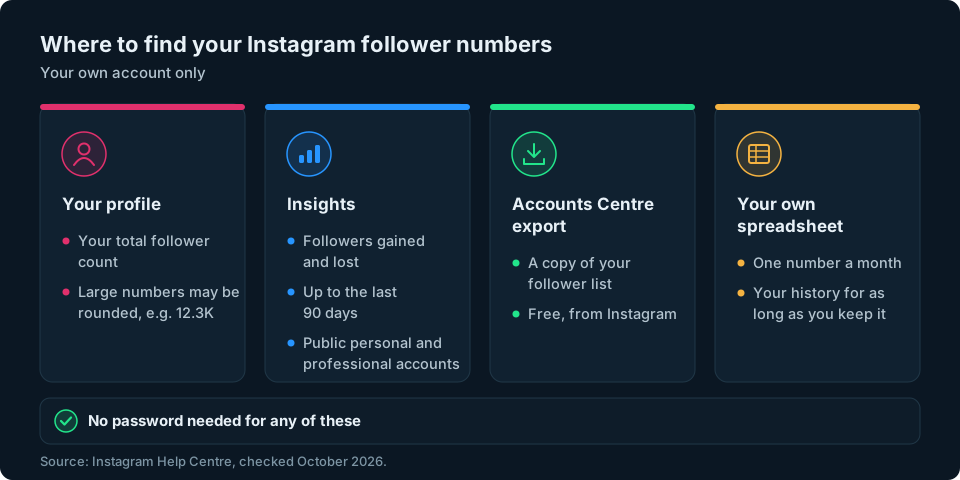
How to see your exact Instagram follower count
- Open Instagram and tap Profile or your profile picture.
- The number next to Followers at the top is your current total.
- Tap Followers to see the list of accounts that follow you.
Once you have a lot of followers, the profile may shorten the number, so 12,348 might appear as 12.3K. Instagram's Help Centre doesn't spell this out, but if you need a fuller figure for a report or your own records, your insights (see the next section) may show it, along with how it has changed.
What about Instagram follower checker websites?
Plenty of websites offer to "check" a follower count. For checking your own follower count and recent growth, you don't need one. Instagram already shows you those figures for free. If a site or app ever asks for your Instagram password, don't give it. Our guide to Instagram unfollow tracker apps explains what to check before you connect anything.
How to see follower growth in Instagram insights
Insights are Instagram's built-in statistics. Instagram says you need a public account, personal or professional, and that you can view any period within the last 90 days (View account and content insights on Instagram). If your account is private, you won't have them.
- Tap Profile or your profile picture.
- Tap Professional dashboard if you have a professional account, or Your dashboard if you have a personal one. If you can't see either, tap More to go to Settings and activity, then tap Insights below For professionals, or Your dashboard below Your insights and tools.
- You'll see an overview of the last 30 days, including New followers. Tap it to see more detail, if your screen offers it.
- To change the period, tap the drop-down menu and pick a preset (last 7 days, last 14 days, last 30 days, previous month or last 90 days) or choose your own start and end dates, then tap Update.
Instagram's About Instagram insights page says the followers insight shows your growth, meaning the number of followers you've gained or lost, along with your followers' top locations, age range and most active times. You can tap the (i) in the top right for definitions of each figure.
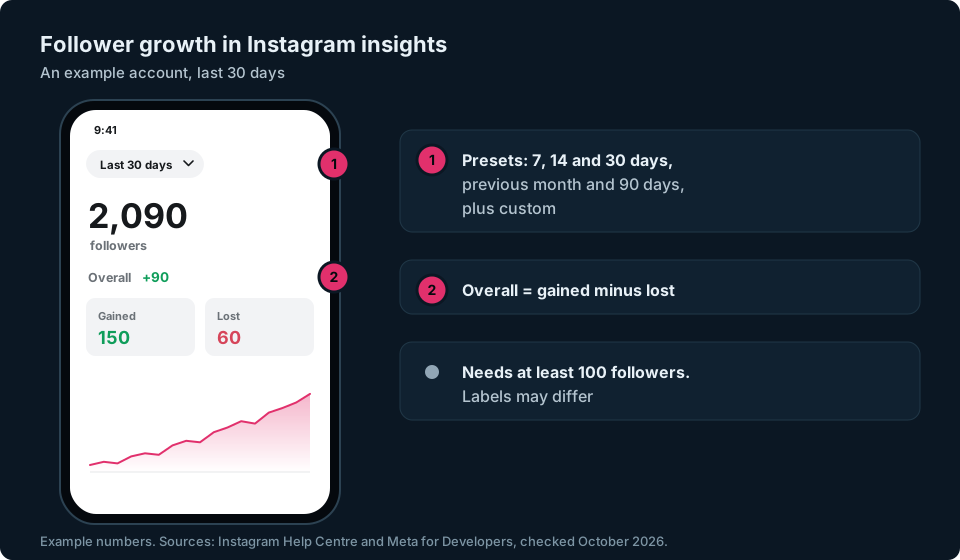
Meta's developer documentation describes the same pair of numbers as the accounts that followed you and the accounts that unfollowed you in the period (Meta for Developers). Instagram rearranges its insights screens from time to time, so the exact labels and layout may differ on your phone.
A few things to know:
- Small accounts see less. Instagram says follower trends, including growth, appear once you have at least 100 followers. If you have fewer, you can still see your count on your profile.
- Going private matters. Instagram says you lose access to insights if you switch to private, and you can get your past insights back if you switch to public again within 90 days.
Insights show you how many people you gained or lost, not who. If you want names, our guides to seeing your newest Instagram followers and seeing who unfollowed you cover that.
How far back does Instagram's follower history go?
Not very far. Insights cover up to the last 90 days. They don't give you a complete history of your follower count since you started, so you'll need your own records to compare with older figures.
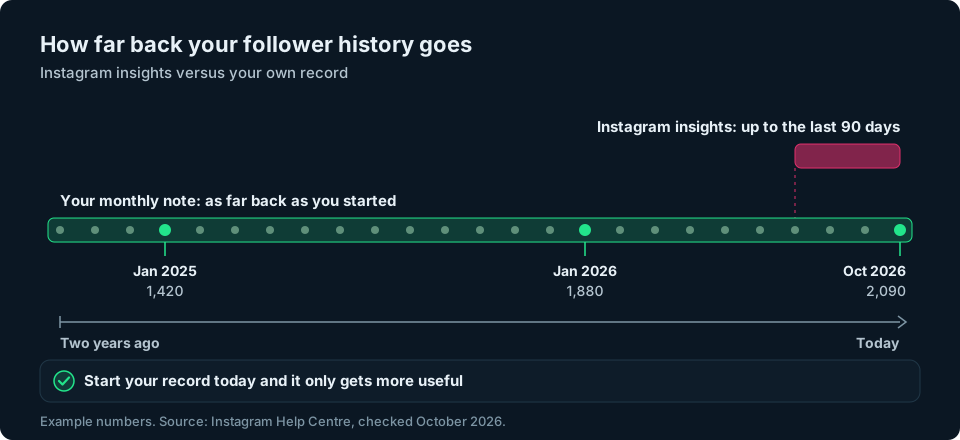
Keep a monthly note
The simplest way to build a longer history is to write your number down. It takes a few minutes a month.
- Pick a day you'll remember, such as the 1st of each month.
- Open your profile (or your insights, which may show the full figure) and note your follower count.
- Add it as a new row in a spreadsheet, with the date.
- Work out the change from last month, and the percentage (see the next section).
- Add a short note if something unusual happened, like a post that took off or a sudden drop.
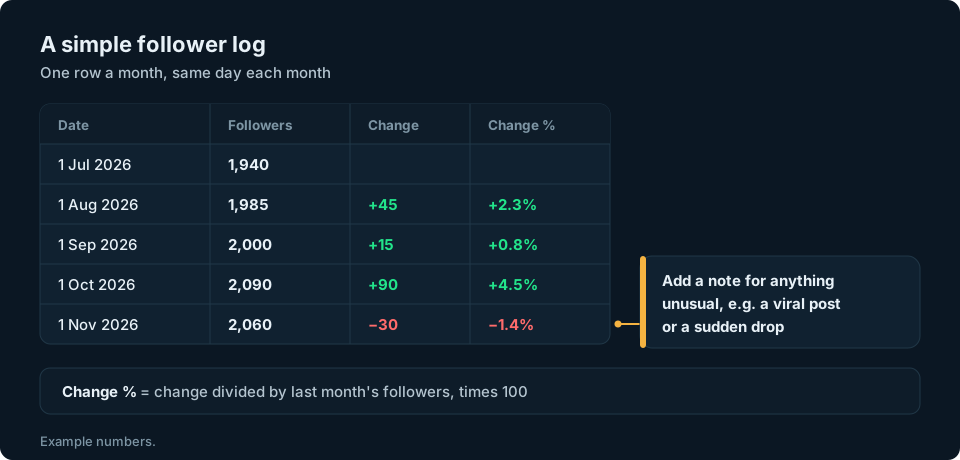
If you also note the followers gained and lost from your insights each month, you'll be able to tell later whether a quiet month was because fewer people found you or because more people left.
Download your follower list
Instagram also lets you export a copy of your information, including your followers, through Accounts Centre (Review and export a copy of your Instagram information):
- Go to your profile and tap Menu in the top right.
- Tap Accounts Centre (Instagram is gradually moving people to Meta Account, so you may see that name instead), then Your information and permissions.
- Tap Export your information, then Create export.
- Select your Instagram profile and tap Next.
- Select Export to device.
- Choose the specific information you want (your followers and following), plus a date range and format, then tap Start export.
Instagram says it can take up to 30 days to email you the link, and you then have four days to download the file. The export gives you follower information, not a chart of how your count changed over time. What it contains depends on the information and date range you choose. It may include a date next to each follower, but Instagram's help pages don't say so. Check your own file before relying on that, and keep the file somewhere private, because it contains other people's usernames.
How to read your follower growth
Two numbers tell you most of what you need.
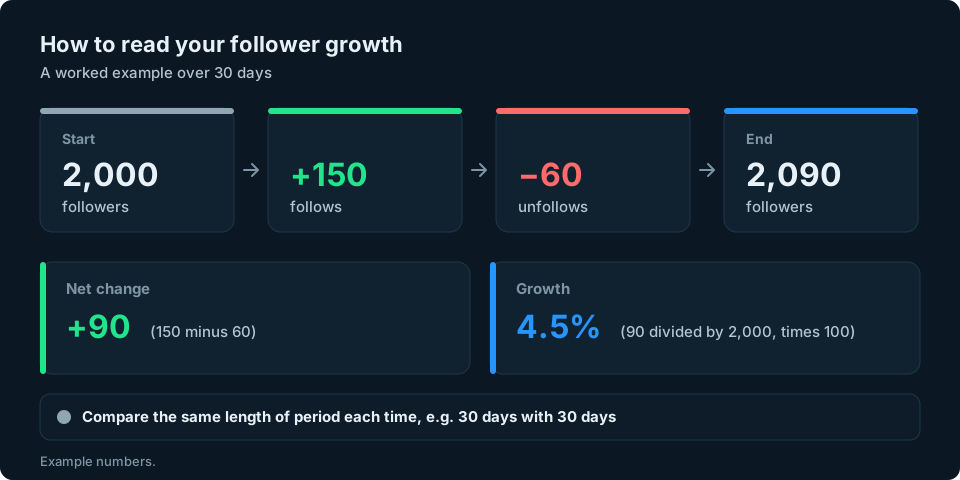
Net change is the difference between where you started and where you ended. It's roughly your follows minus your unfollows. If 150 accounts followed you this month and 60 unfollowed, your net change is +90.
Growth rate turns that into a percentage, so you can compare months fairly as your account gets bigger. Divide the net change by the number you started with, then multiply by 100. Going from 2,000 to 2,090 followers is 90 divided by 2,000, times 100, which is 4.5%.
Some tips for reading it well:
- Compare like with like. Put 30 days next to 30 days, not a week next to a month.
- Look at both halves. Lots of follows and lots of unfollows suggest you're attracting people but also losing them. Few of either means your count is changing slowly, although your posts may still be reaching people.
- Don't expect an exact match. Your count can differ slightly from follows minus unfollows, for example when accounts that followed you are deactivated or removed.
- Watch the trend, not the day. A single day's change is noisy. Three months of monthly notes tells you far more.
Why your follower count can change suddenly
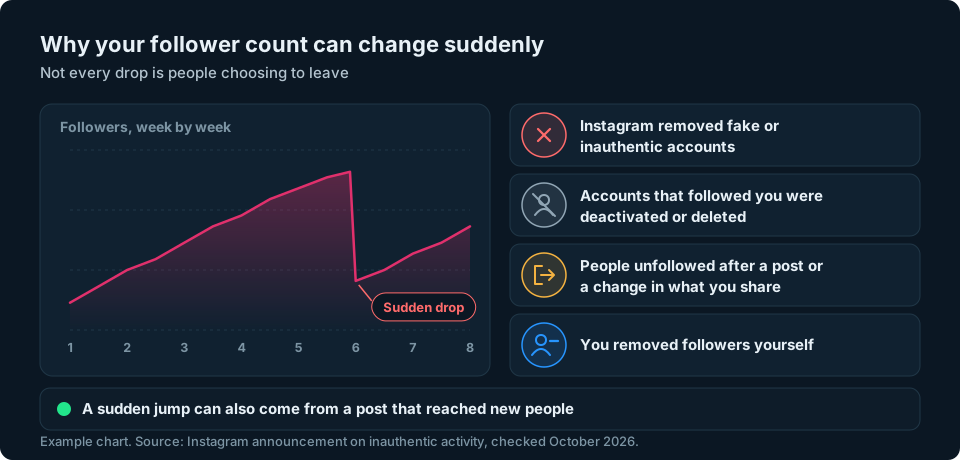
A drop of dozens or hundreds overnight is unsettling, but it isn't always people choosing to leave.
Instagram removes fake and inauthentic activity. When it announced this in 2018, Instagram said it would remove inauthentic likes, follows and comments from accounts that use third-party apps to boost their popularity (Reducing Inauthentic Activity on Instagram). If Instagram removes fake accounts that follow you, your count can fall without anyone deliberately unfollowing you. A sudden drop on its own doesn't tell you whether this happened.
Other common reasons:
- Accounts were deactivated or deleted. When someone closes their account, they stop counting as a follower.
- People unfollowed. A post that didn't land, or a change in what you share, can prompt a wave of unfollows. Your insights may show this as a rise in followers lost.
- You removed followers. If you've been clearing out spam accounts yourself, your count goes down by that number.
If your total falls by more than your followers lost figure seems to explain, removed or deactivated accounts are possible reasons. Instagram doesn't tell you which caused the difference. Our guides on why you might be losing Instagram followers and how to spot fake Instagram followers go into more detail.
Keeping a longer view
The number on your profile is a snapshot. Watching how it changes over several months shows you whether your audience is growing. Instagram's insights only cover the last 90 days, so your own record gives you the longer view. A monthly note, plus a glance at follows and unfollows in your insights, gives you a far clearer picture than checking every day.
If Instagram is one of several accounts you're keeping an eye on, we're working on something to make that easier. Sign up at the top of this page and we'll let you know when it's ready.
Frequently asked questions
How can I check my Instagram follower count history?
Instagram's insights show your follower changes for up to the last 90 days, if your account is public and has at least 100 followers. For anything older, Instagram doesn't keep a history you can view, so the best option is to note your count once a month in a spreadsheet from now on.
How do I see how many followers I gained on Instagram?
Open your insights from Professional dashboard or Your dashboard, tap New followers, choose a time period and look at your growth. Instagram says this shows the number of followers you've gained or lost.
Can I see how many people unfollowed me on Instagram?
Yes, as a number. Instagram says your insights show how many followers you've gained or lost in the period you choose, but not who they were.
Why did my Instagram followers drop suddenly?
It can be because Instagram removed fake or inauthentic accounts, or because accounts that followed you were deactivated. A wave of genuine unfollows after a post is the other common cause, and your insights may show that as a rise in followers lost.
How do I calculate my Instagram follower growth rate?
Take the change in followers over a period, divide it by the number you started with and multiply by 100. Going from 2,000 to 2,090 is a growth rate of 4.5%.
Are Instagram follower checker websites safe?
You don't need one to check your own account, as the Instagram app shows your count and your insights for free. Never type your Instagram password into a third-party website or app.