How to remove followers on X (without blocking them)

Photo by Abdelrahman Ahmed on Pexels
Sometimes you want someone gone from your followers list without making a fuss. Maybe it's an old account you don't recognise, a spam account or someone you'd rather didn't have following you. X (formerly Twitter) has a built-in way to do this that is quieter than blocking.
This guide shows you how to remove a follower on X, what happens afterwards and when blocking, muting or protecting your posts is the better choice. It is based on X's own Help Center pages, which are linked as we go.
The short answer
- To remove a follower: go to your followers list on the web, select the more icon next to their name, choose Remove this follower and confirm with Remove. You can also do it from their profile.
- It's a web feature: X's Help Center says removing followers is available on the web only, so use a browser at x.com if you can't see the option in the app.
- They can follow you again: removing someone doesn't stop them following you again if your posts are public, or asking to follow you if they're protected.
- To stop them following you at all: block them instead.
- To keep followers to people you approve: protect your posts, so every new follower has to ask first.
How to remove a follower on X
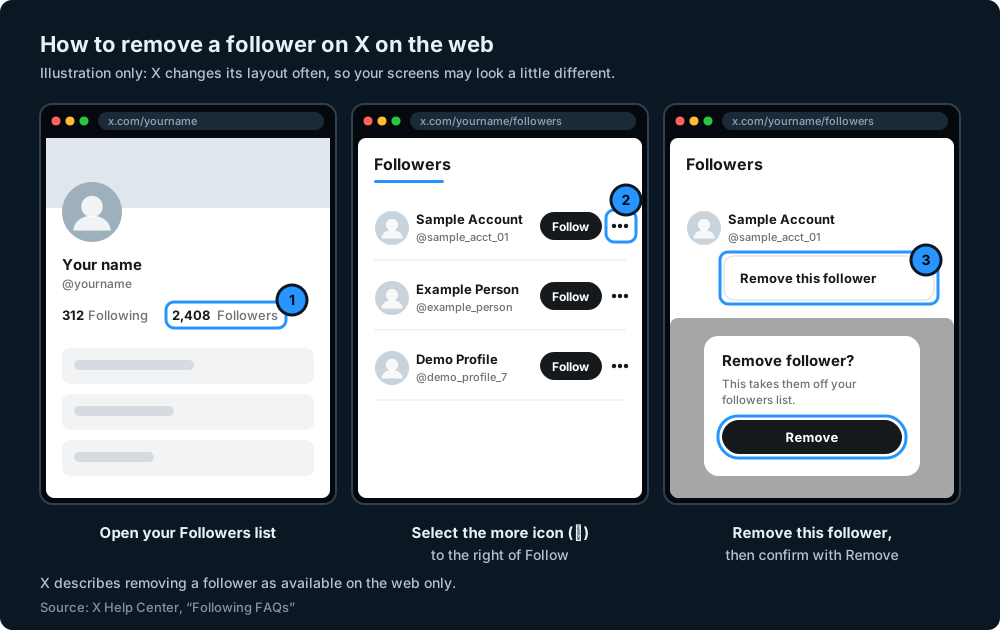
X's Help Center describes two ways to do it. Both end with the same confirmation (X Help Center: Following FAQs).
From your followers list
- Sign in at x.com in a web browser.
- Go to your profile and open your Followers list.
- Find the account you want to remove and select the more icon (three dots) to the right of their Follow button.
- Choose Remove this follower.
- Confirm by selecting Remove.
From their profile
- Open the profile of the account you want to remove.
- Select the more icon on their profile.
- Choose Remove this follower, then confirm with Remove.
Why can't I see Remove this follower in the app?
X's Help Center says the option to remove a follower is "available on web only" (Following FAQs). If you can't find it in the X app on your phone, open x.com in your phone's browser or on a computer and follow the steps above.
What happens after you remove a follower
Once you remove someone, they're taken off your followers list and your follower count should go down by one.
Removing a follower is different from unfollowing someone. Unfollowing stops you following them. Removing a follower stops them following you.
Will they know?
X's Help Center doesn't say whether someone is told when you remove them as a follower. What it does say is that removing a follower doesn't stop them following you again. So if they look at your profile and see a Follow button where it used to say Following, they may work it out for themselves.
Can they follow you again?
Yes. X says removing a follower won't stop them following your account again if your posts are public, or sending a new follow request if your posts are protected (Following FAQs). If your posts are public, they can also still see them without following you.
If you want to be sure someone can't follow you again, removing them isn't enough. Blocking is the option that does that.
Other ways to deal with unwanted followers
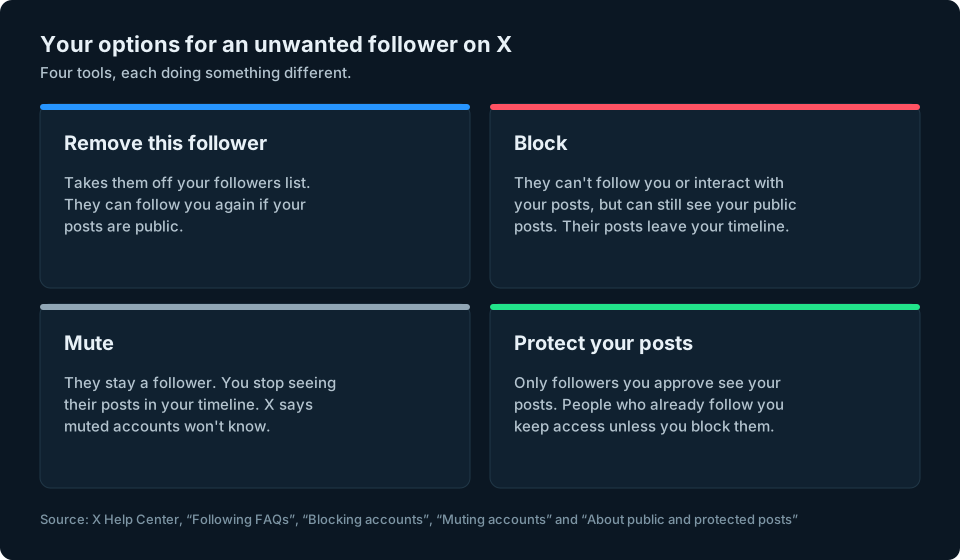
Removing a follower is the gentlest option, but it isn't always the right one. Here is what the alternatives do, according to X.
Block
Blocking is the strongest option if you want to stop someone following or interacting with you. A blocked account can't follow you, send you Direct Messages or interact with your posts. But X says that if your posts are public, blocked accounts can still see them. If your posts are protected, blocked accounts can't see them. Their posts also stop appearing in your timeline (X Help Center: blocking accounts).
To block an account:
- Open their profile, or find one of their posts.
- Select the more icon (on the profile) or the icon at the top of the post.
- Choose Block, then confirm.
You can unblock someone at any time from their profile. X says blocked accounts aren't sent a notification, but they can see that you've blocked them if they visit your profile.
Mute
Muting is for when you're happy for someone to keep following you, but you don't want to see their posts. X says muting removes an account's posts "from your timeline without unfollowing or blocking that account", and that "muted accounts will not know that you've muted them" (X Help Center: muting accounts).
Muting doesn't change your follower count. It only changes what you see.
Protect your posts
If you'd like to decide who follows you from now on, you can protect your posts. X says protected posts are only visible to your followers, you approve or deny each new follower and protected posts are kept out of search engine results (X Help Center: About public and protected posts).
There's one catch. X says accounts that followed you before you protected your posts "will still be able to view and interact with your protected posts unless you block them". So protecting your posts controls who can follow you in future. It doesn't clear out the followers you already have.
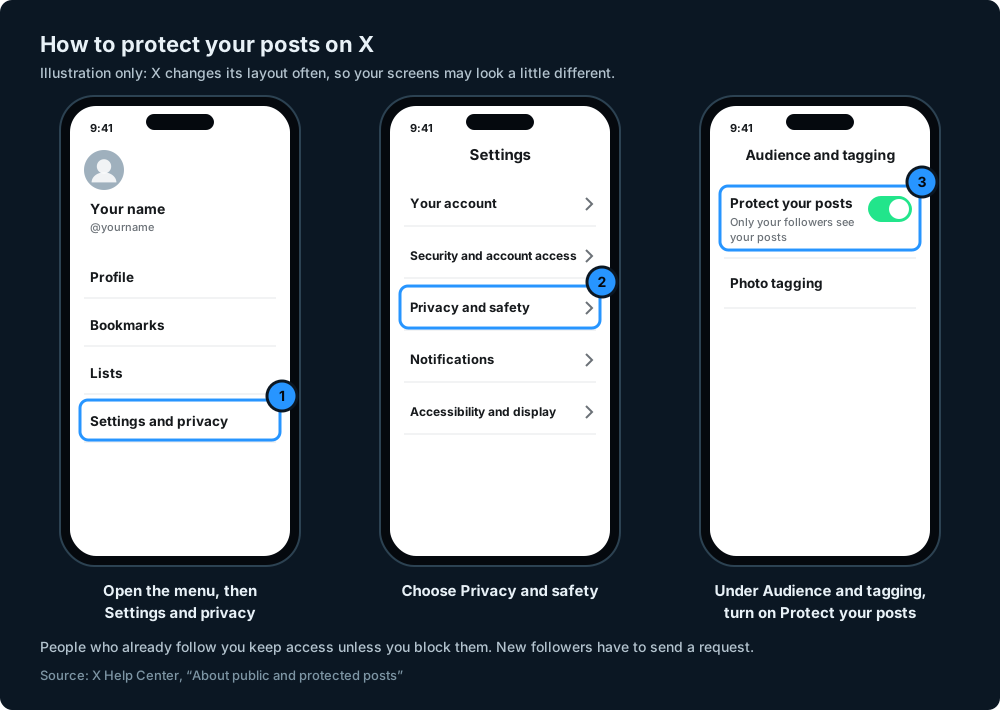
To protect your posts, X's steps are (X Help Center: protecting your posts):
- Open the menu (your profile photo or the more icon, depending on your device).
- Go to Settings and privacy.
- Choose Privacy and safety.
- Under Audience and tagging, turn on Protect your posts.
Once your posts are protected, new followers appear as requests. X's Help Center explains how to review them under Follower requests, where you can accept or decline each one (X Help Center: How to approve or deny follower requests).
Removing spam and bot followers
Spam accounts are one of the most common reasons people want to remove followers. A few things are worth knowing.
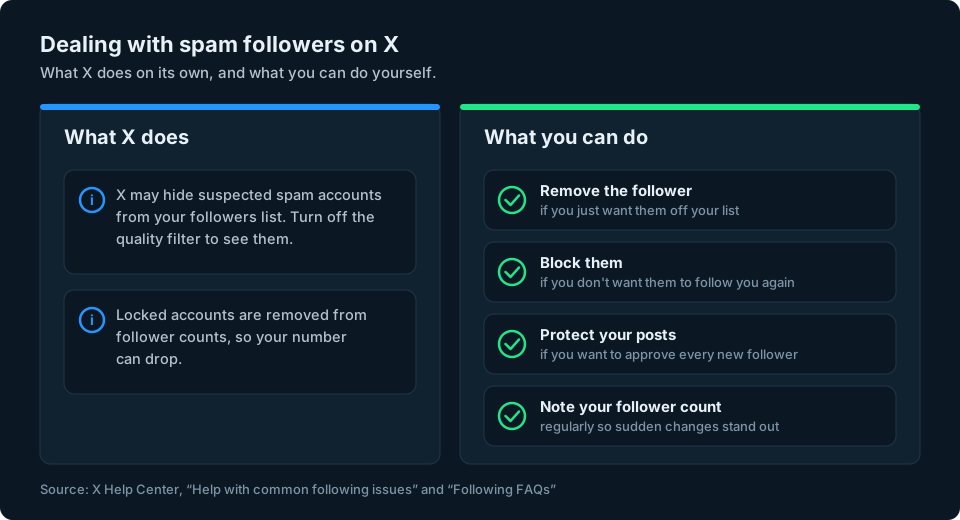
- X may hide or restrict accounts. X says that if an account disappears from your followers list, it was likely hidden for spam activity, unfollowed you or deactivated its account. To see your full list, including suspected spam accounts, X says you can turn off the quality filter in your settings (X Help Center: Help with common following issues). X also says that when accounts are locked, it removes them from follower counts, so your number can go down if a locked account was following you (Following FAQs).
- Remove or block the rest. For an obvious spam account, removing it works, but blocking stops it following you again.
- Watch your count. A sudden jump in followers you don't recognise, or a sudden drop when X clears out spam, is easier to spot if you note your count regularly. Our guide to tracking your X follower count shows simple ways to do it.
Be cautious about judging an account by its appearance alone. An unfamiliar username, few posts or a missing profile photo may be a reason to look more closely, but none of them proves an account is fake. Our guide to spotting fake followers is written for Instagram, but its checks are a useful starting point on X too.
Can you remove followers in bulk on X?
X's Help Center describes removing followers one at a time, from your followers list or their profile. Its help pages don't describe a built-in way to remove lots of followers at once.
You'll find websites and apps that promise to remove followers in bulk. Be careful about giving them access to your account (see below). If you have many unwanted followers, X's own options are to remove or block individual accounts and to protect your posts so you approve future followers. Protecting your posts won't remove anyone who already follows you.
Watch out for apps that ask for your X login
Some services that promise to clean up your followers or get you more of them ask for access to your X account, so be careful what you authorise. X's warning is specifically about "free followers" apps: it says they can lead to account compromise, automatic spammy posts, forced following and reposting, fake or compromised new followers and blocks that can lead to suspension (X Help Center: About "free followers" apps).
If you think you've connected an app like that, X recommends reviewing your connected apps and revoking their access as soon as possible. Never type your X password into a third-party website.
Keeping an eye on your followers
Removing a handful of followers is easy. Noticing when your count moves for reasons you didn't expect, such as X clearing out spam accounts, is harder if you only check now and again, and harder still if you post on more than one platform.
We're working on a simpler way to keep an eye on your audience numbers across social platforms. You can sign up at the top of this page to hear when it's ready.
Frequently asked questions
How do I remove a follower on X?
On the web, open your Followers list, select the more icon next to the account, choose Remove this follower and confirm with Remove. You can also do it from the account's profile using the more icon.
Can I remove a follower in the X app?
X's Help Center says removing a follower is available on the web only. If you can't see the option in the app, use x.com in your phone's browser or on a computer.
Does X tell someone when you remove them as a follower?
X's Help Center doesn't say. It does say that removing someone doesn't stop them following you again, so they may notice if they look at your profile.
Can a removed follower follow me again?
Yes. If your posts are public they can follow you again, and if your posts are protected they can send a new follow request. To stop them following you at all, block them.
What's the difference between removing and blocking a follower on X?
Removing takes someone off your followers list but lets them follow you again. Blocking stops them following you, sending you Direct Messages or interacting with your posts. They can still see public posts, but not protected ones.
Does muting someone remove them as a follower?
No. Muting hides their posts from your timeline but they stay a follower. X says muted accounts won't know they've been muted.
Can I remove followers in bulk on X?
X's Help Center describes removing followers one at a time and doesn't describe a bulk option. Be wary of third-party apps that offer bulk removal and ask you to connect your account.
Why did my X follower count drop when I didn't remove anyone?
Someone may have unfollowed you or deactivated their account. X also says that when accounts are locked, it removes them from follower counts, so your number can go down. Separately, X may hide suspected spam accounts from your followers list.