How to see who doesn't follow you back on Instagram (without risky apps)

Photo by Kerde Severin on Pexels
Instagram shows you who follows you and who you follow, but it doesn't put the two side by side. There's no "doesn't follow you back" list anywhere in the app. That's why so many apps offer to work it out for you, and why many of them ask for your password.
You don't need them. You can use Instagram's own features to check your followers or export your information, then compare the lists yourself in a spreadsheet. There's no need to give another service your Instagram password. This guide covers how to check a single account in seconds, how to compare your whole following list against your followers using your own data export and how to tidy things up afterwards. It's based on Instagram's own Help Centre, linked as we go, and it's about your own account.
The short answer
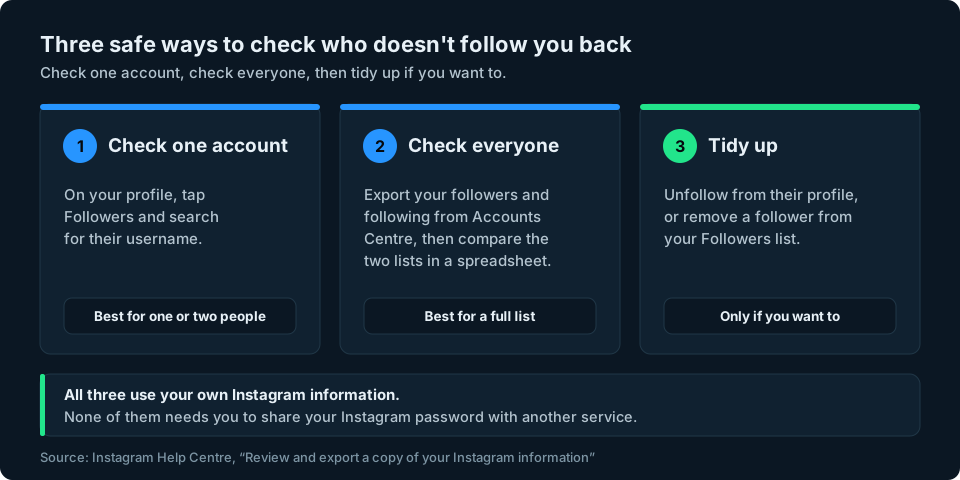
- Instagram has no built-in list of accounts that don't follow you back. You have to compare your followers with the accounts you follow.
- To check one account: go to your profile, tap Followers and search for their username. If their account doesn't appear, they may not follow you.
- To check everyone: export your own followers and following from Accounts Centre, then compare the two lists. Anyone on your following list who isn't on your followers list doesn't follow you back.
- To tidy up: unfollow from their profile, or remove a follower from your Followers list.
- Never give an app your Instagram password. Instagram warns it can give the app complete access to your account.
Not following back vs unfollowed: two different questions
People often mix these up, and they need different methods:
- Who doesn't follow you back is about right now. You compare the accounts you follow with the accounts that follow you today. One export is enough.
- Who unfollowed you is about change over time. You need two copies of your followers list from different dates. Our guide to seeing who unfollowed you on Instagram covers that.
This guide is about the first one.
Method 1: Check one account
If you're wondering about a particular person, this is the quickest way:
- Go to your profile.
- Tap Followers.
- Type their name or username into the search box at the top.
If their account appears, they follow you. If it doesn't, they may not follow you. Check that you've searched for their current username before drawing conclusions, as they may also have deactivated their account or blocked you.
It's fast for one or two people but slow for more. If you follow hundreds of accounts, use Method 2.
Method 2: Check everyone using your own Instagram data
Instagram lets you export a copy of your own information, and that includes both your followers and the accounts you follow. With both lists in hand, anyone who appears on your following list but not on your followers list doesn't follow you back.
Step 1: Export your followers and following
These are the steps from Instagram's Review and export a copy of your Instagram information page:
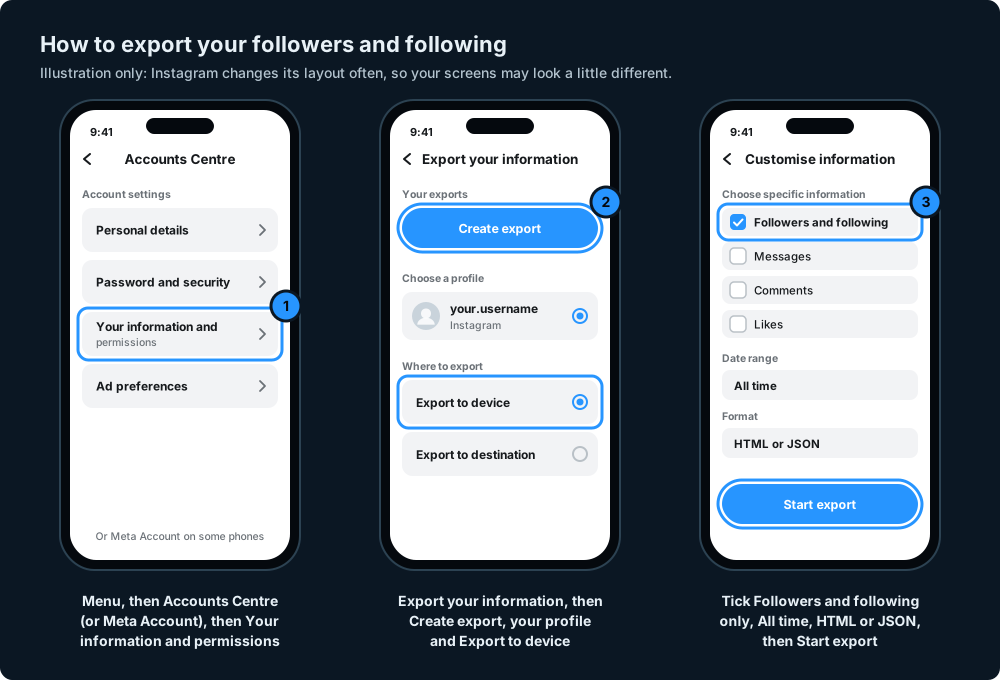
- Go to your profile and tap Menu in the top right.
- Tap Accounts Centre, then Your information and permissions. Instagram is gradually moving people to Meta Account, so you may see that name instead of Accounts Centre.
- Tap Export your information, then Create export.
- Select your Instagram profile and tap Next.
- Select Export to device.
- Choose the specific information you want. Pick only your followers and following, so the file stays small and doesn't include your messages or photos.
- Set the date range to all time, choose a format and tap Start export.
On formats: HTML opens in a web browser and is the easiest to read. JSON is designed for computers and looks like code, but it can be useful if you're comfortable with data.
Instagram says it can take up to 30 days to email you the link, although a small export is often much quicker. Once it's ready, you have four days to download it, so save the file somewhere safe.
Step 2: Find the two lists in your download
The download arrives as a zip file. Unzip it first.
Instagram explains how to request your information, but its Help Centre doesn't give a map of every folder and file in the download, and the names and layout may change. At the time of writing, both lists are usually in a folder called connections, then followers_and_following. Your followers are in a file starting followers (larger accounts may have followers_1, followers_2 and so on, so use all of them) and the accounts you follow are in a file called following.
If the names are different in your download, look around the folders for anything mentioning followers and following.
Step 3: Compare the two lists
For a small account, you can open both HTML files in your browser side by side and scan them. For anything bigger, a spreadsheet does it in seconds:
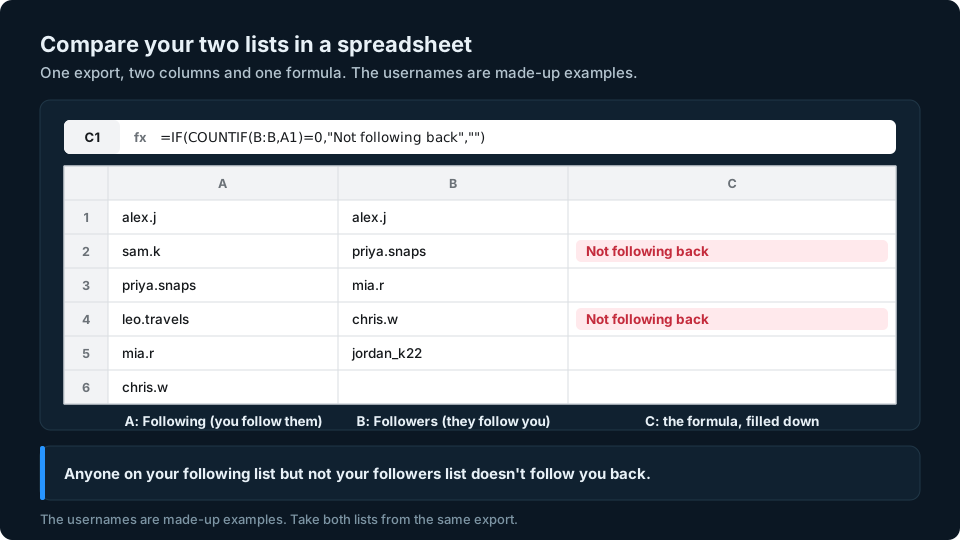
- Copy the usernames from your following file into column A of a spreadsheet, one per row.
- Copy the usernames from your followers file (all of them) into column B.
- In cell C1, type
=IF(COUNTIF(B:B,A1)=0,"Not following back","")and fill it down to the last row of column A.
Every row marked Not following back is an account you follow that doesn't follow you. This works in most spreadsheet programs.
Make sure both columns contain Instagram usernames only, without dates, links, extra spaces or other text, and use usernames rather than display names. Copying from the HTML files can bring extra text along with each username. If the formula marks everyone as Not following back, check the copied data before trusting the results. Both lists must come from the same export, or a difference may just reflect a change between the two.
Keep the export private. It contains other people's usernames, so don't share it or upload it anywhere you don't trust.
Before you unfollow anyone
A name on your "not following back" list isn't necessarily a snub. Common reasons include:
- Brands, news accounts, creators and public figures. Accounts that people follow for their content often don't follow most people back, and that's normal.
- Private accounts. If you've requested to follow a private account, your request must be approved before you become a follower. A pending request isn't the same as following that account, so don't count it as someone who isn't following you back.
- Deactivated or deleted accounts. They can disappear from lists, or show up in odd ways.
- Changed usernames. If someone renamed their account between your looks, searching for the old name won't find them.
- Blocking. If someone has blocked you, they won't appear in your followers.
So check a name on Instagram before you act on it, especially for people you know.
How to tidy up your following list
Once you know who doesn't follow you back, you can decide what to do about it. These are Instagram's own options.
Unfollow an account
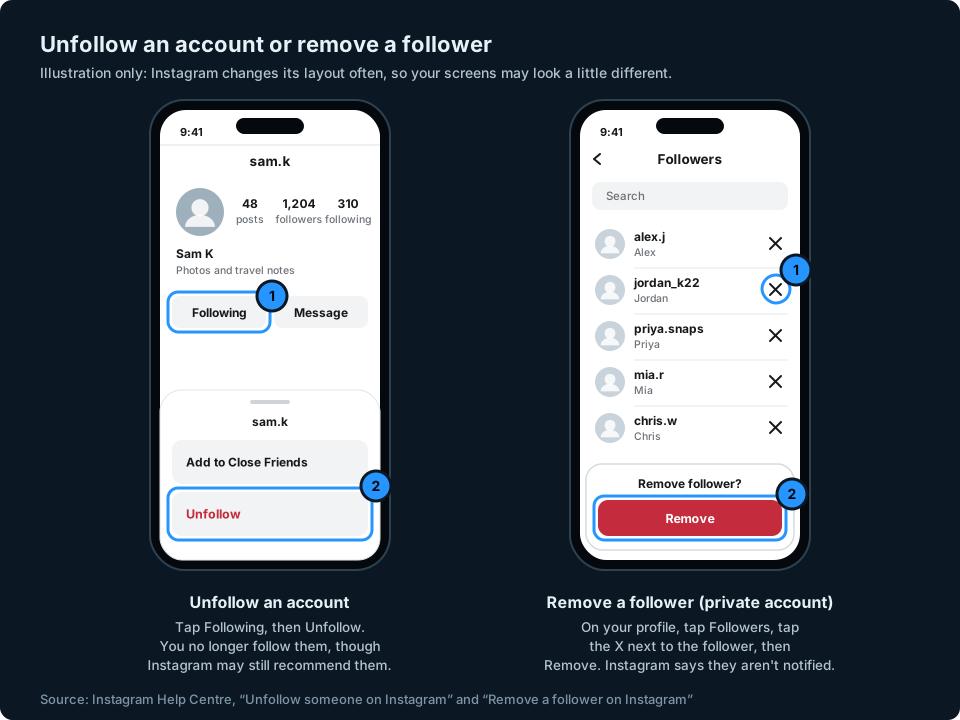
- Go to the profile of the account you want to unfollow.
- Tap Following, then tap Unfollow to confirm.
Their profile will then say Follow instead of Following. Instagram says people won't be notified when you unfollow them (Unfollow someone on Instagram), although they may still notice, for example if they check their own followers.
Remove a follower
If it's the other way round, and someone follows you but you'd rather they didn't, you can remove them. Instagram's Help Centre page on removing followers is written for private accounts. If you have a public account and don't see the option, you can block the account instead: Instagram says blocking someone gets them to stop following you, and they aren't notified. To remove a follower from a private account on iPhone:
- Tap Profile or your profile picture to go to your profile.
- Tap Followers at the top.
- Tap X to the right of the follower you want to remove.
- Tap Remove to confirm.
Instagram says the person won't be notified that you've removed them. If you're tidying up suspected spam accounts, our guide to spotting fake Instagram followers covers Instagram's flagged review, which lets you remove several at once.
Watch out for "unfollower" and "not following back" apps
Apps and websites that promise to show who doesn't follow you back often ask you to log in with your Instagram username and password. Instagram is clear about the risks:
- In its warning about apps that offer likes and followers, Instagram says that if you give a non-Instagram app your login details, it can gain complete access to your account, including your messages, and could post spam on your profile (Why you should not use apps that offer likes and followers).
- Instagram lists giving your username and password to a third-party app or website among the reasons an account can be restricted for data scraping (Why your account has been restricted for data scraping).
Some tools ask you to upload your Instagram export instead. That avoids sharing your password, but the file still contains your followers' usernames, so check whether the tool reads it on your device or uploads it, and read its privacy policy first. Our guide to Instagram unfollow tracker apps has a checklist to run through before using any of them.
If you've already given an app your password, change it. To remove an app's access, go to your profile, tap Menu, then Website permissions, then Apps and websites. Tap Active, then Remove next to the app (Instagram Help Centre).
Keeping an eye on your audience
Knowing who doesn't follow you back is a one-off tidy-up. The more useful long-term question is usually whether your audience is growing, and that means watching your follower count over weeks and months, not just today. If your numbers start dropping, our guide to why you might be losing Instagram followers covers the usual causes.
We're working on a simpler way to keep an eye on your audience numbers across social platforms. You can sign up at the top of this page to hear when it's ready.
Frequently asked questions
Can you see who doesn't follow you back on Instagram?
Not directly. Instagram doesn't have a "not following back" list. You can search your Followers list for one person, or export your followers and following and compare the two lists.
How do I see who doesn't follow me back on Instagram without an app?
Export your followers and following from Accounts Centre (or Meta Account), then compare the two lists in a spreadsheet. Anyone on your following list who isn't on your followers list doesn't follow you back.
Is it safe to use an app to see who doesn't follow you back?
Not if it asks for your Instagram password. Instagram warns that giving your login details to a non-Instagram app can give it complete access to your account and can lead to restrictions.
Does Instagram tell someone when you unfollow them?
No. Instagram says people won't be notified when you unfollow them. They may still notice if they look at their own followers.
Will someone know if I remove them as a follower?
Instagram says people aren't notified when you remove them as a follower. They may notice later that they no longer follow you.
How long does an Instagram data export take?
Instagram says it can take up to 30 days to email you the link, although small exports are often quicker. Once it's ready, you have four days to download it.
Why is someone missing from my followers when I know they followed me?
They may have unfollowed you, changed their username, deactivated their account or blocked you. Search for them on Instagram before assuming they've left.